
Networking services for Azure Stack HCI 2-node clusters: Part 1

This is a multi-part series. Today, I will talk about some of the important networking customer use cases for applications on smaller Azure Stack HCI clusters and how we can satisfy those requirements. In the next part, I will dive into the design, deployment and management of these network services.
With growing adoption of Azure Stack HCI, we are seeing many customers deploying smaller clusters, with 2-node clusters being a popular choice. Some of these customers are deploying Azure Stack HCI in their store Point of Sale (POS) terminals, in manufacturing plants for faster edge processing, etc.
Some common patterns that we are seeing on these smaller clusters:
- Multiple applications deployed on each cluster.
- Customers have a mix of applications hosted in virtual machines and containers.
- Security is critical for many customers.
Network services for smaller clusters
What are some of the value-added network services that Azure Stack HCI provides for customer applications in smaller clusters?
You can protect your VM workloads from external network threats, by restricting access from specific sources and/or specific applications (port/protocol)
Organizations are faced with increasing breaches, threats and cyber risk. Distributed Remote Desktop Protocol (RDP) brute force is one of the most common methods used by malicious agents to gain access to systems.
With Azure Stack HCI, you can configure security access control list (ACL) rules to restrict access to well-known sources as well as only the necessary ports and protocols. These are distributed rules, provisioned on virtual switch ports to which virtual machines are attached, hence making them tamper-free from application users.
Learn more about this feature here and know how to manage these ACL rules with Windows Admin Center here.
You can protect your VM workloads from lateral threats by using microsegmentation to implement zero trust network access in your Azure Stack HCI cluster
Along with external threats, lateral threats are a major source of attacks today. Once a system inside the organization is compromised, malware exhibits worm-like behavior to spread unnoticed to other parts of the organization. The ideal solution to complete protection is to protect every traffic flow inside the organization with a firewall, allowing only the flows required for applications to function.
With Azure Stack HCI, you can create granular network policies between applications and services, essentially reducing the security perimeter to a fence around each application or virtual machine. So, you can define policies to prevent your web application from communicating with your Virtual Desktop Infrastructure (VDI) application, so that if one is compromised, it cannot infect the other. You can securely isolate apps or even app tiers from each other, reducing the total attack surface of a network security incident.
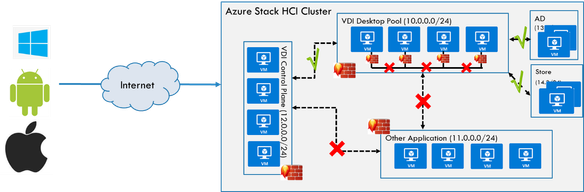
Figure: Azure Stack HCI Microsegmentation policies allowing only necessary communication between apps
These policies are also implemented using ACL rules. Learn more about this feature here and know how to manage these ACL rules with Windows Admin Center here.
You can ensure fair network allocation on a HCI host, thereby preventing particular workload VMs from hogging the bandwidth of HCI host machines
If you have smaller clusters and more than one application running in your cluster, chances are that some of your apps may be starved for network bandwidth. A particular application may end up taking a lot of network bandwidth, thereby starving other apps. How do you guarantee fair bandwidth allocation for all your applications?
With Azure Stack HCI, you can configure maximum send and receive side bandwidth for virtual machines. Once set, your virtual machine will not be able to send/receive traffic above the configured maximum limits.
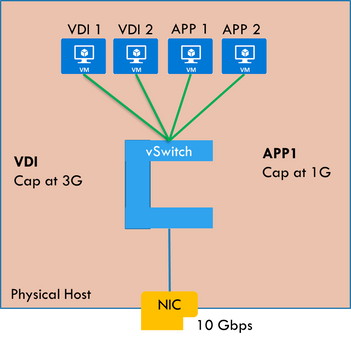
Figure: QoS policies capping apps’ bandwidth on Azure Stack HCI host machine
Learn more about how to configure these limits here.
You can load balance application traffic, thereby increasing application responsiveness and availability.
Do you require applications hosted on your Azure Stack HCI clusters to be highly available and scalable? Azure Stack HCI provide load balancing capabilities for your applications, all in software, allowing you to evenly distribute network traffic across multiple VMs.
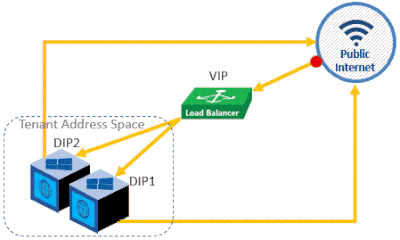
Figure: Load balancing across two VMs in Azure Stack HCI
Read more about Software Load Balancing capabilities here. Configure load balancing for your applications here.
All the above scenarios are very relevant for smaller clusters but are applicable for larger clusters as well. Please try these out and give us feedback at [email protected]. Don't hesitate to reach out for any questions as well.
Stay tuned for the next post in this series!!!
Published on:
Learn moreRelated posts
Public Preview of Azure Migrate from VMware to Azure Stack HCI
Today, we are thrilled to announce the public preview of the Azure Migrate functionality to migrate VMs from VMware to Azure Stack HCI, a sign...
Sneak peek at new Azure edge infrastructure at Hannover Messe 2024
Written by Cosmos Darwin, Principal Group Manager on the Azure Edge & Platform team This week is Hannover Messe 2024, the world’s biggest ...
Apply critical update for Azure Stack HCI VMs to maintain Azure verification
Azure verification for VMs on Azure Stack HCI makes it possible for Azure-exclusive benefits to work outside of the cloud and in on-premises a...
Logical Networks in Azure Portal for HCI: Setting the Stage for Software Defined Networking
At this past Microsoft Ignite 2023, we officially announced the public preview of logical networks in Azure Portal for Azure Stack HCI. These ...
Introducing Azure Virtual Desktop workload in Azure Stack HCI Sizer!
Earlier in February 2024, we announced the general availability of Azure Virtual Desktop for Azure Stack HCI which extends the capabilities of...
Hyper-V VM Migration to Azure Stack HCI, version 23H2
Written by Kerim Hanif, Senior Program Manager on the Azure Edge & Platform team Azure Migrate is a unified platform t...
Possible MAC address assignment strategies for tenant VMs running on Stack-HCI environment
Azure Stack HCI is a hyperconverged infrastructure (HCI) cluster solution consists of windows servers (Hyper-V), Storage Spaces Direct, a...
Azure Stack HCI version 23H2 is generally available
Written by Cosmos Darwin, Principal PM Manager on the Azure Edge & Platform team Today we’re announcing the general availab...
AKS enabled by Azure Arc is now available on Azure Stack HCI 23H2
Azure Kubernetes Service (AKS) allows you to run a managed Kubernetes solution at the edge wherever you need it, with built-in support...
MAC address assignment strategies for tenant VMs running on Stack-HCI environment
Azure Stack HCI is a hyperconverged infrastructure (HCI) cluster solution consists of windows servers (Hyper-V), Storage Spaces Direct, a...