
Announcing Public Preview of SDN integration with AKS HCI

Azure Kubernetes Service (AKS) on Azure Stack HCI enables developers and administrators to deploy and manage containerized apps on Azure Stack HCI. With AKS on Azure Stack HCI, Microsoft is delivering an Industry leading experience for modern application development and deployment in a hybrid cloud era. This takes our popular Azure Kubernetes Service (AKS) and makes it available to customers to run on-premises: delivering Azure consistency, a familiar Azure experience, ease of use and high security for their containerized applications.
Software Defined Networking (SDN) is a critical foundational component of Azure Stack HCI providing our customers the ability to dynamically create, secure, and connect their networks to meet the evolving needs of their applications. Like in Azure, customers can deploy their apps on completely virtualized networks, and attach network services like microsegmentation, load balancing, quality of service policies, connect to external networks, etc. all in software, without requiring any changes on the physical network.
Today, we are announcing the Public Preview of SDN integration with AKS on Azure Stack HCI. Customers can now bring in their own networks and attach the AKS-HCI nodes to these networks. Additionally, customers can use the SDN Software Load Balancers to provide load balancer services for their containerized applications.
How does SDN deliver on the promises of AKS HCI
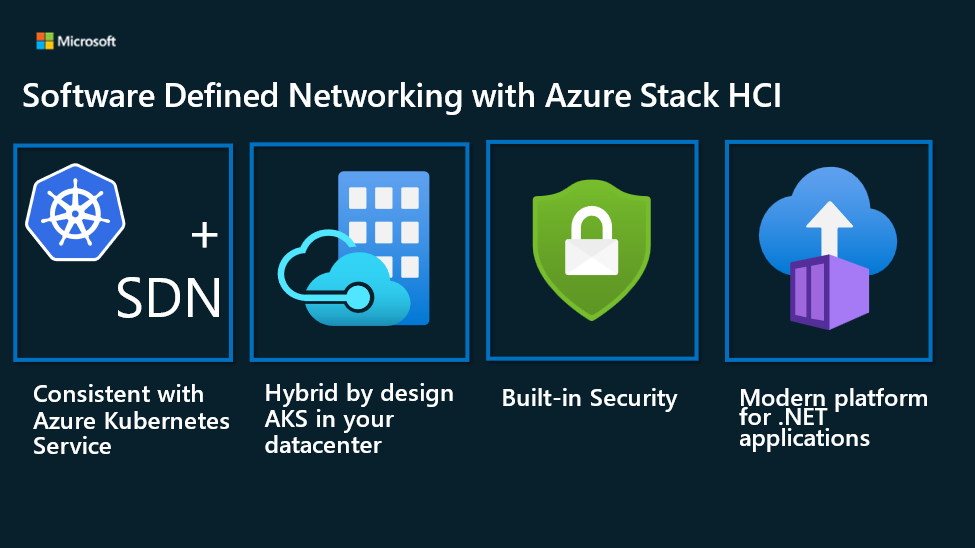
SDN delivers on the key promises of AKS HCI. Let’s take a look.
- Consistent with Azure Kubernetes service: SDN on Azure Stack HCI brings many exciting features that will improve application portability between AKS and AKS-on-HCI and deliver a consistent user experience. SDN brings true virtual networking support. Without SDN, AKS HCI VMs attach directly to your physical network which means scaling out will have an impact on your physical network. With SDN, you can create “overlay” networks that are equivalent to the Azure virtual networks. Additionally, you can use Azure equivalent network services like load balancers, network security groups and user defined routes with SDN on Azure Stack HCI.
- Hybrid by Design: With SDN on Azure Stack HCI, you get seamless connectivity from edge to Azure using SDN first party virtual gateway appliance. This enables exciting scenarios such as scaling out into Azure with direct connectivity to services available in a remote Azure virtual network.
- Built-in security: SDN with AKS-HCI improves security and reduces attack vectors from networking standpoint. It provides many features such as network isolation between virtual networks, a distributed Firewall that allows you to define access control lists (a.k.a Network Security Groups in Azure) to manage network traffic, or even bringing in third party virtual appliances to control traffic flow through user-defined routes.
- Modern platform for applications: SDN on Azure Stack HCI is a unified solution maintained by Microsoft with no dependency on third parties. SDN minimizes operational complexity, by offering a converged network infrastructure that manages networked devices and appliances from VMs to containers running in Kubernetes under a single pane of glass.
How can you get started?
To try out this functionality, you will need to do the following:
- Deploy an Azure Stack HCI cluster with SDN
- Install AKS HCI Powershell module on one of the cluster hosts
- Replace some Powershell module files from this location
- Configure AKS HCI for installation and then install AKS HCI
Detailed installation instructions and Powershell module files are available for download here.
Next, you can create workload clusters and deploy your applications. All AKS-HCI VM NICs will seamlessly get attached to the SDN virtual network that was provided during installation. The SDN Software Load Balancer will also be used as the external load balancer for all Kubernetes services, as well as act as the load balancer for the API server on Kubernetes control-plane(s).
Share feedback
We can’t wait for you to get started with SDN and AKS-HCI on your Azure Stack HCI clusters. For any issues, reach out to [email protected]. We would love to hear your feedback and suggestions on this form.
Published on:
Learn moreRelated posts
Public Preview of Azure Migrate from VMware to Azure Stack HCI
Today, we are thrilled to announce the public preview of the Azure Migrate functionality to migrate VMs from VMware to Azure Stack HCI, a sign...
Sneak peek at new Azure edge infrastructure at Hannover Messe 2024
Written by Cosmos Darwin, Principal Group Manager on the Azure Edge & Platform team This week is Hannover Messe 2024, the world’s biggest ...
Apply critical update for Azure Stack HCI VMs to maintain Azure verification
Azure verification for VMs on Azure Stack HCI makes it possible for Azure-exclusive benefits to work outside of the cloud and in on-premises a...
Logical Networks in Azure Portal for HCI: Setting the Stage for Software Defined Networking
At this past Microsoft Ignite 2023, we officially announced the public preview of logical networks in Azure Portal for Azure Stack HCI. These ...
Introducing Azure Virtual Desktop workload in Azure Stack HCI Sizer!
Earlier in February 2024, we announced the general availability of Azure Virtual Desktop for Azure Stack HCI which extends the capabilities of...
Hyper-V VM Migration to Azure Stack HCI, version 23H2
Written by Kerim Hanif, Senior Program Manager on the Azure Edge & Platform team Azure Migrate is a unified platform t...
Possible MAC address assignment strategies for tenant VMs running on Stack-HCI environment
Azure Stack HCI is a hyperconverged infrastructure (HCI) cluster solution consists of windows servers (Hyper-V), Storage Spaces Direct, a...
Azure Stack HCI version 23H2 is generally available
Written by Cosmos Darwin, Principal PM Manager on the Azure Edge & Platform team Today we’re announcing the general availab...
AKS enabled by Azure Arc is now available on Azure Stack HCI 23H2
Azure Kubernetes Service (AKS) allows you to run a managed Kubernetes solution at the edge wherever you need it, with built-in support...
MAC address assignment strategies for tenant VMs running on Stack-HCI environment
Azure Stack HCI is a hyperconverged infrastructure (HCI) cluster solution consists of windows servers (Hyper-V), Storage Spaces Direct, a...