
Announcing the General Availability of Azure Monitor HCI Insights

Introduction
Earlier in May 2022, we launched Azure Monitor HCI Insights for public preview. Based on customer feedback during the preview, we improved the performance of the workbooks and supported the new Azure Monitor Agent and are excited to announce General Availability (GA) of Azure Monitor HCI Insights.
What is HCI Insights?
Azure Stack HCI Insights is an interactive, fully integrated service which provides health, performance, and usage insights about Azure Stack HCI clusters that are connected to Azure and are enrolled in Azure Monitor. In Microsoft Azure, you can see all your resources in Azure portal and monitor them with Azure Stack HCI Insights.
There are some key benefits of using Azure Stack HCI Insights:
- It’s managed by Azure and accessed from Azure portal, so it's always up to date, and there's no database or special software setup required.
- Azure Monitor Agent uses managed identity to interact with Log analytics workspace which ensures secure communication.
- It's highly scalable, which means it is capable of loading more than 250 cluster information sets across multiple subscriptions at a time, with no boundary limitations on cluster, domain, or physical location.
- It's highly customizable. The user experience is built on top of Azure Monitor workbook templates, where you can easily add/remove/edit visualizations and queries.
- HCI Insights follows Pay-as-you-go model which means you pay only for the logs that are collected and they can be removed/edited as per user need.
What's new in GA?
The new, enhanced Azure Monitor HCI Insights uses the new improved Azure Monitor Agent and Data Collection Rule. These rules specify the event logs and performance counters that need to be collected and stores it in a Log Analytics workspace. Once the logs are collected, HCI Insights uses Azure Monitor Workbooks to provide deeper insights on the health, performance and usage of the cluster.
There are a few prerequisites for using Azure Stack HCI Insights:
- Azure Stack HCI cluster should be registered with Azure and Arc-enabled. If you registered your cluster on or after June 15, 2021, this happens by default. Otherwise, you'll need to enable Azure Arc integration.
- The cluster must have Azure Stack HCI version 22H2 and the May 2023 cumulative update or later installed.
- Enable the managed identity for the Azure resource. For more information, see Enabled enhanced management.
Below is a screenshot of the Azure workbook displayed for multiple clusters.
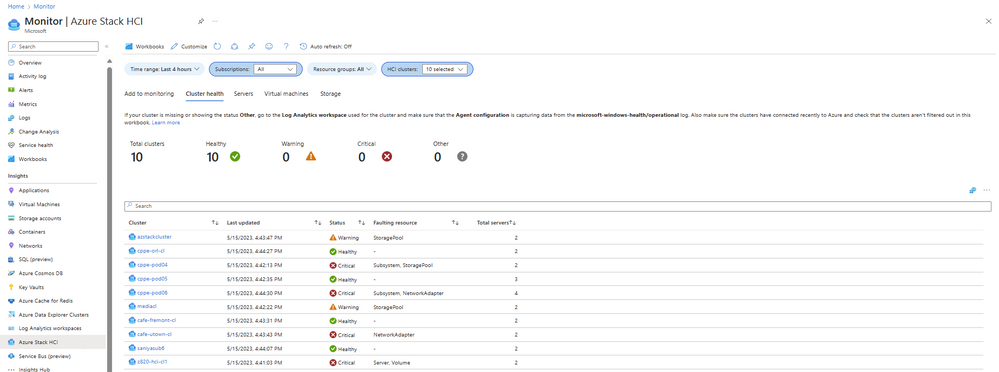
You can click on the cluster name, and it will redirect you to the single cluster workbook template with a drill down view and more details as shown below:

Pre-defined workbook templates exist with default views to give you a head-start. You can switch between different tabs like Health, Servers, Virtual machines, and Storage. Each tab provides data and metrics about the cluster which is carefully designed keeping your needs in mind. Health data such as faults and resource status, performance data like IOPS and throughput, and usage data like CPU usage and memory usage are collected. Moreover, the rich visualizations make it easier to decipher the data and give a quick glance of useful insights.
Additional data can be easily collected in the form of event logs or performance counters, and you can add it to the Data collection rule that was created while enabling monitoring for the cluster. Once the data starts flowing, the user can use Azure workbooks to visualize the collected data. A workbook provides a set of visualizations like charts, graphs, grids, honeycomb, composite bar, maps etc. and it is very convenient to modify and alter. It allows you to pin the graphs to Azure dashboards which gives a holistic view of resource health, performance, and usage. It is also very easy to share the data by downloading this information in Excel and deriving useful insights.
Customers also use logs and Insights workbook templates to create alerts. Some of the common alerts created by customers are if cluster node is down, and if CPU or memory usage exceeds set threshold. You can set up alerts for multiple clusters and integrate 3rd party solutions like PagerDuty to get notified. This will make sure that you take timely action and resources are healthy and performant.

Here is a video with more details.
Future plans
This is just the beginning of Monitoring Insights for Azure Stack HCI. We plan to build additional workbook templates for new HCI features and essential monitoring capabilities. If you have feedback, please send it to [email protected]!
For more detailed information, please visit our documentation for Single Cluster Insights and Multiple Cluster Insights .
Published on:
Learn moreRelated posts
Public Preview of Azure Migrate from VMware to Azure Stack HCI
Today, we are thrilled to announce the public preview of the Azure Migrate functionality to migrate VMs from VMware to Azure Stack HCI, a sign...
Sneak peek at new Azure edge infrastructure at Hannover Messe 2024
Written by Cosmos Darwin, Principal Group Manager on the Azure Edge & Platform team This week is Hannover Messe 2024, the world’s biggest ...
Apply critical update for Azure Stack HCI VMs to maintain Azure verification
Azure verification for VMs on Azure Stack HCI makes it possible for Azure-exclusive benefits to work outside of the cloud and in on-premises a...
Logical Networks in Azure Portal for HCI: Setting the Stage for Software Defined Networking
At this past Microsoft Ignite 2023, we officially announced the public preview of logical networks in Azure Portal for Azure Stack HCI. These ...
Introducing Azure Virtual Desktop workload in Azure Stack HCI Sizer!
Earlier in February 2024, we announced the general availability of Azure Virtual Desktop for Azure Stack HCI which extends the capabilities of...
Hyper-V VM Migration to Azure Stack HCI, version 23H2
Written by Kerim Hanif, Senior Program Manager on the Azure Edge & Platform team Azure Migrate is a unified platform t...
Possible MAC address assignment strategies for tenant VMs running on Stack-HCI environment
Azure Stack HCI is a hyperconverged infrastructure (HCI) cluster solution consists of windows servers (Hyper-V), Storage Spaces Direct, a...
Azure Stack HCI version 23H2 is generally available
Written by Cosmos Darwin, Principal PM Manager on the Azure Edge & Platform team Today we’re announcing the general availab...
AKS enabled by Azure Arc is now available on Azure Stack HCI 23H2
Azure Kubernetes Service (AKS) allows you to run a managed Kubernetes solution at the edge wherever you need it, with built-in support...
MAC address assignment strategies for tenant VMs running on Stack-HCI environment
Azure Stack HCI is a hyperconverged infrastructure (HCI) cluster solution consists of windows servers (Hyper-V), Storage Spaces Direct, a...