
Azure Stack Hub Remote Support

As an Azure Stack Hub Operator, you can use the Remote support feature for Azure Stack Hub and benefit from a simplified experience by allowing a Microsoft support professional to solve your case faster by permitting access to your device remotely and performing limited troubleshooting and repair. In this next article, we've invited Chris Black (who is one of our Azure Stack Hub MVPs) to walk us through his experience with this feature and highlight some of the benefits he's seen.
~~~
A few weeks ago I had a pleasure to test out the latest Azure Stack Hub feature – Remote support and wanted to share a few bits on why I think it is a step in the right direction and why I am loving it!
For those unfamiliar with how regular support for Azure Stack Hub works, a brief overview. When you have issues with the system that you cannot resolve via Admin portal or a locked PEP (Privileged Endpoint) session – you have to open a Support Request (SR) with Microsoft, go over token exchange to unlock your session and then the engineer will guide you through the steps to bring your Azure Stack Hub integrated system back into healthy state. You will have to type the commands yourself, and engineer over a Teams session will be with you at all times. Once you finished with a session, you have to close it as those sessions are not meant to be left open without Microsoft’s supervision. That is for your own protection. If you want to find out more about this process see -> https://docs.microsoft.com/azure-stack/operator/azure-stack-privileged-endpoint?view=azs-2108#unlocking-the-privileged-endpoint-for-support-scenarios
Bonus content: Recently those tokens were changed so that they are now in human-readable format instead of pretty much something that looked more akin to a certificate hash. It now looks a lot more like GUID -> Azure Stack Hub hotfix 1.2102.30.116 - Azure Stack Hub | Microsoft Docs This is a fantastic change as when you are dealing with a lot of copy paste issues or need to read the token out, it was rather challenging to say the least:
DJDF2-N136Y-CE5QV-XPAE4-1C46D-4RQ1L
Now to the “new” or more like the additional process that has just been introduced – remote support. It does what it says on the tin really, by providing consent on a still case-by-case basis to Microsoft Support Engineers, you are letting professionals deal with the issues on your system remotely without you having to sit and “babysit” them. It is as cool and as easy as it sounds!
With one command executed inside a locked PEP session, you are given a prompt to provide consent and then the session is active for a specified period of time:
Once you do that, the Microsoft Engineer can initiate the session on their end, when it is convenient for them. No need to supervise them, no need to stay on the phone, they will notify you once it is done.

Sounds too good to be true? Well, there are some caveats to this, but more or less, this is how it works:
- To enable this feature, you only need to allow ports specified here -> https://docs.microsoft.com/azure-stack/operator/azure-stack-integrate-endpoints?view=azs-2108#ports-and-urls-outbound
- Overview in a graphic:
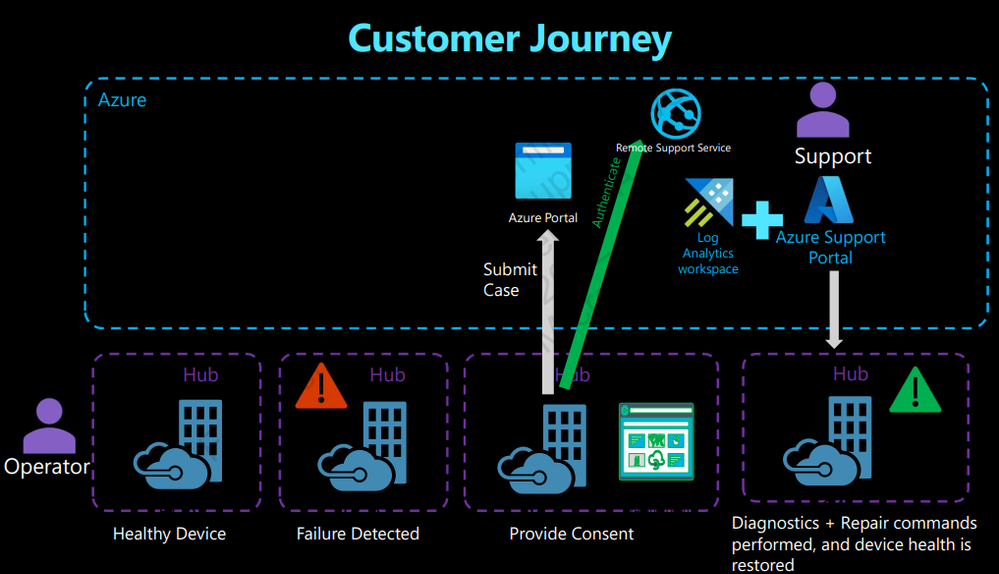
I believe that it is phenomenal feature to have, given that so many customers really would like to have more of that black box appliance experience that is Azure Stack Hub. This is not the first feature to make it closer to this design. We already have proactive diagnostic log collection (see Diagnostic log collection - Azure Stack Hub | Microsoft Docs for more information), so this is just a step further into making sure that all customers are provided with more time and value using the system, than troubleshooting and fixing issues.
Not every customer can dedicate engineers to spend hours on the phone with Microsoft Support, nor do they have enough trained staff to know the ins and outs of such a complex system that is Azure Stack Hub. For those who need it, I think this is godsend, one more thing less to worry about.
Let us tackle a few caveats as well.
- Not everything can be fixed like that, but it was never meant to be.
- There is a subset of commands that Microsoft Engineer can run (full list here https://docs.microsoft.com/azure-stack/operator/remote-support#list-of-microsoft-support-operations). There also two modes of which you can provide said support: Diagnostics or Diagnostics and Repair. Due to complexity of the design of Azure Stack Hub, having the correct logs and information is vital – equipped with the ability to collect the info they need, Microsoft Support Engineers will have much easier time helping you fix any issues you might have.
- Some basic cmdlets are still missing, but feedback has been provided to add a few more
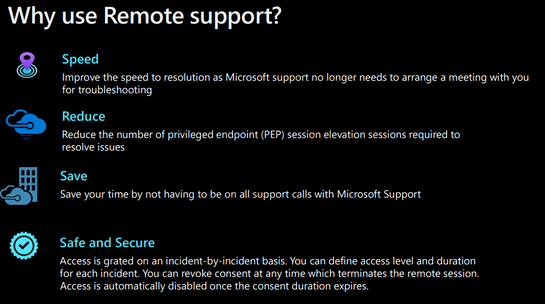
So when I say not everything can be fixed, why use it at all then I think this graphic explains it really well:
For those with their Security and Compliance hats on, pretty sure you have all of your alarm bells ringing right about now. Fret not, it is actually super secure and let me explain why.
There is a good overview in the official documentation that talks about just-in-time access and just enough administration JIT and JEA respectively. Then we have the consent process initiated by you, the Operator. When Microsoft Engineer wants to access your session, they have a dedicated separate machine that they use for this purpose alone. In COVID-19 days, imagine how hard it must have been to procure such a thing! It is quite a feat in and of itself – well done! The request to access the system comes from this machine, and a second engineer, needs to approve it before access is granted. Full audit of all commands ran is also created.
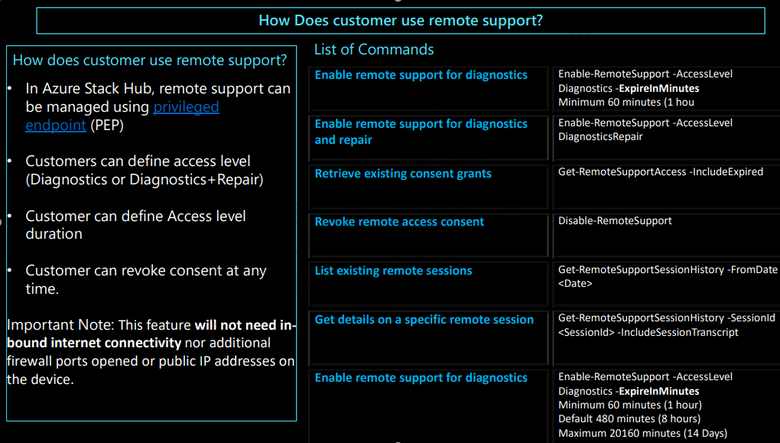
You can also find historical sessions and provide an audit trail of those with just one command:

Or to find out if there are any current active sessions:

Additional very useful overview:
Official documentation for the feature -> Overview of remote support for Azure Stack Hub - Azure Stack Hub | Microsoft Docs
All in all, I think this is a great additional tool at our disposal that will alleviate a lot of concerns people have when deciding if Azure Stack Hub is something they would like to deploy. The feature is bundled with regular support plans for Azure Stack Hub, so you are getting it at no extra cost. The best part for me though, is the sheer fact that we are giving the USP (unique selling point) of Azure Stack Hub – the EXTRAORDINARY Microsoft Support Engineers – even more control over how they want to engage with their customers. It should be no secret to anybody that Microsoft Support and the respective Engineering Team is what makes Azure Stack Hub the best platform ever made.
Happy Azure Stacking! 
Published on:
Learn moreRelated posts
Public Preview of Azure Migrate from VMware to Azure Stack HCI
Today, we are thrilled to announce the public preview of the Azure Migrate functionality to migrate VMs from VMware to Azure Stack HCI, a sign...
Sneak peek at new Azure edge infrastructure at Hannover Messe 2024
Written by Cosmos Darwin, Principal Group Manager on the Azure Edge & Platform team This week is Hannover Messe 2024, the world’s biggest ...
Apply critical update for Azure Stack HCI VMs to maintain Azure verification
Azure verification for VMs on Azure Stack HCI makes it possible for Azure-exclusive benefits to work outside of the cloud and in on-premises a...
Logical Networks in Azure Portal for HCI: Setting the Stage for Software Defined Networking
At this past Microsoft Ignite 2023, we officially announced the public preview of logical networks in Azure Portal for Azure Stack HCI. These ...
Introducing Azure Virtual Desktop workload in Azure Stack HCI Sizer!
Earlier in February 2024, we announced the general availability of Azure Virtual Desktop for Azure Stack HCI which extends the capabilities of...
Hyper-V VM Migration to Azure Stack HCI, version 23H2
Written by Kerim Hanif, Senior Program Manager on the Azure Edge & Platform team Azure Migrate is a unified platform t...
Possible MAC address assignment strategies for tenant VMs running on Stack-HCI environment
Azure Stack HCI is a hyperconverged infrastructure (HCI) cluster solution consists of windows servers (Hyper-V), Storage Spaces Direct, a...
Azure Stack HCI version 23H2 is generally available
Written by Cosmos Darwin, Principal PM Manager on the Azure Edge & Platform team Today we’re announcing the general availab...
AKS enabled by Azure Arc is now available on Azure Stack HCI 23H2
Azure Kubernetes Service (AKS) allows you to run a managed Kubernetes solution at the edge wherever you need it, with built-in support...
MAC address assignment strategies for tenant VMs running on Stack-HCI environment
Azure Stack HCI is a hyperconverged infrastructure (HCI) cluster solution consists of windows servers (Hyper-V), Storage Spaces Direct, a...