
Evolving networking with a DPU-powered edge
Introduction
An edge deployment model commonly constitutes many smaller, independently managed environments where the total cost of ownership needs to be optimized. In today's configurations, infrastructure runs on the same servers and CPUs that host customer workloads. Infrastructure overhead (for example, processing network traffic) places a significant drain on resources which necessitates larger cluster deployments and increased cost.
SmartNICs or Data Processing Units (DPUs) bring an opportunity to double down on the benefits of a software-defined infrastructure without sacrificing the host resources needed by your line-of-business apps in your (virtual machines) VMs or containers. With a DPU, we can enable SR-IOV usage removing the host CPU consumption incurred by the synthetic datapath, alongside the SDN benefits. Over time, we expect that DPUs will provide even larger benefits and redefine the host architecture for our flagship edge products, like Azure Stack HCI.
Recently, we demonstrated how to build and run CBL-Mariner on an NVIDIA BlueField-2 DPU. DPUs enable the use of Software-defined networking (SDN) policies alongside traditional kernel-bypass technologies like SR-IOV. This is a powerful combination that yields the security and agility benefits only possible through hardware accelerators in a software-defined network.
In this blog, we’ll demonstrate a prototype running the Azure Stack HCI SDN Network Controller integrated with the NVIDIA BlueField-2 DPU.
Topology
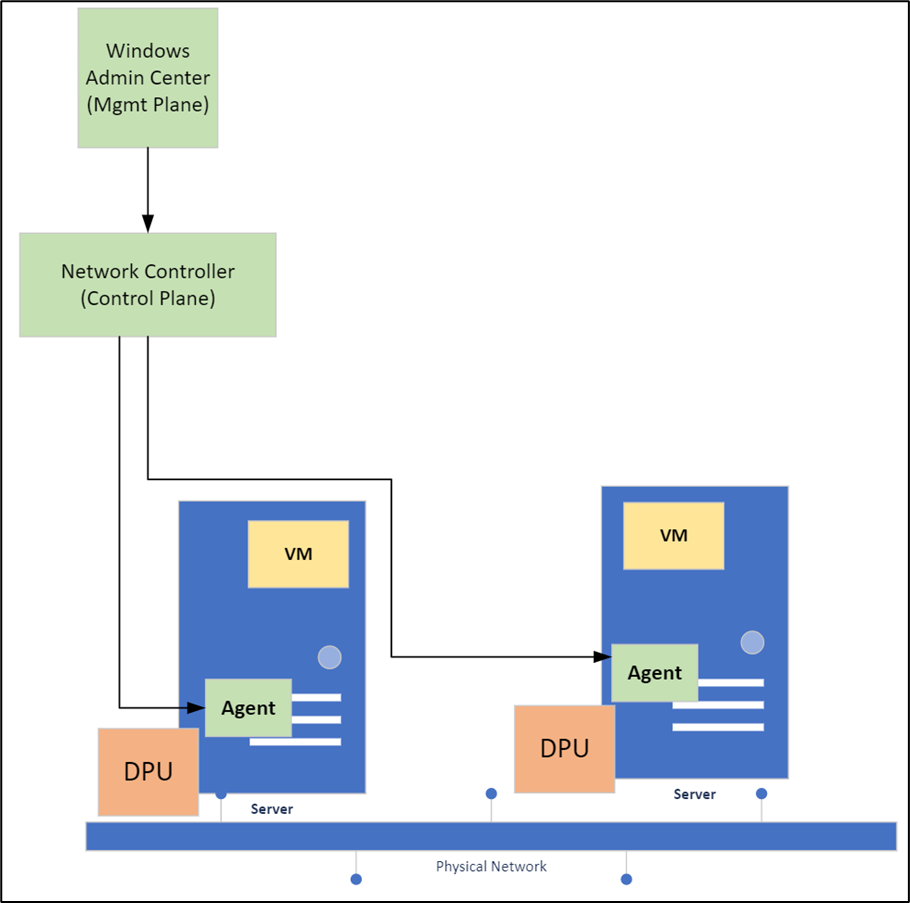
There are several components to this demonstration:
- Two hosts with:
- An NVIDIA BlueField-2 DPU running CBL-Mariner on its system-on-chip (SoC)
- A host agent that communicates with the NVIDIA BlueField-2 DPU
- The Microsoft SDN Network Controller
- Two tenant virtual machines in an SDN virtual network, one on each host
- One virtual machine using Windows Admin Center for remote management
Prototype Description
In a traditional (non-DPU) SDN environment, Virtual Filtering Platform (VFP) is loaded as an extension in the Hyper-V virtual switch. Since policy is enforced in the Hyper-V virtual switch, and SR-IOV bypasses this component on the data path, Access Control Lists (ACL) and Quality of Service (QoS) cannot be enforced. In this prototype, we move VFP to the DPU so that policies can be applied to the SR-IOV data path as well.
In this prototype, the policy application now works in the following way:
- We use Windows Admin Center to set ACLs for an SR-IOV enabled virtual machine on the Microsoft SDN Network Controller.
- The Network Controller communicates with the host agents running on each host.
- The host agent uses a gRPC communication channel to program the policy to the VFP component on the DPU.

Prototype
Configuring SDN Policies
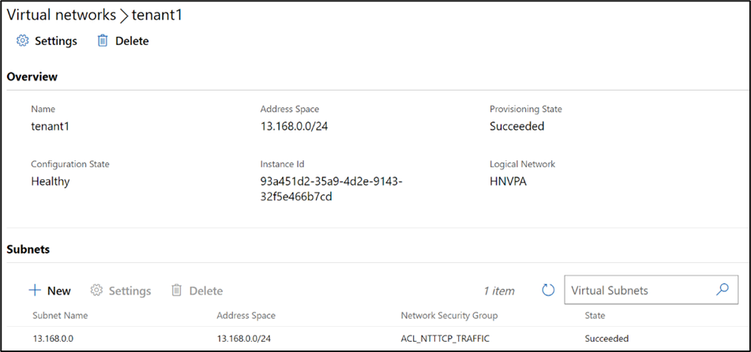
In the image below you can see the hosts have a virtual network, tenant1, configured in Windows Admin Center.
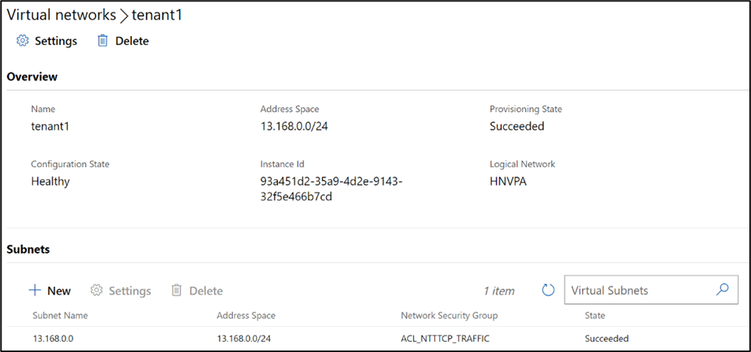
In this image, there is a Network Security Group with a Network security rule (ACL) named, NTTTCP_Allow_All that allows NTTTCP to receive inbound traffic for all virtual machines in the tenant1 virtual network.
Comparing Synthetic and SR-IOV Network Performance
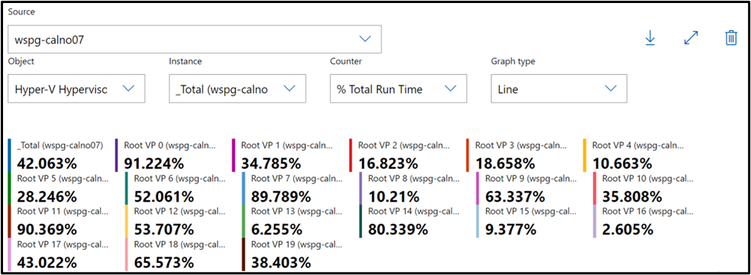
The image below shows the workload VMs running traffic over the synthetic network stack which must be processed by the host CPU cores. Looking at the _Total report you can see that 42% of the hosts CPU cores (on this system, 8 cores) were spent processing (in this case 60 Gbps) network traffic over the synthetic data path.
This host CPU consumption will continue to grow as bandwidth consumption by VMs and containers increases.
Now we enable an SR-IOV VF on the guest VMs, offloading the data path while still enforcing the SDN policies. This image shows NTTTCP output from within the guest reaching line rate of 96 Gbps.
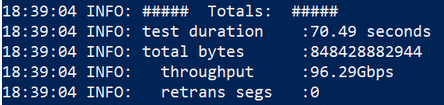
In this image, the host CPU remains nearly untouched. This returns the 8 cores previously used by the synthetic data path (42% of the host CPU for 60 Gbps) to be used by customer workloads (VMs or Containers). This means more VMs on the same servers, or less servers needed for your workloads.

Conclusion
In a common edge deployment model, there are many smaller, independently managed environments where the total cost of ownership needs to be optimized. In today's configurations, infrastructure runs on the same server and CPUs that host customer workloads placing a significant drain on resources which necessitates larger cluster deployments and increased cost.
In this prototype we demonstrated the host CPU reduction with SR-IOV alongside the Microsoft SDN stack, enabled by a Nvidia BlueField-2 DPU. Stay tuned for more prototypes!
Thanks for reading,
Alan Jowett
Published on:
Learn moreWe can help you with Evolving networking with a DPU-powered edge
If you want help implementing, troubleshooting, or improving this product, contact us and we’ll point you in the right direction.
Related posts
Public Preview of Azure Migrate from VMware to Azure Stack HCI
Today, we are thrilled to announce the public preview of the Azure Migrate functionality to migrate VMs from VMware to Azure Stack HCI, a sign...
Sneak peek at new Azure edge infrastructure at Hannover Messe 2024
Written by Cosmos Darwin, Principal Group Manager on the Azure Edge & Platform team This week is Hannover Messe 2024, the world’s biggest ...
Apply critical update for Azure Stack HCI VMs to maintain Azure verification
Azure verification for VMs on Azure Stack HCI makes it possible for Azure-exclusive benefits to work outside of the cloud and in on-premises a...
Logical Networks in Azure Portal for HCI: Setting the Stage for Software Defined Networking
At this past Microsoft Ignite 2023, we officially announced the public preview of logical networks in Azure Portal for Azure Stack HCI. These ...
Introducing Azure Virtual Desktop workload in Azure Stack HCI Sizer!
Earlier in February 2024, we announced the general availability of Azure Virtual Desktop for Azure Stack HCI which extends the capabilities of...
Hyper-V VM Migration to Azure Stack HCI, version 23H2
Written by Kerim Hanif, Senior Program Manager on the Azure Edge & Platform team Azure Migrate is a unified platform t...
Possible MAC address assignment strategies for tenant VMs running on Stack-HCI environment
Azure Stack HCI is a hyperconverged infrastructure (HCI) cluster solution consists of windows servers (Hyper-V), Storage Spaces Direct, a...
Azure Stack HCI version 23H2 is generally available
Written by Cosmos Darwin, Principal PM Manager on the Azure Edge & Platform team Today we’re announcing the general availab...
AKS enabled by Azure Arc is now available on Azure Stack HCI 23H2
Azure Kubernetes Service (AKS) allows you to run a managed Kubernetes solution at the edge wherever you need it, with built-in support...
MAC address assignment strategies for tenant VMs running on Stack-HCI environment
Azure Stack HCI is a hyperconverged infrastructure (HCI) cluster solution consists of windows servers (Hyper-V), Storage Spaces Direct, a...