
Now Available – A Revamped Office.com for Business and Education customers

In February, we began the full rollout of the enhancements to Office.com and the Office app for Windows we first announced at the Microsoft Ignite event in November 2021. We’re pleased the release has been landing very well so far and thrilled to announce the updates will be available to all commercial and education customers by the end of this week. Anyone using their Microsoft Account for work or school will be able to use this new experience to help manage their files and start their work across their apps.
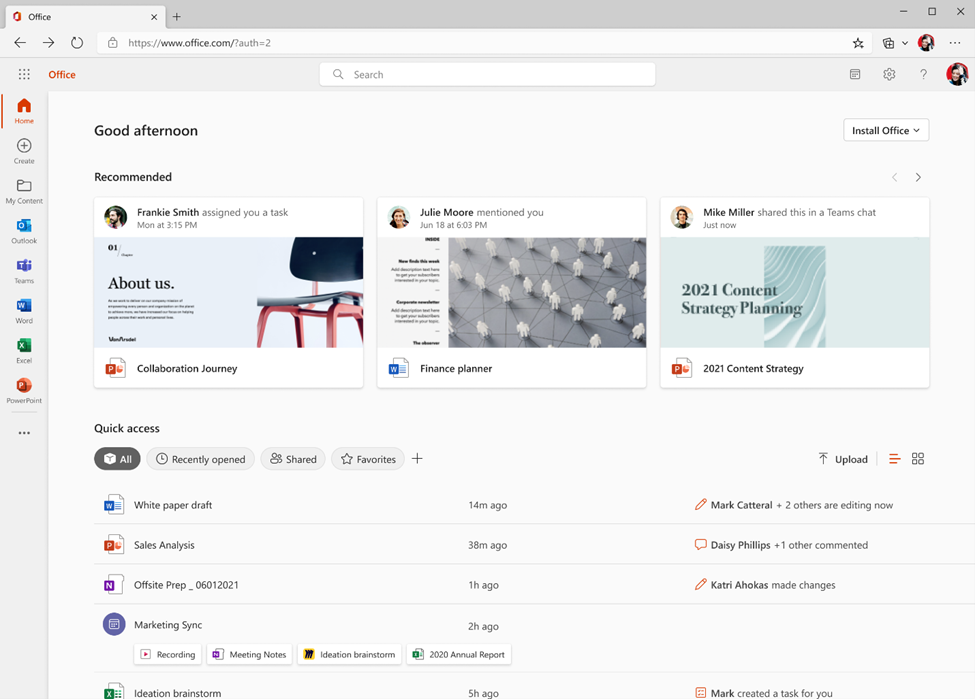
We designed Office.com and the parallel Office app for Windows to be the hub for your content – a place where you can get to all your files and documents, understand what needs your attention, and easily start creating content.
Some of the biggest changes include:
- A redesigned Home screen featuring a Quick Access section to easily get to the files related to your work. We’ve included customizable filters so you can see your content according to your collaborators, document type, and more with a single click.
- A new My Content pane helps you get to all the work related to you no matter the file type, where it’s stored, or how it was shared with you. New “Browse by” views help you find content associated with the people with whom you work or the meetings you've had so can quickly find attachments, meeting recordings, Loops, or any other file you need. We’ve also added Infinite Scroll to the page making it easier to skim for what you’re looking for rather than clicking through pages of search results.
- A new Create pane makes it easy to see all your apps in one place and quickly create new content. You can create a new file or document with a simple click or use a new template tool that makes it easier to create new content. Just select the type of content you wish to create and you'll be presented with various template options across multiple apps all at once so you can decide which option works best for you. This is also the place for you to find branded templates from your organization (must be enabled by your organization's IT).
You can learn about these features and more in our Tech Community blog post from Ignite.
We’re so excited about these changes we even created a fancy, new video showing off how the whole experience comes together to make you even more productive at work.
To see the new experience for yourself, just log on to Office.com from your work or school account. Windows users will find the same experience in the Office app, which comes preinstalled on all new Windows PCs and is available for download through the Microsoft Store.
We continue to work on similar enhancements for those using their personal Microsoft Accounts (not affiliated with work or school) and look forward to share more updates in the coming months.
Published on:
Learn moreRelated posts
Announcing the General Availability of the Microsoft 365 Document Collaboration Partner Program
Empowering Seamless Collaboration for Modern Workforces We are thrilled to announce the general availability of the Microsoft 365 Docume...
Favorite Microsoft 365 Copilot Prompts
(Amber Plumb interviewing Michael Morales and Allison Sweet) The power of M365 Copilot is transforming the way our support team operates...
Favorite Copilot Prompts
(Amber Plumb interviewing Michael Morales and Allison Sweet) The power of M365 Copilot is transforming the way our support team operates...
Boost digital event engagement with Voting and Archiving in Teams Q&A
Managing and delivering effective town halls is key to enabling two-way dialogue with leaders in today’s hybrid world. Microsoft Teams Q&A...
Prepare now for key end of support moments in 2025
One year from today, on October 14, 2025, support will end for all Office 2016 and 2019 suites, standalone apps, and servers. This includes:&n...
Everything you should know about Visio 2016 and Visio 2019 end of support
On October 14, 2025, Visio 2016 and Visio 2019 will reach end of support. After this date, Visio 2016 and Visio 2019 will no longer receive se...
Limit frontline worker access to Teams when off shift
We’re excited to announce that the frontline working time feature is now generally available! This feature allows admins to block or warn acce...
We are removing Feed on Microsoft 365 (Office)
As part of our ongoing efforts to streamline and enhance user experiences, we will be retiring the Feed feature (shown in figure 1 below) on t...
NOW ON DEMAND | Microsoft Loop Learning Series [Six webinars]
UPDATE | All parts of the Loop Learning Series have aired and are now available to watch on demand, playable below in this blog post. Ar...
Leveraging Partner Apps to Deliver on the Promise of AI-Led Productivity
The advent of generative AI is driving a rethink of what outcomes we deserve from our productivity software – from gains in efficiency to more...