
OneNote: Your Digital Notebook, Reimagined with Copilot

We are thrilled to announce that the Microsoft 365 Copilot is coming to OneNote. This powerful tool combines the power of large language models (LLMs) with your data from the Microsoft Graph—notes, calendars, emails, chats, documents, meetings, and more—and the Microsoft 365 apps to turn your words into a powerful productivity tool. All of this is done within our existing commitments to data security and privacy in the enterprise.
We know that too much time is spent on the mundane tasks of work and not enough time is spent on the work that brings us joy and ignites our creativity. That's why Copilot is being integrated directly into OneNote. It works with you, embedded in the other Microsoft 365 apps you use daily to help you unlock productivity, unleash creativity, and uplevel your skills.
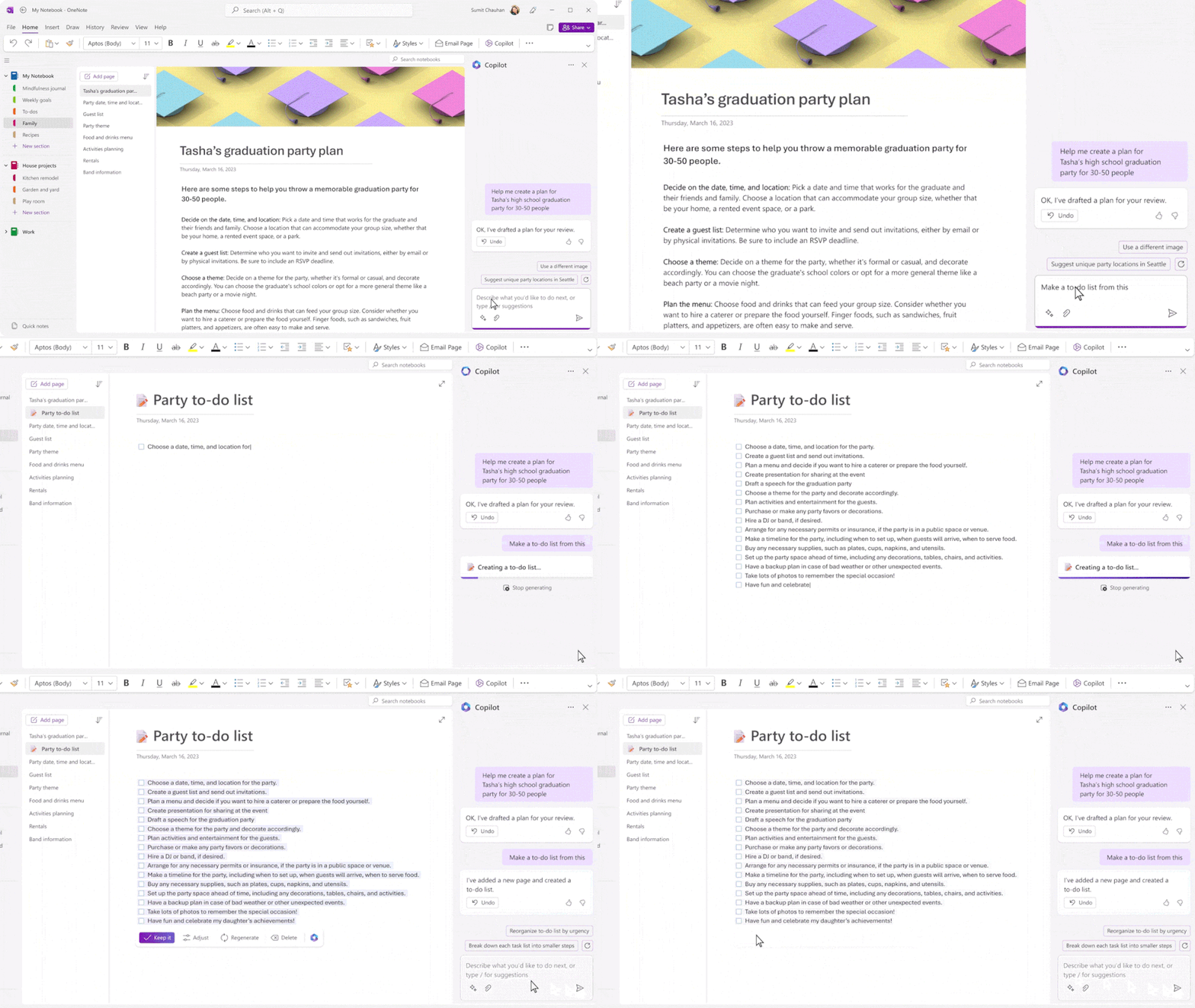
Copilot in OneNote
Your digital notebook reimagined with Copilot.
Copilot in OneNote helps you create, capture, organize, and recall information with confidence. As your notetaking partner, Copilot uses your prompts to draft plans, generate ideas, create lists, organize information, and more. Copilot can transform existing text by summarizing, rewriting, formatting, and adding visual context. Uplevel your digital notebook with natural language commands to reorganize your notebook, adjust formatting, and highlight what's important. Here are some example commands and prompts you can try:
- Create a plan for my daughter’s high school graduation party.
- Summarize notes into bullet points on a new page.
- Generate a list of topics and talking points to be covered in an annual investor update meeting.
- Plan a spring trip to Paris for me, my partner, and my two teenage children.
- I'm starting a wholesale coffee bean and roasting company. Give me 10 suggestions for a company name and vision statement.
Building responsibly
Microsoft 365 Copilot is designed for the needs of the enterprise. Our efforts are guided by our AI principles and Responsible AI Standard and build on decades of research on grounding and privacy-preserving machine learning. Microsoft’s work on AI is reviewed for potential harms and mitigations by a multidisciplinary team of researchers, engineers, and policy experts. We use the Azure Content Moderation Stack across our services to monitor and filter harmful content. Technologies like InterpretML and Fairlearn help to detect and correct data bias.
The Copilot System builds on our existing commitments to data security and privacy in the enterprise. Copilot automatically inherits your organization’s security, compliance, and privacy policies for Microsoft 365. Data is managed in line with our current commitments. Copilot large language models are not trained on your tenant data.
Finally, we have worked to design an experience that prioritizes human agency and puts the user in control. This includes noting limitations, providing links to sources, and prompting users to review, fact-check, and fine-tune content based on their own knowledge and judgment.
Read about Microsoft 365 Copilot on our Official Microsoft Blog.
Continue the conversation by joining us in the Microsoft 365 community! Want to share best practices or join community events? Become a member by "Joining" the Microsoft 365 community. For tips & tricks or to stay up to date on the latest news and announcements directly from the product teams, make sure to Follow or Subscribe to the Microsoft 365 Blog space!
Published on:
Learn moreRelated posts
Announcing the General Availability of the Microsoft 365 Document Collaboration Partner Program
Empowering Seamless Collaboration for Modern Workforces We are thrilled to announce the general availability of the Microsoft 365 Docume...
Favorite Microsoft 365 Copilot Prompts
(Amber Plumb interviewing Michael Morales and Allison Sweet) The power of M365 Copilot is transforming the way our support team operates...
Favorite Copilot Prompts
(Amber Plumb interviewing Michael Morales and Allison Sweet) The power of M365 Copilot is transforming the way our support team operates...
Boost digital event engagement with Voting and Archiving in Teams Q&A
Managing and delivering effective town halls is key to enabling two-way dialogue with leaders in today’s hybrid world. Microsoft Teams Q&A...
Prepare now for key end of support moments in 2025
One year from today, on October 14, 2025, support will end for all Office 2016 and 2019 suites, standalone apps, and servers. This includes:&n...
Everything you should know about Visio 2016 and Visio 2019 end of support
On October 14, 2025, Visio 2016 and Visio 2019 will reach end of support. After this date, Visio 2016 and Visio 2019 will no longer receive se...
Limit frontline worker access to Teams when off shift
We’re excited to announce that the frontline working time feature is now generally available! This feature allows admins to block or warn acce...
We are removing Feed on Microsoft 365 (Office)
As part of our ongoing efforts to streamline and enhance user experiences, we will be retiring the Feed feature (shown in figure 1 below) on t...
NOW ON DEMAND | Microsoft Loop Learning Series [Six webinars]
UPDATE | All parts of the Loop Learning Series have aired and are now available to watch on demand, playable below in this blog post. Ar...
Leveraging Partner Apps to Deliver on the Promise of AI-Led Productivity
The advent of generative AI is driving a rethink of what outcomes we deserve from our productivity software – from gains in efficiency to more...