
Easily sign-in to all Microsoft accounts using the Outlook app

Now you can use Outlook for Android as a sign-in verification method for your Microsoft apps and services.
We know how much of a hassle it is to use and manage passwords for your personal accounts. In addition, passwords and even easy to use sign-in methods like SMS messaging leave accounts vulnerable to attack. That's why we are excited to announce that now you can use the Outlook app to sign in to your Microsoft services, such as Microsoft 365, OneDrive, Teams, and Windows, in a secure and convenient way.
With Outlook sign-in verification, you don't need to remember or type any passwords or use a onetime SMS code, you can simply use the Outlook app plus a biometric or PIN to approve a sign-in on your phone. This sign-in verification functionality will be automatically enabled when you use the latest version of the Outlook app.
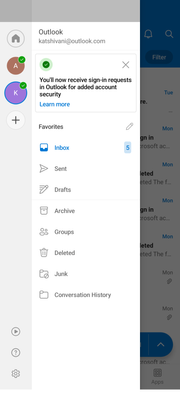
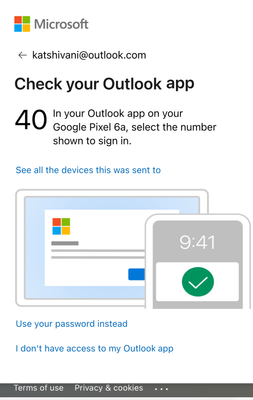
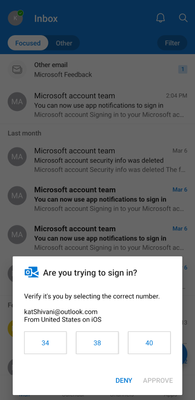
The next time you sign in on to your Microsoft account on any device, you will be prompted to approve sign-in request using Outlook on your Android phone. The notification will show a number matching prompt, followed by biometric or PIN verification.
Note that if you already have Microsoft Authenticator configured on your phone, you can continue to use it to sign in.
Support and Resources
To learn more about the new Outlook sign-in verification feature for Microsoft account and for support, click here. We are rolling this out to all Outlook Android users. Support for Outlook on iOS is on the roadmap, and we will share more details at a future date.
We hope you enjoy this new, more convenient way to sign in, and, as always, please let us know of any questions or feedback by leaving comments down below.
On behalf of Outlook and Microsoft account teams,
Shivani Gupta
Product Manager
Microsoft Identity
Published on:
Learn moreWe can help you with Easily sign-in to all Microsoft accounts using the Outlook app
If you want help implementing, troubleshooting, or improving this product, contact us and we’ll point you in the right direction.
Related posts
Announcing the General Availability of the Microsoft 365 Document Collaboration Partner Program
Empowering Seamless Collaboration for Modern Workforces We are thrilled to announce the general availability of the Microsoft 365 Docume...
Favorite Microsoft 365 Copilot Prompts
(Amber Plumb interviewing Michael Morales and Allison Sweet) The power of M365 Copilot is transforming the way our support team operates...
Favorite Copilot Prompts
(Amber Plumb interviewing Michael Morales and Allison Sweet) The power of M365 Copilot is transforming the way our support team operates...
Boost digital event engagement with Voting and Archiving in Teams Q&A
Managing and delivering effective town halls is key to enabling two-way dialogue with leaders in today’s hybrid world. Microsoft Teams Q&A...
Prepare now for key end of support moments in 2025
One year from today, on October 14, 2025, support will end for all Office 2016 and 2019 suites, standalone apps, and servers. This includes:&n...
Everything you should know about Visio 2016 and Visio 2019 end of support
On October 14, 2025, Visio 2016 and Visio 2019 will reach end of support. After this date, Visio 2016 and Visio 2019 will no longer receive se...
Limit frontline worker access to Teams when off shift
We’re excited to announce that the frontline working time feature is now generally available! This feature allows admins to block or warn acce...
We are removing Feed on Microsoft 365 (Office)
As part of our ongoing efforts to streamline and enhance user experiences, we will be retiring the Feed feature (shown in figure 1 below) on t...
NOW ON DEMAND | Microsoft Loop Learning Series [Six webinars]
UPDATE | All parts of the Loop Learning Series have aired and are now available to watch on demand, playable below in this blog post. Ar...
Leveraging Partner Apps to Deliver on the Promise of AI-Led Productivity
The advent of generative AI is driving a rethink of what outcomes we deserve from our productivity software – from gains in efficiency to more...