
Announcing Striim Cloud integration with Azure Synapse Analytics for continuous data integration

Azure partner Striim recently launched Striim Cloud, a fully managed solution to stream data from on premises and cloud sources to Azure Synapse for near real-time analytics.
Why Striim Cloud with Azure Synapse?
Striim Cloud is hosted on Azure and is fully managed by Striim for data streaming use cases like low latency, near real-time replication, data transformation, and loading large volume of data to Azure Synapse for real-time analytics. It is a fully managed, simple-to-configure service which is designed for you to stand up data pipelines and data streaming in under 10 minutes, from any supported source to Azure Synapse. Striim Cloud takes care of initial load and change data capture (CDC), while maintaining efficiency and performance.
Use case
Let’s explore a sample use case to illustrate Striim Cloud with Azure Synapse. In this example, we are using dummy data to illustrate a real-world scenario. Consider a retail shoe business which uses Salesforce. They have a requirement to analyze business data in real time to make timely business decisions. They need to capture statistics such as shoes sold in the last hour, popular models, and location sold etc.
Let's see how Striim Cloud automates the entire process of data streaming to analytics. Users can evaluate and migrate to production in minutes, by following a simple 3-step process.
Step 1: Signup for Striim Cloud trial
Striim Cloud offers 14-day free trial that includes full set of features and capabilities. Signup for the Striim Cloud trial. And then sign into the Striim Cloud Enterprise UI and create a Striim service that automatically creates and configures the necessary infrastructure required to run a data pipeline (Figure 1). Striim Cloud supports Azure AD for single sign-on (SSO).
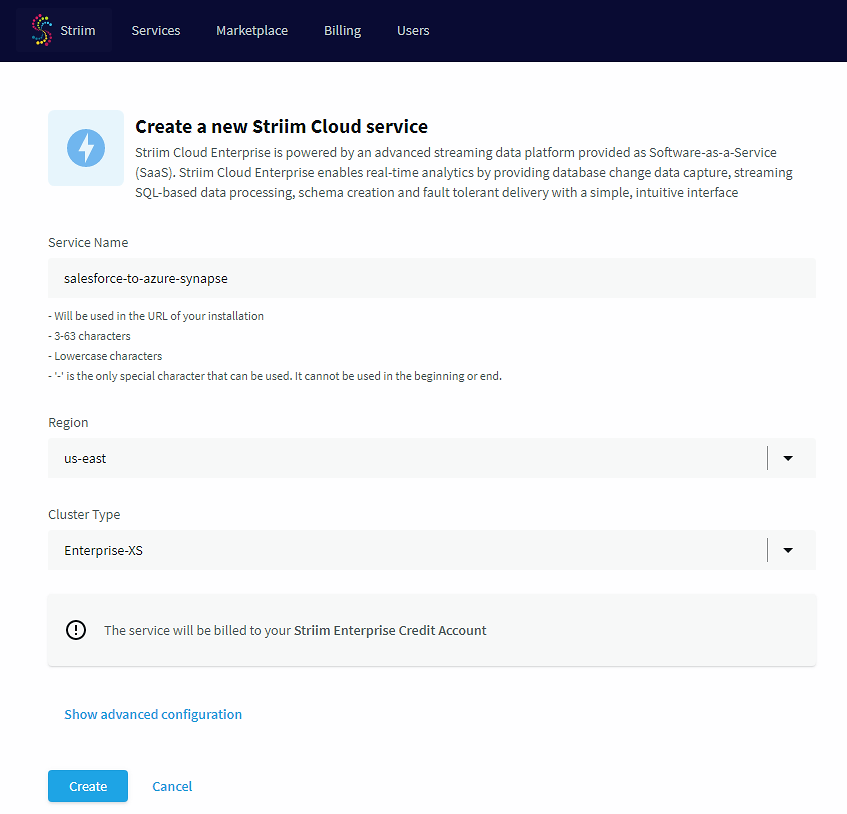
Figure 1: Create Striim Cloud Service
Step 2: Create a data pipeline with source and target details
To create a new app from scratch in the Striim UI, simply drag and drop the source salesforce in this case (Figure1), fill in connection details and the content to be moved from Salesforce to Azure Synapse. In this example, we are moving data created for Shoe Retail business (note: It is not real data) SOBJECT field in the Salesforce.

Figure 2 Create Data pipeline with Salesforce source
To configure the target (Figure 3), simply drag and drop the Azure Synapse onto the canvas and update the connection details and tables mapping from Salesforce as shown in the image below. This sets up the pipeline and ready to stream data from Salesforce to Azure Synapse. In this example, we are writing to the Azure dedicated SQL pool. Striim also supports writing to Azure Data Lake Gen2 as well.
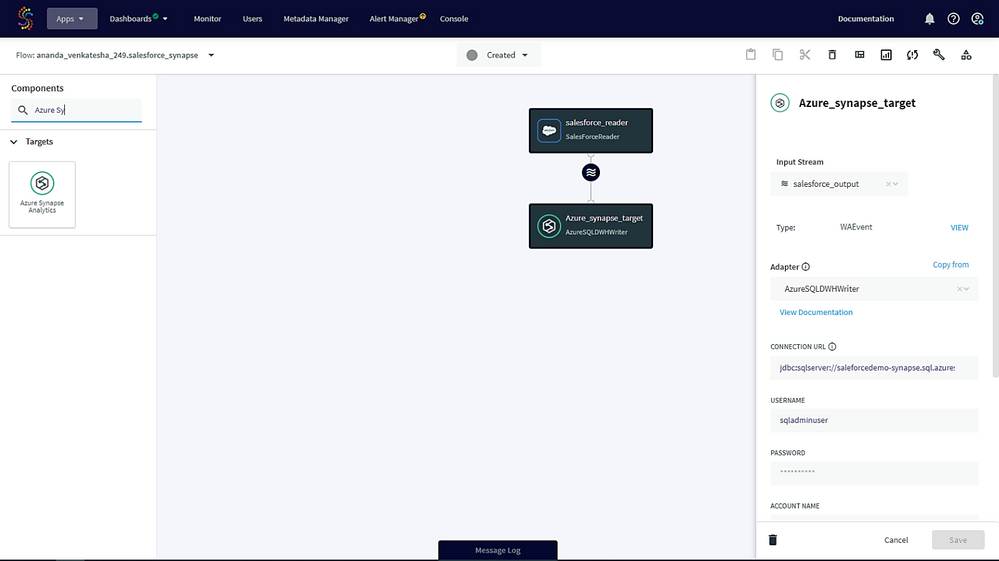
Figure 3 Azure Synapse target configuration
Real time data replication from Salesforce to Azure Synapse
As soon as the source & target configuration is completed and app is deployed, your data pipeline is set up and running. Striim starts streaming the data as shown in the image below (Figure 4, 501 events streamed to Azure Synapse).

Figure 4 Salesforce to Azure Synapse Data streaming in action
Step 3: Data analysis and visualization in Azure Synapse
Once data is streamed and available in Azure Synapse, you can validate the data by connecting to Azure Synapse Studio or Azure Data studio. In this example, lets launch Azure Data Studio and connect to Azure Synapse SQL Pool (Figure 5). We can see the data of the shoe retailer available in the Azure Synapse SQL pool database on Azure Data studio.

Figure 5 Azure Data studio showing the replicated data from Salesforce
Data visualizations using Power BI
For business insights, users can use Power BI which is conveniently integrated with Azure Synapse. Open Synapse Studio and choose Power BI to visualize the data. In this example we are using Power BI desktop (Figure 6) to see the data insights like shoe quantity sold per country, shoe models sold, etc. That helps the shoe company to make real-time business decisions to drive business growth.
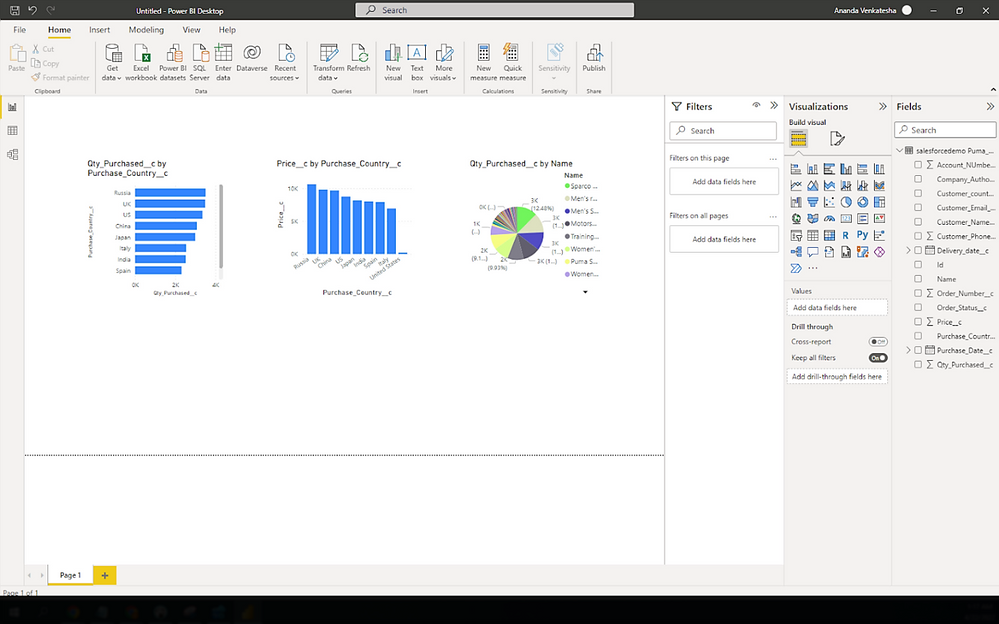
Figure 6 Power BI Desktop visualization of Salesforce data from Azure Synapse
Striim Cloud supports multiple use cases including heterogeneous sources with transformation, enrichment, and loading to Azure Synapse via SQL Pool, Azure Data Lake Gen2 etc. with data validation and data freshness features.
You can get started today with a free trial or contact us to get a customized demo. You can purchase Striim Cloud from Striim Cloud Enterprise solution listed in the Azure Marketplace and select the plan that fits your needs.
Published on:
Learn moreRelated posts
We're moving!
We’re moving to the Analytics on Azure Tech Community! All new Azure Synapse Analytics content will be published there. In the next few days a...
Upgrade to Azure Synapse runtimes for Apache Spark 3.4 & previous runtimes deprecation
It is important to stay ahead of the curve and keep services up to date. That's why we encourage all Azure Synapse customers with Apache ...
ADF\Synapse Analytics - Replace Columns names using Rule based mapping in Mapping data flows
In real time, the column names from source might not be uniform, some columns will have a space in it, some other columns will not. For exampl...
Interpreting Script activity output json with Azure Data Factory\Synapse analytics
Script activity in Azure Data Factory\ Synapse analytics is very helpful to run queries against data sources mentioned here in this document.&...
Synapse Connectivity Series Part #4 - Advanced network troubleshooting and network trace analysis
Continuing the series of this blog posts I would like to go more advanced on troubleshooting connectivity issues. I would like to thank also&n...
Boost your CICD automation for Synapse SQL Serverless by taking advantage of SSDT and SqlPackage CLI
Introduction Azure Synapse Analytics Serverless SQL is a query service mostly used over the data in your data lake, for data discovery,...
Metadata-Based Ingestion in Synapse with Delta Lake
Overview The crucial first step in any ETL (extract, transform, load) process or data engineering program is ingestion, w...
Missing Fields Added to Dedicated SQL pool Diagnostic Settings Logs
Over the past year, customers have informed the team there were a set of key columns missing in the standalone Dedicated SQL pools (formerly S...
Using Azure DevOps with Synapse Workspaces to create hot fixes in production environments
Have you ever deployed a release to production only to find out a bug has escaped your testing process and now users are being severely impact...
Azure Synapse MVP Corner - March 2023
About this blog series Microsoft Most Valuable Professionals, or MVPs, are technology experts who passionately share their knowledge with the ...