
Deliver content your way with PowerPoint enhancements: cameo, recording studio and speaker coach

Cameo in PowerPoint
At Ignite in September, we announced cameo, the PowerPoint experience that seamlessly integrates your camera feed into your presentation, letting you customize how and where you want to appear on your slides and offering layout recommendations via Designer in PowerPoint for optimal viewing. We’re excited to announce that this feature is currently available in our Office Insiders program and will be generally available in the coming months. Here is more information about how you’ll be able to use cameo to present.
Recording studio in PowerPoint
We also recently announced recording studio, a PowerPoint experience that lets you tell your story, in your own words, helping you deliver more impactful and engaging presentations. Recording studio gives you the ability to share your story using video – anywhere, anytime. In a world where hybrid work is our new norm, and our calendars get filled up with meetings – recording studio can be a solution to asynchronous meeting and collaboration. This experience also is a great way to stay connected with others even when we’re not physically in the same room together. We’re excited to announce that recording studio is now generally available, and you can start using it in PowerPoint today!
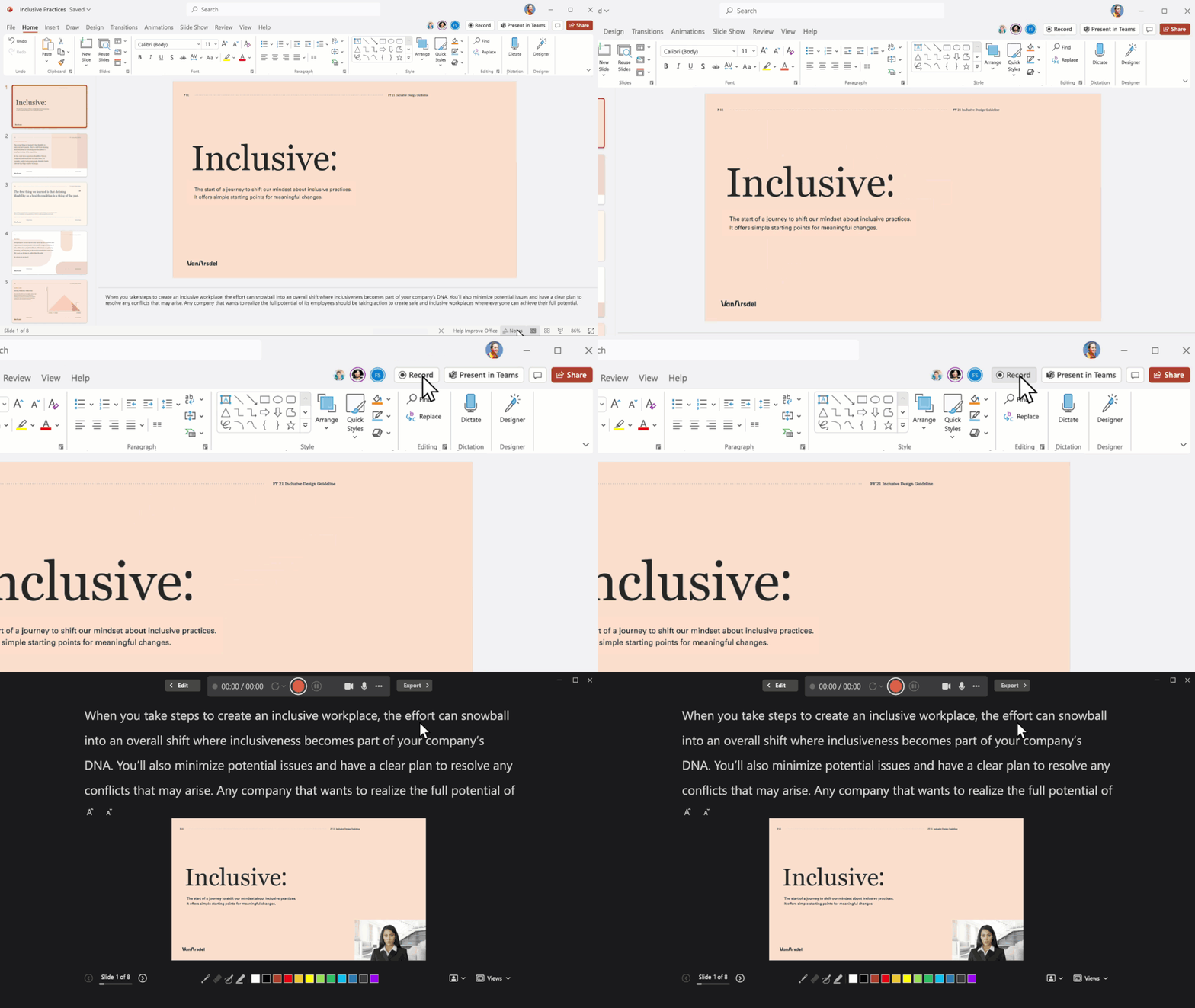
The combined power of cameo in recording studio
Today, we’re announcing that coming soon, we’re bringing cameo and recording studio together to help you land your message well – whether or not you’re attending the live meeting. You’ll be able to create your presentation, decide how and where you appear on your slides with cameo, enhance the slides with Designer, and record yourself speaking to any slide(s) with recording studio. When it's time to deliver your message, PowerPoint Live enables others to see your recording as part the presentation. This gives you the freedom if you’re unable to attend the “live” meeting, but since you’ve used cameo with recording studio, you’ll still show up in the meeting as if you are “live.”
Speaker coach in Microsoft Teams
In addition to the excitement around our cameo and recording studio experiences – we’re also excited to announce that speaker coach in Microsoft Teams will be generally available in the coming months. Speaker coach is your private, personalized coach helping you bring your most confident and best self into every meeting. When you turn speaker coach on in a meeting, the experience will privately assist you by highlighting moments and providing you with the following feedback critiques when necessary:
- Repetitive language - When you speak, you may use words and phrases repetitively without being aware of it. Your audience; however, will be aware. Speaker coach can help you identify these words and phrases so you can avoid overusing them and keep your audience more engaged.
- Filler words – Sounding confident helps make your message be persuasive. Speaker coach listens for filler words, such as “like” or “um,” because research indicates that a presenter who frequently uses filler words is perceived by the audience as less confident in his or her information. We will help you flag it so you can limit your use of filler words over time.
- Pace – Speaking too fast or too slow can affect your audiences' comprehension and recall of your message. You’ll get notified when you should pause and take a breath and slow down if you begin to speak too quickly.
- Inclusiveness - Ensure you are being inclusive with your speech – we will let you know when you say something that might be offensive or culturally insensitive. Speaker coach will also detect moments when you have spoken for an extended period and remind you to pause, so you can check-in with your audience to see if they have any questions.
- Intonation - To keep your audiences’ attention and improve your communication, be sure to emphasize the key words and phrases by adjusting your volume and pitch. We will identify when your pitch has reached monotone level so you can adjust your volume.
- Monologue – When you’re attending a meeting remotely, you may not know when you should pause to see if your audience is still engaged. Speaker coach lets you know when you have spoken for too long without audience engagement and reminds you to check in with your audience.
- Speaker overlaps - If you accidentally speak at the same time as someone else, speaker coach will help you identify who else is talking so you can recognize them and hear what they want to say.
Speaker coach will also help you to understand a comprehensive view of your data post-meeting with a private report of the moments speaker coach captured to reflect and internalize for the next meeting.
It is important to know that speaker coach in Microsoft Teams is designed for anyone in the meeting – not just the presenter – as there are many people who hold a speaking role in meetings. Even if you are simply saying a couple sentences – speaker coach can be there for you privately, to empower you and help give you greater confidence. Find out more about speaker coach in PowerPoint and Microsoft Teams here.
PowerPoint Live
PowerPoint Live in Microsoft Teams is the best way for you to present in meetings. As a presenter – you will feel more confident seeing the slides and speaker notes all in one private presenter view. It will enable you to “read the room” based on the reactions and body language of the meeting participants. With presenter mode, Standout, already available in PowerPoint Live and cameo coming soon, you'll be even more effective in engaging your audience. Find out more about the benefits of PowerPoint Live in this Microsoft Support article.
Continue the conversation by joining us in the Microsoft 365 Tech Community. Whether you have product questions or just want to stay informed with the latest updates on new releases, tools, and blogs, Microsoft 365 Tech Community is your go-to resource to stay connected!
Published on:
Learn moreRelated posts
Announcing the General Availability of the Microsoft 365 Document Collaboration Partner Program
Empowering Seamless Collaboration for Modern Workforces We are thrilled to announce the general availability of the Microsoft 365 Docume...
Favorite Microsoft 365 Copilot Prompts
(Amber Plumb interviewing Michael Morales and Allison Sweet) The power of M365 Copilot is transforming the way our support team operates...
Favorite Copilot Prompts
(Amber Plumb interviewing Michael Morales and Allison Sweet) The power of M365 Copilot is transforming the way our support team operates...
Boost digital event engagement with Voting and Archiving in Teams Q&A
Managing and delivering effective town halls is key to enabling two-way dialogue with leaders in today’s hybrid world. Microsoft Teams Q&A...
Prepare now for key end of support moments in 2025
One year from today, on October 14, 2025, support will end for all Office 2016 and 2019 suites, standalone apps, and servers. This includes:&n...
Everything you should know about Visio 2016 and Visio 2019 end of support
On October 14, 2025, Visio 2016 and Visio 2019 will reach end of support. After this date, Visio 2016 and Visio 2019 will no longer receive se...
Limit frontline worker access to Teams when off shift
We’re excited to announce that the frontline working time feature is now generally available! This feature allows admins to block or warn acce...
We are removing Feed on Microsoft 365 (Office)
As part of our ongoing efforts to streamline and enhance user experiences, we will be retiring the Feed feature (shown in figure 1 below) on t...
NOW ON DEMAND | Microsoft Loop Learning Series [Six webinars]
UPDATE | All parts of the Loop Learning Series have aired and are now available to watch on demand, playable below in this blog post. Ar...
Leveraging Partner Apps to Deliver on the Promise of AI-Led Productivity
The advent of generative AI is driving a rethink of what outcomes we deserve from our productivity software – from gains in efficiency to more...