
Machine learning on AKS hybrid & Stack HCI using Azure Arc-enabled ML

This blog post is about building, training & deploying ML workloads on-premises using Azure Stack HCI, AKS Hybrid & Azure Arc-enabled ML. The full ML lifecycle on AKS Hybrid (hosted on Stack HCI) addresses the security & compliance requirements of highly regulated industry workloads while benefiting from capabilities of Azure managed services.
Before we dive into the step-by-step guide, let’s have a brief introduction of the key technologies involved in this process.
Azure Stack HCI is a hyperconverged infrastructure (HCI) cluster solution that provides a robust approach to host virtualized workloads on-premises, enables seamless integration with Azure services & unified management across hybrid environment. With Stack HCI, customers can gain cloud efficiencies while hosting security-sensitive workloads on-premises.
Azure Kubernetes Service (AKS) Hybrid on Azure Stack HCI is an on-premises Kubernetes implementation of AKS that automates running containerized applications at scale. AKS Hybrid provides simplified experience of setting up & managing Kubernetes on Azure Stack HCI & integrate with Azure services via Arc for Kubernetes.
Azure Arc-enabled ML is a technology developed by Microsoft that allows IT operators to manage machine learning (ML) workloads across hybrid and multi-cloud environments using Kubernetes. With Azure Arc-enabled ML, IT operators can deploy and manage ML workloads on Kubernetes clusters that are running on-premises, at the edge, or in other public clouds, such as Amazon Web Services (AWS) or Google Cloud Platform (GCP). By leveraging native Kubernetes concepts, such as namespace and node selector, and tools like Azure Machine Learning, Azure Arc-enabled ML simplifies the deployment and management of ML workloads across diverse environments, providing a seamless experience for data scientists. To leverage this capability on Azure Stack HCI, customers can enable Arc connection for AKS Hybrid & deploy Azure ML extension to the Arc-enabled Kubernetes resource.
Azure Arc-enabled ML has several use cases and benefits for organizations that need to manage machine learning (ML) workloads across hybrid and multi-cloud environments. Some of the common use cases of Azure Arc-enabled ML include:
- Simplified management: With Azure Arc-enabled ML, IT operators can manage ML workloads across diverse environments using Kubernetes, which provides consistent and simplified management experience.
- Improved efficiency: By leveraging native Kubernetes concepts and tools, such as namespace and node selector, and Azure Machine Learning, Azure Arc-enabled ML helps optimize ML compute utilization and improve efficiency.
- Increased agility: Azure Arc-enabled ML allows organizations to deploy and manage ML workloads on Kubernetes clusters that are running on-premises, at the edge, or in other public clouds, providing greater flexibility and agility.
- Enhanced collaboration: Data scientists can work with tools like Azure Machine Learning Studio, AML CLI, AML Python SDK, and Jupyter notebook, while IT operators handle the ML compute setup, creating a seamless experience and improving collaboration.
- Better security: Azure Arc-enabled ML provides advanced security features, such as Azure Policy and Azure Security Center, to help organizations protect their ML workloads and data.
Overall, Azure Arc-enabled ML is a powerful technology that helps organizations streamline the management of ML workloads across hybrid and multi-cloud environments, improving efficiency, agility, collaboration, and security.
Setup & Configuration
Follow the steps below to train & infer from ML model using Azure arc enabled ML on Azure Stack HCI:
- Prepare an Arc enabled Kubernetes cluster for AKS Hybrid on Stack HCI.
- Assuming AKS Hybrid is already deployed on Azure Stack HCI, however, if you would like to explore the options to deploy the same then follow the links below.
OR
Quickstart to set up AKS hybrid using Windows Admin Center - AKS hybrid | Microsoft Learn
- Install the Azure Machine Learning extension.
- We can either use Azure CLI or Azure Portal to install the extension. Both the approaches are listed in the link below.
- Create AML workspace and attach workspace to Arc enabled cluster.
- Follow the link below to create a Workspace in Azure ML
Create workspace resources - Azure Machine Learning | Microsoft Learn
- Attach Kubernetes cluster to your Azure Machine Learning workspace.
- Training & Inference: Create a model training script which will train and register a model. Once model is registered, it can be deployed as a Kubernetes endpoint which can be invoked for inferencing. Follow the steps as listed below.
- Connect to the AML workspace.
- Get the compute target (Kubernetes compute)
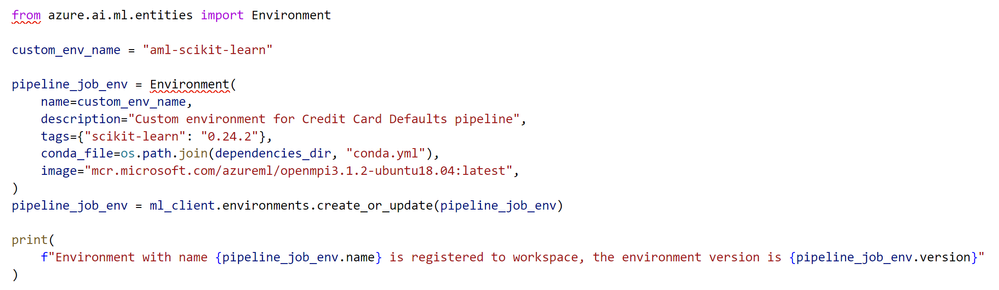
- Create an environment to run the training job.

To run AzureML job on a compute resource, you need an environment (https://docs.microsoft.com/azure/machine-learning/concept-environments). An environment lists the software runtime and libraries that are required to run the training script.
- Create a training script.
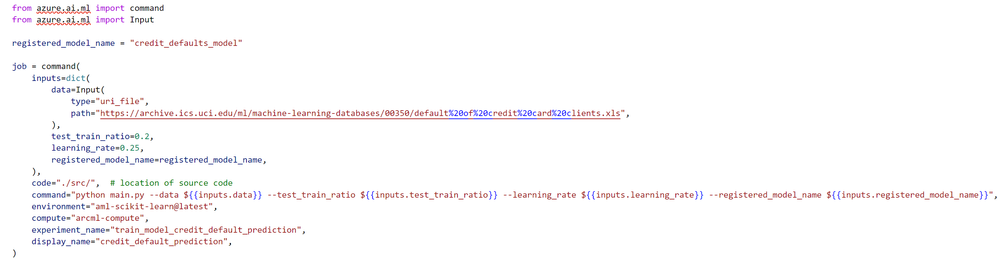
- Create a job to run the training script on the attached compute resource, configured with the appropriate job environment.
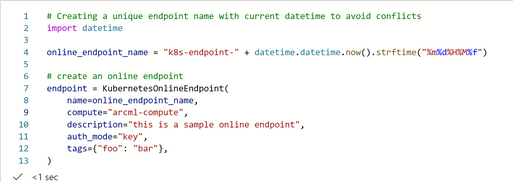
- Create Kubernetes online endpoint
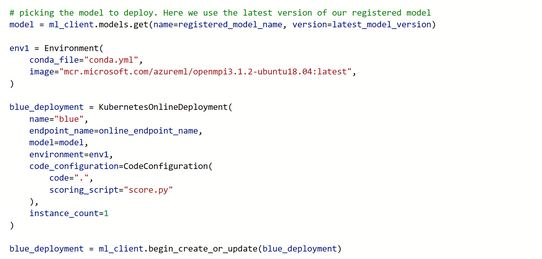
- Once the endpoint is created, deploy the newly trained model to the Kubernetes endpoint.
- Invoke the endpoint for inferencing.
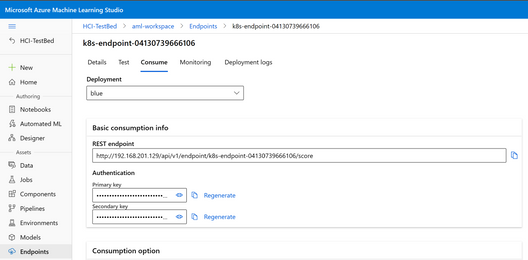
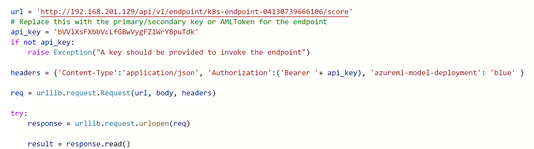
Reference links for the code samples:
azureml-examples/azureml-in-a-day.ipynb at main · Azure/azureml-examples · GitHub
Published on:
Learn moreWe can help you with Machine learning on AKS hybrid & Stack HCI using Azure Arc-enabled ML
If you want help implementing, troubleshooting, or improving this product, contact us and we’ll point you in the right direction.
Related posts
Public Preview of Azure Migrate from VMware to Azure Stack HCI
Today, we are thrilled to announce the public preview of the Azure Migrate functionality to migrate VMs from VMware to Azure Stack HCI, a sign...
Sneak peek at new Azure edge infrastructure at Hannover Messe 2024
Written by Cosmos Darwin, Principal Group Manager on the Azure Edge & Platform team This week is Hannover Messe 2024, the world’s biggest ...
Apply critical update for Azure Stack HCI VMs to maintain Azure verification
Azure verification for VMs on Azure Stack HCI makes it possible for Azure-exclusive benefits to work outside of the cloud and in on-premises a...
Logical Networks in Azure Portal for HCI: Setting the Stage for Software Defined Networking
At this past Microsoft Ignite 2023, we officially announced the public preview of logical networks in Azure Portal for Azure Stack HCI. These ...
Introducing Azure Virtual Desktop workload in Azure Stack HCI Sizer!
Earlier in February 2024, we announced the general availability of Azure Virtual Desktop for Azure Stack HCI which extends the capabilities of...
Hyper-V VM Migration to Azure Stack HCI, version 23H2
Written by Kerim Hanif, Senior Program Manager on the Azure Edge & Platform team Azure Migrate is a unified platform t...
Possible MAC address assignment strategies for tenant VMs running on Stack-HCI environment
Azure Stack HCI is a hyperconverged infrastructure (HCI) cluster solution consists of windows servers (Hyper-V), Storage Spaces Direct, a...
Azure Stack HCI version 23H2 is generally available
Written by Cosmos Darwin, Principal PM Manager on the Azure Edge & Platform team Today we’re announcing the general availab...
AKS enabled by Azure Arc is now available on Azure Stack HCI 23H2
Azure Kubernetes Service (AKS) allows you to run a managed Kubernetes solution at the edge wherever you need it, with built-in support...
MAC address assignment strategies for tenant VMs running on Stack-HCI environment
Azure Stack HCI is a hyperconverged infrastructure (HCI) cluster solution consists of windows servers (Hyper-V), Storage Spaces Direct, a...