
Azure Synapse Analytics July Update 2022

Azure Synapse Analytics July Update 2022
Welcome to the July 2022 update for Azure Synapse Analytics! This month, you will find information about Apache Spark 3.2 general availability, a new Cast transformation added to Synapse data flows, performance/cost improvements to Synapse Link for SQL, and support for Data Explorer as an output connection on Azure Stream Analytics jobs. Additional general updates and new features in Spark, Synapse Data Explorer, Data Integration, Developer Experience and Security are also mentioned in this edition.
Don’t forget to check out our companion video!
Table of contents
- Apache Spark for Synapse
- Synapse Data Explorer
- Data Integration
- Synapse Link
- Developer Experience
- Security
Apache Spark for Synapse
Synapse runtime for Spark 3.2 is now generally available
Apache Spark 3.2 for Synapse has been in public preview for two months. After considerable customer feedback and notable improvements in performance and stability, Azure Synapse runtime for Apache Spark 3.2 now becomes generally available and ready for production workloads.
Here’s what got better:
- Delta Lake version 1.2 brings new features like bin-compaction, data skipping using statistics and generated columns, lightweight column renaming, and many more. For further details, please read the full Delta Lake 1.2 release notes.
- The pandas API on Apache Spark helps unify small data and big data APIs.
- Adaptive Query Execution to speed up Spark SQL at runtime, along with query compilation and shuffle performance improvements.
- Extended ANSI SQL compatibility mode to simplify migration of SQL workloads.
Here is the list of specific changes:
- Support Pandas API layer on PySpark (SPARK-34849)
- Enable adaptive query execution by default (SPARK-33679)
- Query compilation latency reduction (SPARK-35042, SPARK-35103, SPARK-34989)
- Support push-based shuffle to improve shuffle efficiency (SPARK-30602)
- Add RocksDB StateStore implementation (SPARK-34198)
- EventTime based session windows (SPARK-10816)
- ANSI SQL mode GA (SPARK-35030)
- Support for ANSI SQL INTERVAL types (SPARK-27790)
For detailed contents and lifecycle information on all runtimes, you can visit Apache Spark runtimes in Azure Synapse.
Intelligent Cache is now generally available
The Intelligent Cache works seamlessly behind the scenes and caches data to speed up Spark execution as it reads from your ADLS Gen2 data lake. The feature helps reduce your total cost of ownership by improving performance up to 65% on subsequent reads of cached files for Parquet files and 50% for CSV files. This feature is now available for all Synapse runtimes for Apache Spark version 3 (3.1 and 3.2), and you can enable it in the Synapse Spark pool configuration.
To learn more, read Intelligent Cache in Azure Synapse Analytics.
Synapse runtime for Apache Spark 2.4 officially enters its retirement lifecycle
Back in May 2021, we announced the retirement of Apache Spark 2.4 in favor of Apache Spark 3.2. We extended Apache Spark 2.4 based on customer feedback. With the general availability of the Apache Spark 3.2 runtime, we are officially announcing a retirement date for the Azure Synapse runtime for Apache Spark 2.4.
Starting July 2022, a full 12-month retirement cycle begins. You should relocate your workloads to the newer Apache Spark 3.2 runtime within this period. To understand the Apache Spark lifecycle and support policies as well as impact on workloads, you can read more at Apache Spark runtimes in Azure Synapse.
Synapse Data Explorer
Azure Data Explorer is a fast and highly scalable data exploration service for log and telemetry data. It offers ingestion from Event Hubs, IoT Hubs, blobs written to blob containers, and Azure Stream Analytics jobs.
Ingest data from Azure Stream Analytics into Synapse Data Explorer (Preview)
Azure Stream Analytics is a real-time analytics service and an event-processing engine designed to analyze and process high volumes of fast streaming data from multiple sources simultaneously. An Azure Stream Analytics job consists of an input source, a transformation query, and an output connection. There are several output types to which you can send transformed data.

You can now use a Streaming Analytics job to collect data from an event hub and send it to your Azure Data Explorer cluster using the Azure portal or an ARM template. For full details, please read Ingest data from Azure Stream Analytics into Azure Data Explorer.
Synapse Web Data Explorer now supports rendering charts for each y column
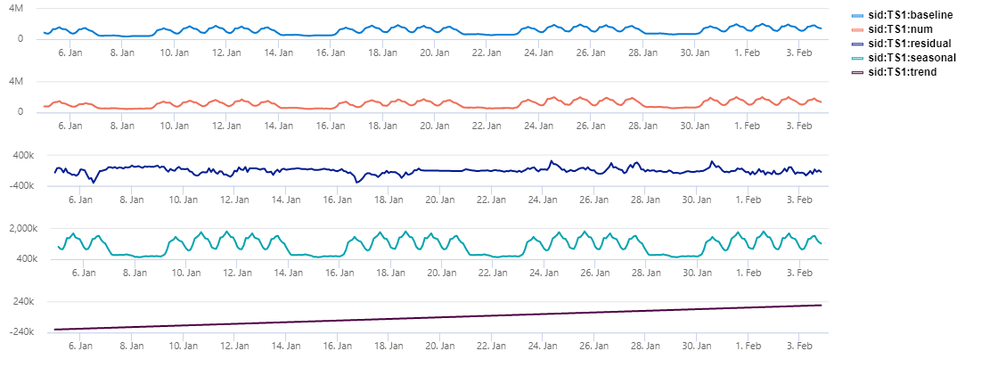
Starting this month, we have added support for the y-split property when using the render operator for bar, column, time, line, and area charts in Synapse Web Explorer. When implementing ysplit=panels, one chart is rendered for each ycolumn value (up to some limit), as you can see in the example below:
Create tables graphically in Synapse Web Data Explorer
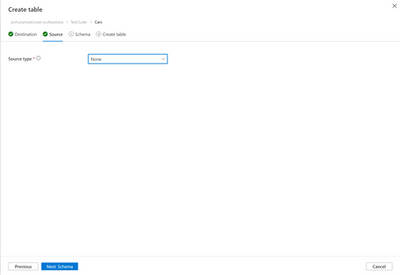
Previously, you could create a table in Synapse Web Data Explorer using ingestion by inferring its structure from sample data provided in a blob, ADLS, or Event Hubs. Starting this month, you can create tables graphically without providing data.
The new source type “None” triggers the flow.
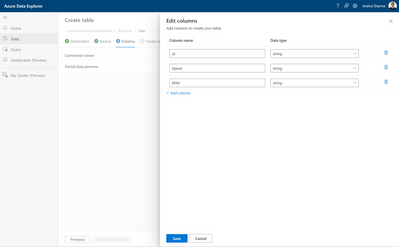
On the schema tab, you can add columns and select data types to create a new table graphically.
Data Integration
Time-To-Live in managed VNET [Public Preview]
We have introduced the public preview of time-to-live (TTL) in managed virtual network. With this, you can reserve computes for the TTL period, saving time and improving efficiency.
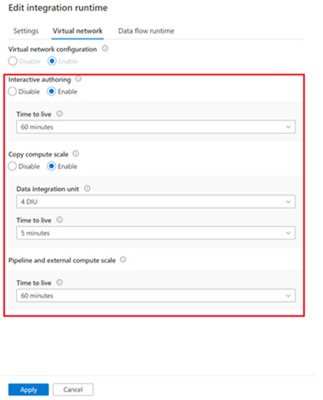
To learn more, read Announcing public preview of Time-To-Live (TTL) in managed virtual network.
SAP Change Data Capture (CDC) connector is now available in [Public Preview]
We have released a new data connector which can connect to all SAP systems that support ODP and can be used with predefined templates to help streamline the integration of SAP data within Azure services. You can now extract data changes instead of using workarounds like watermarking to extract new or updated records.
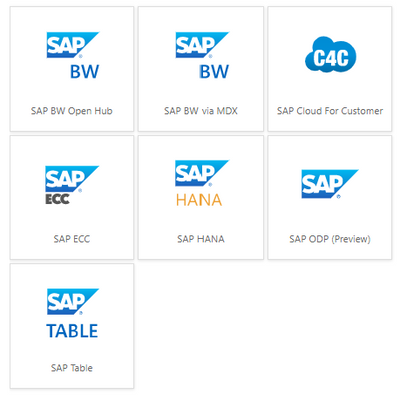
To learn more, see Announcing the Public Preview of the SAP CDC solution in Azure Data Factory and Azure Synapse Analytics
Synapse Link
Reduce cost with batch mode in Synapse link for SQL
Azure Synapse Link for SQL is an automated system for replicating data from your transactional databases into a dedicated SQL pool in Azure Synapse Analytics. Starting this month, you can make trade-offs between cost and latency in Synapse Link for SQL by selecting the continuous or batch mode to replicate your data.
By selecting “continuous mode”, the runtime will be running continuously so that any changes applied to the SQL database or SQL Server will be replicated to Synapse with low latency. Alternatively, when you select “batch mode” with a specified interval, the changes applied to the SQL database or SQL Server will be accumulated and replicated to Synapse in batch mode with the specified interval. This can save cost as you are only charged for the time the runtime is required to replicate data. After each batch of data is replicated, the runtime will be shut down automatically.
To learn more about Synapse link for SQL, please read What is Azure Synapse Link for SQL? and Synapse Link for SQL Deep Dive.
Developer Experience
Synapse Notebooks is now fully compatible with IPython
The official kernel for Jupyter notebooks is IPython and it is now supported in Synapse Notebooks. Previously, Synapse Notebooks did not support IPython. When running PySpark notebooks, IPython will be used as the default Python interpreter.
Here’s what got better for you:
- Dozens of new built-in magic commands. Register your custom magics and use them in any language context.
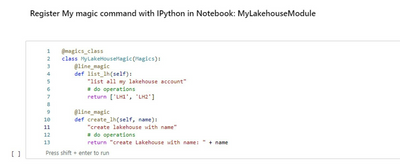
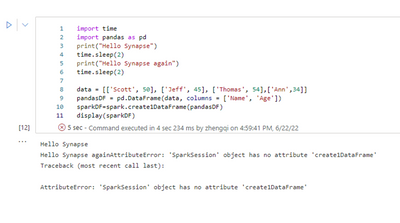
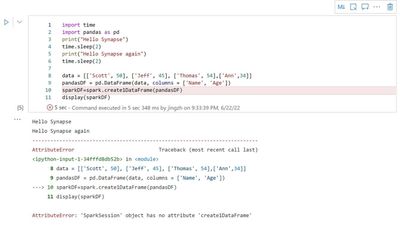
- Better debug experience with in-line error highlighting.
Before:
After:
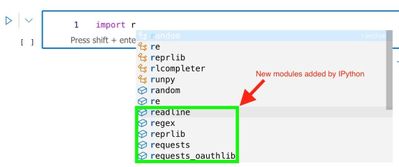
- Richer auto-completion experience.
Mssparkutils now has spark.stop() method
A new API mssparkutils.session.stop() has been added to the mssparkutils package. With this new API, you can programmatically stop your interactive session. You can release resources as soon as their notebook is finished running. This feature becomes handy when there are multiple sessions running against the same Spark pool. The new API is available for Scala and Python.
To learn more please read Stop an interactive session.
Security
Changes to permissions needed for publishing to Git
Previously, to commit changes to the current branch in Synapse, you needed Git permissions and the Azure Contributor role (Azure RBAC) in addition to the Synapse Artifact Publisher role (Synapse RBAC). With this enhancement, you will now need only Git permissions and the Synapse Artifact Publisher (Synapse RBAC) role to commit changes in Git-mode. To learn more, please read Access control enforcement in Synapse Studio.
Published on:
Learn moreRelated posts
We're moving!
We’re moving to the Analytics on Azure Tech Community! All new Azure Synapse Analytics content will be published there. In the next few days a...
Upgrade to Azure Synapse runtimes for Apache Spark 3.4 & previous runtimes deprecation
It is important to stay ahead of the curve and keep services up to date. That's why we encourage all Azure Synapse customers with Apache ...
ADF\Synapse Analytics - Replace Columns names using Rule based mapping in Mapping data flows
In real time, the column names from source might not be uniform, some columns will have a space in it, some other columns will not. For exampl...
Interpreting Script activity output json with Azure Data Factory\Synapse analytics
Script activity in Azure Data Factory\ Synapse analytics is very helpful to run queries against data sources mentioned here in this document.&...
Synapse Connectivity Series Part #4 - Advanced network troubleshooting and network trace analysis
Continuing the series of this blog posts I would like to go more advanced on troubleshooting connectivity issues. I would like to thank also&n...
Boost your CICD automation for Synapse SQL Serverless by taking advantage of SSDT and SqlPackage CLI
Introduction Azure Synapse Analytics Serverless SQL is a query service mostly used over the data in your data lake, for data discovery,...
Metadata-Based Ingestion in Synapse with Delta Lake
Overview The crucial first step in any ETL (extract, transform, load) process or data engineering program is ingestion, w...
Missing Fields Added to Dedicated SQL pool Diagnostic Settings Logs
Over the past year, customers have informed the team there were a set of key columns missing in the standalone Dedicated SQL pools (formerly S...
Using Azure DevOps with Synapse Workspaces to create hot fixes in production environments
Have you ever deployed a release to production only to find out a bug has escaped your testing process and now users are being severely impact...
Azure Synapse MVP Corner - March 2023
About this blog series Microsoft Most Valuable Professionals, or MVPs, are technology experts who passionately share their knowledge with the ...