
Synapse Link for SQL Deep Dive

Azure Synapse Link for SQL greatly simplifies analytics pipelines as Microsoft manages the orchestration process for you. Since being announced at Microsoft Build, many of you have had the opportunity to try it out in a POC so now seems like a good time to take a deep dive on some implementation aspects that may save you time later.
This blog post will assume you have experience with Synapse dedicated SQL pools and that you have some basic working knowledge of Synapse Link for SQL from following the quick start or from doing an initial POC.
Known Limitations
Synapse Link for SQL is currently in Preview, and as with all preview services, there are limitations you should be aware of prior to use. Review the known limitations page before starting any projects. The product will continue to improve over time as it moves to general availability.
Ingestion Service New Features
Speaking of that constant improvement journey, you can now select from a wider variety of core counts when establishing the link. Most notably the option for 4 cores (2 + 2 driver cores), which would cut the minimum ingestion cost (previously 8 cores) in half.
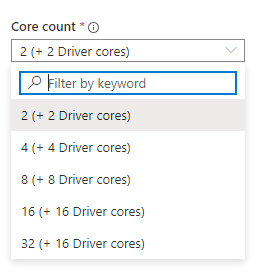
There is also a new feature to select a batch mode for ingestion. Batch mode allows you to save even more on costs by only paying for ingestion service during the batch loads instead of it being continuously on. You can select between 20 and 60 minutes for batch processing.

Concurrency
In Synapse link for SQL, the ingestion service is by default “aggressive” in providing the lowest latency possible for syncing data. However, there are concurrency implications.
At different service level objectives (SLOs), Synapse dedicated SQL pools have an increasing number of concurrency slots available. As found in this chart, a 100 DWU dedicated SQL pool has 4 concurrency slots while a DWU 30000 has 128. In pools with lower SLOs, setting up Synapse Link for SQL could increase that number of queued queries when using the defaults.
Below is a link configuration for three identical tables representing NYC taxi trip data. This link is running on a minimum 100 DWU dedicated SQL pool which gives 4 total concurrency slots.

In this scenario, I am sending hundreds of taxi trip events per minute (using event hub and stream analytics) to all three Azure SQL DB tables simultaneously.
When I start the link, these tables will be processed concurrently. Three tables would create three concurrent connections. We can validate that behavior below.
In the Azure Portal, there is a metric for workload group allocation. Synapse Link for SQL uses the default “smallrc” workload group (see concurrency limits doc). At 100 DWU, there are 4 concurrency slots available so in the below chart, the maximum concurrency being achieved is 75% of the total, or 3 of 4 slots.
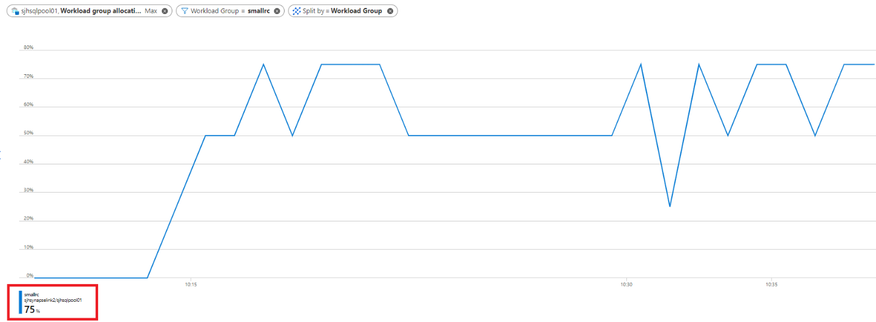
There is fluctuation here based on the ingestion service processing of each table, however 50-75% or 2-3 slots respectively is constantly being allocated to Synapse Link for SQL. If we normally have 3 or 4 active user queries running at a time on this dedicated SQL pool, then they would all be competing for the 1-2 slots not being used by Synapse Link for SQL.
So what do we do?
Rather than increasing the DWU, there is a setting in Synapse Link for SQL that enables transaction consistency across tables.
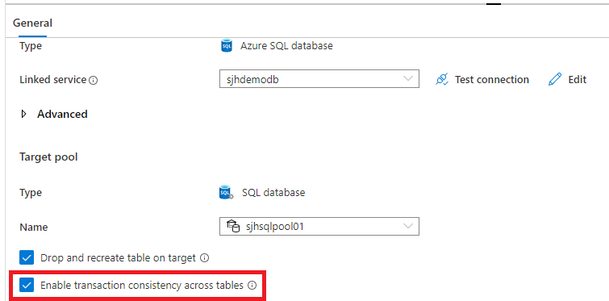
Enabling transaction consistency also has the biproduct of changing the processing logic from concurrent to sequential. Latency will increase between SQL DB and Synapse, but now only one concurrency slot is being used.

The above chart shows only 25% allocation (1 of 4 slots) for smallrc.
For smaller dedicated SQL pools, running Synapse Link for SQL with “transaction consistency” is a good practice and will allow processing of dozens of tables without consuming dozens of slots.
Snapshot Isolation and Dirty Reads
To see how Synapse Link for SQL is applying inserts, updates, and deletes to the dedicated sql pool, you can simply look in sys.dm_pdw_exec_requests or view the recent sql requests in the Monitor Hub.

QID10618 from the screenshot above is below SQL.
You can see that a staging table is being populated from a file in blob storage called “insert.index”. If there were updates or deletes being processed there would be presumably another file called “delete.index” as well.
The workflow here is that all updates are replaced with delete/insert pairs and then all deletes and inserts are applied to separate temp tables using the copy command. Then a join delete and bulk insert from select take place to update the target tables defined in the link.
These are all implementation details that could change at any time, but they can plainly be identified from reviewing the previously run queries.
This all takes place in one transaction. However, some customers have noticed when running updates through the link, such as the scenario below, that they can see the dirty reads within the transaction boundaries.
(1737 rows affected)

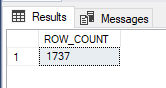
This is simply because many POC environments for Synapse dedicated SQL pools have default settings, one of which is read_committed_snapshot being set to OFF.
Ensure that snapshot isolation is ON, then rerun your tests and the dirty reads are no longer allowed.
Stopping and Restarting your Link
One great feature of Synapse Link for SQL is that new tables can be added, or existing tables can be deleted, without having to stop your link.

However, if you want to change the properties of the ingestion service, such as batch mode, or increasing or decreasing the core count, you must stop the link.
After your changes are made, publish them, and restart the link. It is not obvious from the link dialog that there may be errors, use the “monitor this link connection” shortcut at the top of the dialog or go to the Monitor Hub Link Connections pane.

Unfortunately, the existing tables in the link have errors.

There is a checkbox “Drop and recreate table on target” on the link connection that can fix this.

When this box is checked, Synapse Link for SQL will drop and recreate the target table, then get a snapshot of all records in the source tables and bulk load them. When restarting with this checkbox checked, everything will work as expected.
As shown earlier, we can look at the query executions during snapshot and see the path is now “FullCopyData/data-n.parquet”.
What are the implications of this?
Most obviously, large tables must be reloaded which could take much longer than smaller tables to complete.
As Synapse can support multiple links to the same source database, one idea would be for very large tables, establish a dedicated link.

Now when updates have to be made to the main link with multiple tables, it won’t disrupt the “largetablelink” that I have exclusively setup for dbo.NYCTaxiTrips4.
With the addition of lower core counts, and batch mode in the ingestion service, having multiple links becomes more feasible from a cost perspective.
Conclusion
Synapse Link for SQL will continue to evolve as moving from Preview to GA. Continue to watch for updates in this space.
Published on:
Learn moreRelated posts
We're moving!
We’re moving to the Analytics on Azure Tech Community! All new Azure Synapse Analytics content will be published there. In the next few days a...
Upgrade to Azure Synapse runtimes for Apache Spark 3.4 & previous runtimes deprecation
It is important to stay ahead of the curve and keep services up to date. That's why we encourage all Azure Synapse customers with Apache ...
ADF\Synapse Analytics - Replace Columns names using Rule based mapping in Mapping data flows
In real time, the column names from source might not be uniform, some columns will have a space in it, some other columns will not. For exampl...
Interpreting Script activity output json with Azure Data Factory\Synapse analytics
Script activity in Azure Data Factory\ Synapse analytics is very helpful to run queries against data sources mentioned here in this document.&...
Synapse Connectivity Series Part #4 - Advanced network troubleshooting and network trace analysis
Continuing the series of this blog posts I would like to go more advanced on troubleshooting connectivity issues. I would like to thank also&n...
Boost your CICD automation for Synapse SQL Serverless by taking advantage of SSDT and SqlPackage CLI
Introduction Azure Synapse Analytics Serverless SQL is a query service mostly used over the data in your data lake, for data discovery,...
Metadata-Based Ingestion in Synapse with Delta Lake
Overview The crucial first step in any ETL (extract, transform, load) process or data engineering program is ingestion, w...
Missing Fields Added to Dedicated SQL pool Diagnostic Settings Logs
Over the past year, customers have informed the team there were a set of key columns missing in the standalone Dedicated SQL pools (formerly S...
Using Azure DevOps with Synapse Workspaces to create hot fixes in production environments
Have you ever deployed a release to production only to find out a bug has escaped your testing process and now users are being severely impact...
Azure Synapse MVP Corner - March 2023
About this blog series Microsoft Most Valuable Professionals, or MVPs, are technology experts who passionately share their knowledge with the ...