
Announcing General Availability of Database Designer & Database Templates in Azure Synapse Analytics

Today, I’m excited to announce the general availability of database designer in Azure Synapse Analytics. The database designer allows users to visually create databases within Synapse Studio without writing a single line of code. The designer also enables users to explore database templates, customize and/or extend these templates to create lake databases. Azure Synapse Analytics database templates are also generally available. Database templates make Azure Synapse industry-aware and help you standardize your data lakes by adding a business-context rich metadata layer for data in the lake. These templates provide industry-specific schema for pre-defined business areas that can be used as blueprints or accelerators for creating the foundation of an enterprise data lake or data platform.
Here are some of the key features that the no-code database designer offers:
- Exploration experience for database templates to browse & explore the business areas and the rich table metadata.

- Modeling experience to subset database templates to create your own lake database.
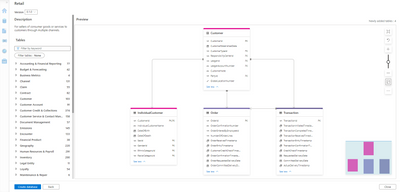
- Create custom tables from scratch or using schema from pre-existing data in the data lake.
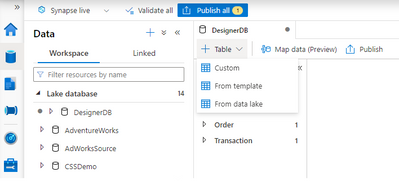
- Customize and/or extend lake databases created from database templates by defining new tables, columns & relationships.

- Leverage existing data in the lake as source for your lake database reducing data duplication.
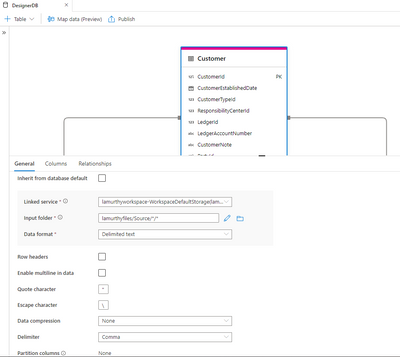
Since the launch of this database designer for database templates in preview in November 2021, we have brought several qualify of life improvements to simplify the overall experience for our users. With GA, we’ve revamped the exploration experience for database templates with the ability to toggle and view all relationships of a given table. Added the ability to clone lake databases and tables to allow individual teams across your organization to begin customizations by cloning the enterprise templates and extending it based on their specific requirements and many more features to simplify the customization and data processing experience.
To learn more or to get started, check out the documentation at aka.ms/SynapseDBTemplates.
Published on:
Learn moreRelated posts
We're moving!
We’re moving to the Analytics on Azure Tech Community! All new Azure Synapse Analytics content will be published there. In the next few days a...
Upgrade to Azure Synapse runtimes for Apache Spark 3.4 & previous runtimes deprecation
It is important to stay ahead of the curve and keep services up to date. That's why we encourage all Azure Synapse customers with Apache ...
ADF\Synapse Analytics - Replace Columns names using Rule based mapping in Mapping data flows
In real time, the column names from source might not be uniform, some columns will have a space in it, some other columns will not. For exampl...
Interpreting Script activity output json with Azure Data Factory\Synapse analytics
Script activity in Azure Data Factory\ Synapse analytics is very helpful to run queries against data sources mentioned here in this document.&...
Synapse Connectivity Series Part #4 - Advanced network troubleshooting and network trace analysis
Continuing the series of this blog posts I would like to go more advanced on troubleshooting connectivity issues. I would like to thank also&n...
Boost your CICD automation for Synapse SQL Serverless by taking advantage of SSDT and SqlPackage CLI
Introduction Azure Synapse Analytics Serverless SQL is a query service mostly used over the data in your data lake, for data discovery,...
Metadata-Based Ingestion in Synapse with Delta Lake
Overview The crucial first step in any ETL (extract, transform, load) process or data engineering program is ingestion, w...
Missing Fields Added to Dedicated SQL pool Diagnostic Settings Logs
Over the past year, customers have informed the team there were a set of key columns missing in the standalone Dedicated SQL pools (formerly S...
Using Azure DevOps with Synapse Workspaces to create hot fixes in production environments
Have you ever deployed a release to production only to find out a bug has escaped your testing process and now users are being severely impact...
Azure Synapse MVP Corner - March 2023
About this blog series Microsoft Most Valuable Professionals, or MVPs, are technology experts who passionately share their knowledge with the ...