
Real-time data ingestion in Synapse SQL dedicated pool at scale
This article reviews a common pattern of streaming data (i.e. real-time message ingestion) in Synapse SQL dedicated pool. It opens a discussion on the simple standard way to implement this, as well as the challenges and drawbacks. It then presents an alternate solution which enables optimal performance and greatly reduces maintenance tasks when using clustered column store indexes. This is aimed at developers, DBAs, architects, and anyone who works with streams of data that are captured in real-time.
Scenario description
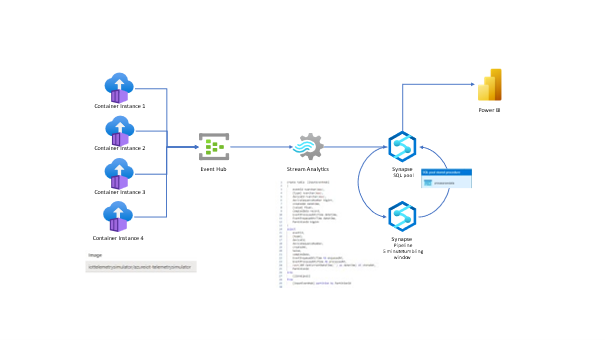
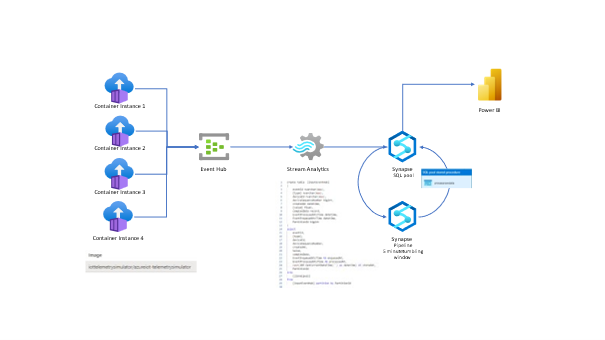
Description of this scenario is as follow: we have messages produced by sensors (simulated by Azure container instances) sent to an Event Hub, then processed by an ASA job which redirects its output into a Synapse table named “rawdata”. At this stage there are two options:
- query directly “rawdata” table.
- use “rawdata” as a staging table, then build a pipeline that process the data every ten minutes and store it in a final fact table. It consists of an UPSERT statement to ensure existing records are updated (in case they are resent), otherwise inserts them into a final fact table named “rawdata_fact”.
General solution Design Architecture
Building blocks of the current solution can be found on the following link
This sample deploys within one resource group:
- Container instances simulating IoT devices sending their temperature and amount of CO2.
- Event Hub ingesting messages in real time.
- Stream Analytics job preprocessing messages and redirect them into Synapse SQL dedicated pool.
How to handle the data ingested
In case ASA job loads data directly in the fact table and assuming it has a clustered column store index, what happens is:
- no delta store compression can take place as the table is constantly inserted
- simultaneous COPY INTO statements issued by ASA job can potentially trigger new delta stores creation, hence reduce the performance and/or require index maintenance tasks.
See illustration below which shows this:

In case ASA job loads the telemetry data into a staging table named "rawdata" then upsert the fact table, we can see that what happens is the following:
- there is one delta store per distribution where the insertions land, and no closed rowgroup hence all others are compressed rowgroups.
- the tuple mover at each compute node ensures that once the delta stores get filled up they are converted in compressed rowgroups.
See illustration below which shows this:

This task is constituted of:
- A simple pipeline with a stored procedure activity.
- A tumbling windows trigger that runs the pipeline every 10 minutes.
- a stored procedure scheduled to update the fact from the staging:
Then we can a simple view on to of both tables so we have the latest data as well as the processed one:
And monitor in near real time the average temperature and CO2 values:
Takeaways
We can stream data directly from Stream Analytics into a Synapse SQL dedicated pool. We can avoid the clustered store index maintenance by using an intermediate table and a scheduled pipeline.
Published on:
Learn moreWe can help you with Real-time data ingestion in Synapse SQL dedicated pool at scale
If you want help implementing, troubleshooting, or improving this product, contact us and we’ll point you in the right direction.
Related posts
We're moving!
We’re moving to the Analytics on Azure Tech Community! All new Azure Synapse Analytics content will be published there. In the next few days a...
Upgrade to Azure Synapse runtimes for Apache Spark 3.4 & previous runtimes deprecation
It is important to stay ahead of the curve and keep services up to date. That's why we encourage all Azure Synapse customers with Apache ...
ADF\Synapse Analytics - Replace Columns names using Rule based mapping in Mapping data flows
In real time, the column names from source might not be uniform, some columns will have a space in it, some other columns will not. For exampl...
Interpreting Script activity output json with Azure Data Factory\Synapse analytics
Script activity in Azure Data Factory\ Synapse analytics is very helpful to run queries against data sources mentioned here in this document.&...
Synapse Connectivity Series Part #4 - Advanced network troubleshooting and network trace analysis
Continuing the series of this blog posts I would like to go more advanced on troubleshooting connectivity issues. I would like to thank also&n...
Boost your CICD automation for Synapse SQL Serverless by taking advantage of SSDT and SqlPackage CLI
Introduction Azure Synapse Analytics Serverless SQL is a query service mostly used over the data in your data lake, for data discovery,...
Metadata-Based Ingestion in Synapse with Delta Lake
Overview The crucial first step in any ETL (extract, transform, load) process or data engineering program is ingestion, w...
Missing Fields Added to Dedicated SQL pool Diagnostic Settings Logs
Over the past year, customers have informed the team there were a set of key columns missing in the standalone Dedicated SQL pools (formerly S...
Using Azure DevOps with Synapse Workspaces to create hot fixes in production environments
Have you ever deployed a release to production only to find out a bug has escaped your testing process and now users are being severely impact...
Azure Synapse MVP Corner - March 2023
About this blog series Microsoft Most Valuable Professionals, or MVPs, are technology experts who passionately share their knowledge with the ...