
New informative Livy errors codes for Apache Spark in Azure Synapse Analytics!

Apache Spark for Azure Synapse now provides descriptive Livy error codes. When an Azure Synapse Spark job fails, this new and updated error handling feature parses and checks the logs on the backend to identify the root cause and displays it on the monitoring pane along with the steps to take to resolve the issue.
What is Livy?
Livy is a service that enables easy interaction with a Spark cluster over a REST interface to enable easy submission of jobs, result retrieval as well as Spark Context management. In the context of this discussion, if a Spark application fails, Livy receives the state of the application from YARN which is then surfaced up, generally in the form of the `LIVY_JOB_STATE_DEAD` error code.
Spark application failure scenarios
A Spark application can fail for a variety of reasons ranging from user errors like reading data from an incorrect storage account to missing dependencies, as well as system errors such as the Spark executor running out of memory. In all of these scenarios, Livy registered the status of the application as failed, and it was up to you to figure out the cause and the resolution.
What problem does this feature solve?
Previously, all failing jobs on Synapse would surface a generic error code, LIVY_JOB_STATE_DEAD, with no other information. As you can see in the image below, this error code provided no further insight into why the job had failed and required significant effort to identify the root cause by digging into the driver, executor, Spark Event and Livy logs to find the source problem.
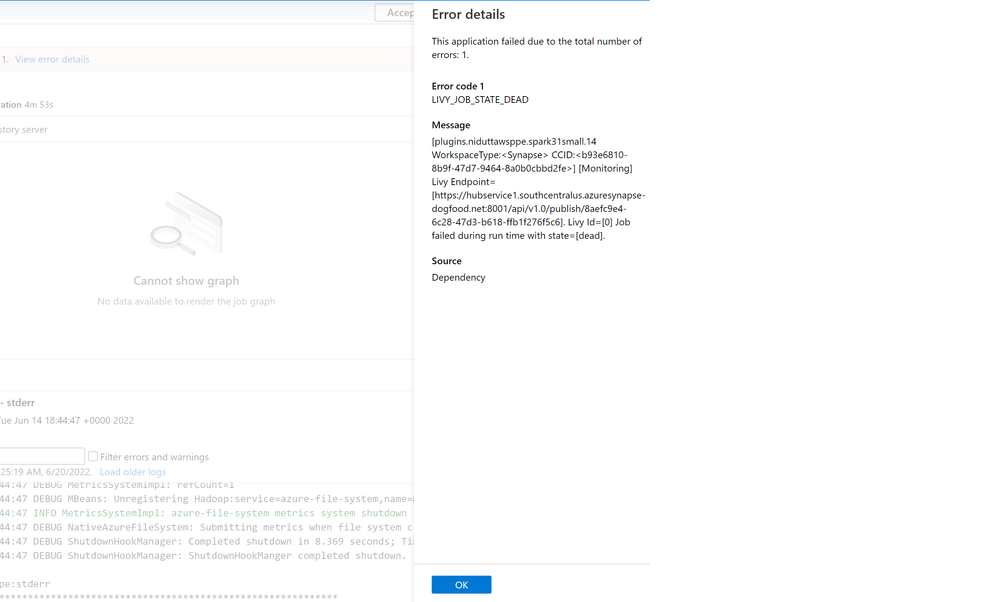
Figure 1 - Previous error codes when a Spark job fails
To make troubleshotting errors easier, we have introduced a more precise list of error codes that describes the cause of failure and replaces the previous generic error codes. The error codes are now divided into four categories which helps classify the type of error:
- User: Indicating a user error
- System: Indicating a system error
- Ambiguous: Could be either user or system error
- Unknown: No classification yet, most probably because the error type isn't included in the model
The message provided with the error is more detailed to help you debug the issue.

Figure 2 - New error codes when a Spark job fails
It is important to note that this feature is currently disabled by default but will be enabled by default for all Spark applications shortly. To try this out now, all you have to do is set the following Spark configuration to true at the job or pool level:
livy.rsc.synapse.error-classification.enabled.
How this feature works
When a Spark application fails, the Spark driver generates a diagnostic string containing the reason of failure and exception stacktrace which is sent to YARN. Livy pools YARN for the application status and gets this diagnostic string, where it uses our error classification library to generate the specific error code and TSG to help resolve the error. This is then returned by Livy as a response.
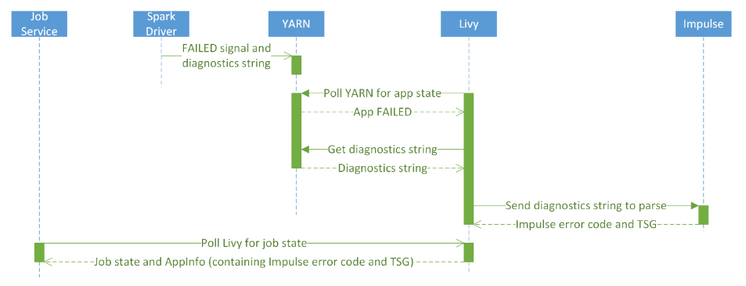
Figure 3 - New Livy error code handling sequence diagram
We are continually improving our classification model to capture more types of errors to make your debugging experience easy and effortless.
To learn more, please read Interpret error codes in Synapse Analytics
Published on:
Learn moreRelated posts
We're moving!
We’re moving to the Analytics on Azure Tech Community! All new Azure Synapse Analytics content will be published there. In the next few days a...
Upgrade to Azure Synapse runtimes for Apache Spark 3.4 & previous runtimes deprecation
It is important to stay ahead of the curve and keep services up to date. That's why we encourage all Azure Synapse customers with Apache ...
ADF\Synapse Analytics - Replace Columns names using Rule based mapping in Mapping data flows
In real time, the column names from source might not be uniform, some columns will have a space in it, some other columns will not. For exampl...
Interpreting Script activity output json with Azure Data Factory\Synapse analytics
Script activity in Azure Data Factory\ Synapse analytics is very helpful to run queries against data sources mentioned here in this document.&...
Synapse Connectivity Series Part #4 - Advanced network troubleshooting and network trace analysis
Continuing the series of this blog posts I would like to go more advanced on troubleshooting connectivity issues. I would like to thank also&n...
Boost your CICD automation for Synapse SQL Serverless by taking advantage of SSDT and SqlPackage CLI
Introduction Azure Synapse Analytics Serverless SQL is a query service mostly used over the data in your data lake, for data discovery,...
Metadata-Based Ingestion in Synapse with Delta Lake
Overview The crucial first step in any ETL (extract, transform, load) process or data engineering program is ingestion, w...
Missing Fields Added to Dedicated SQL pool Diagnostic Settings Logs
Over the past year, customers have informed the team there were a set of key columns missing in the standalone Dedicated SQL pools (formerly S...
Using Azure DevOps with Synapse Workspaces to create hot fixes in production environments
Have you ever deployed a release to production only to find out a bug has escaped your testing process and now users are being severely impact...
Azure Synapse MVP Corner - March 2023
About this blog series Microsoft Most Valuable Professionals, or MVPs, are technology experts who passionately share their knowledge with the ...