
Public Preview for Network Provider Performance and Availability Reporting
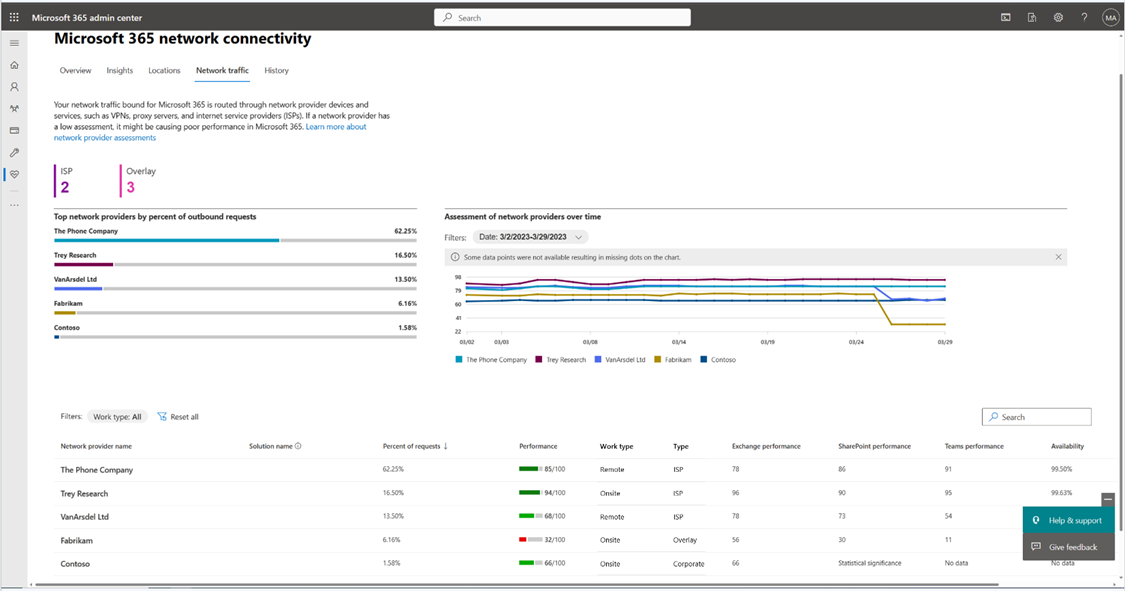
We are thrilled to announce the availability of a Public Preview for network provider performance and availability reporting in the Microsoft 365 admin center.
With these new reports, admins can see their users’ network performance and availability based on the detected network provider. Network performance and availability relates to the network connectivity between Microsoft 365 users and Microsoft’s network. These reports may also enable you to identify network settings that adversely affect your users’ experience with Microsoft 365.
The new reports (illustrated below) show tenant-wide information but if you added office network locations, then we provide reports based on office location, as well. The reports also separate network providers for corporate offices from those used by remote workers. They also separate network providers by ISPs and overlay providers (for example, VPN providers).

We invite you to join the Public Preview for these reports. You can register your interest at https://aka.ms/networkpreview. Space is limited, so if you want to participate, you should fill out the form soon.
We will be sharing network performance and availability information with network providers and offering suggestions for improvements that relate to the Microsoft 365 user experience.
If you are a network provider and want to learn more, see https://aka.ms/M365_NPP.
-- Microsoft 365 Networking Team
Published on:
Learn moreWe can help you with Public Preview for Network Provider Performance and Availability Reporting
If you want help implementing, troubleshooting, or improving this product, contact us and we’ll point you in the right direction.
Related posts
Announcing the General Availability of the Microsoft 365 Document Collaboration Partner Program
Empowering Seamless Collaboration for Modern Workforces We are thrilled to announce the general availability of the Microsoft 365 Docume...
Favorite Microsoft 365 Copilot Prompts
(Amber Plumb interviewing Michael Morales and Allison Sweet) The power of M365 Copilot is transforming the way our support team operates...
Favorite Copilot Prompts
(Amber Plumb interviewing Michael Morales and Allison Sweet) The power of M365 Copilot is transforming the way our support team operates...
Boost digital event engagement with Voting and Archiving in Teams Q&A
Managing and delivering effective town halls is key to enabling two-way dialogue with leaders in today’s hybrid world. Microsoft Teams Q&A...
Prepare now for key end of support moments in 2025
One year from today, on October 14, 2025, support will end for all Office 2016 and 2019 suites, standalone apps, and servers. This includes:&n...
Everything you should know about Visio 2016 and Visio 2019 end of support
On October 14, 2025, Visio 2016 and Visio 2019 will reach end of support. After this date, Visio 2016 and Visio 2019 will no longer receive se...
Limit frontline worker access to Teams when off shift
We’re excited to announce that the frontline working time feature is now generally available! This feature allows admins to block or warn acce...
We are removing Feed on Microsoft 365 (Office)
As part of our ongoing efforts to streamline and enhance user experiences, we will be retiring the Feed feature (shown in figure 1 below) on t...
NOW ON DEMAND | Microsoft Loop Learning Series [Six webinars]
UPDATE | All parts of the Loop Learning Series have aired and are now available to watch on demand, playable below in this blog post. Ar...
Leveraging Partner Apps to Deliver on the Promise of AI-Led Productivity
The advent of generative AI is driving a rethink of what outcomes we deserve from our productivity software – from gains in efficiency to more...