
Share IoT and Log data in real time using Azure Data Share and Azure Data Explorer
In today's digital world, more and more data is generated from devices and software deployed at home and work. This could be data collected from applications, websites, IoT devices and equipment. Often, this data needs to be shared and enriched with 3rd party data in real-time to derive insights. Traditionally, data is shared by generating a data feed made available via file share, FTP, etc. This process requires organizations to invest in maintaining the data pipelines and introduces latency into the system.
Azure Data Explorer is a fully managed data analytics service for real-time analysis on large volumes of data streamed from applications and devices. You can use Azure Data Explorer to collect, store, and analyze diverse data on the fly to quickly identify patterns, anomalies and trends. Azure Data Share enables easy and secure data sharing within or cross organizations. You can share data code-free while maintain full visibility into your data sharing relationships including what data is shared and who it is shared with.
With the integration between Azure Data Explorer and Azure Data Share, data can be easily and securely shared with partners, service providers or customers for near-real-time collaboration.
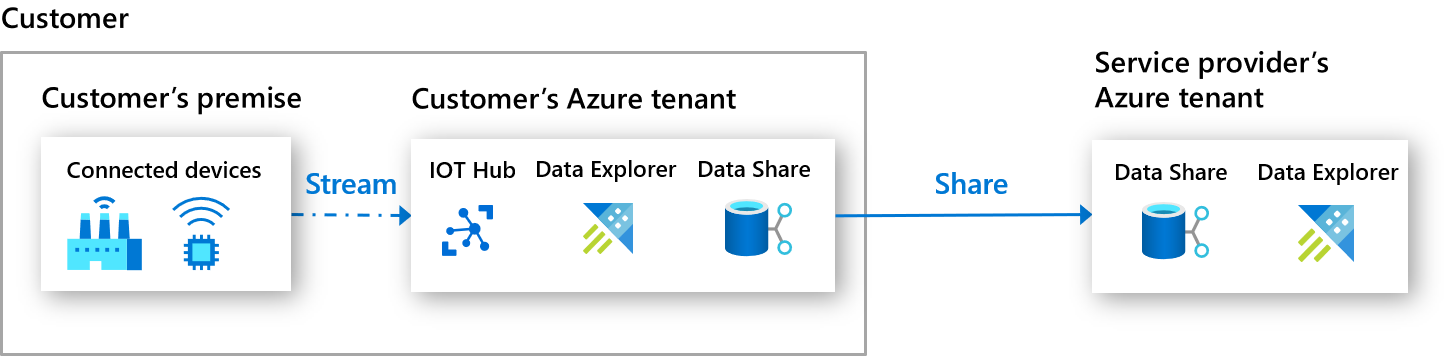
Here is an example of how organizations with manufacturing plants are using Azure Data Explorer and Azure Data Share for near-real-time analytics. Data is streamed from IoT Hub into Azure Data Explorer cluster and stored in databases. It is then shared through Azure Data Share to the service provider’s Azure Data Explorer cluster for analysis and dashboarding.

How data sharing works
Azure Data Share enables sharing of databases in-place from Azure Data Explorer clusters. Data provider can create a share by specifying the databases they want to share, who to share with and terms of use. The same data can be shared with multiple data consumers. Azure Data Share service sends an email invitation to each data consumer, who can then accept the invitation and specify a target Azure Data Explorer cluster in the same Azure data center to access the data.
After sharing relationship is established, Azure Data Share creates a symbolic link between the provider and consumer's Azure Data Explorer clusters. This enables data consumer to read and query the data, but not write to the shared databases. Access to the data uses compute resources from the consumer's Azure Data Explorer cluster. Data consumer can also configure its own access and caching policies to the shared databases, as well as view logs of its own query. When caching policy is configured, data is cached on the consumer's Azure Data Explorer cluster for improved query performance, but is not copied into the blob storage powering the consumer's Azure Data Explorer cluster.

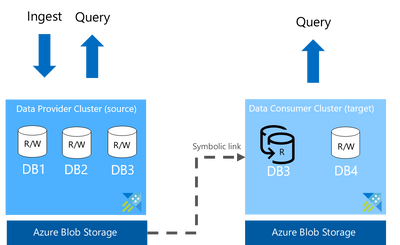
Data provider can stop sharing by revoking access. This will remove the symbolic link and terminate access to the shared database(s).
Data provider share data
To share data, user needs write permission and permission to add role assignment to the source Azure Data Explorer cluster. These permissions typically exist in the Owner role.
The following are steps to share data:
- Create an Azure Data Share resource
- Within the Azure Data Share resource, create a share by specifying the following information:
- Name
- Share type: In-place
- Description (optional)
- Terms of use (optional)
- Azure Data Explorer cluster or databases - When a cluster is shared, all databases on the cluster including future databases created by the data provider are made available to the data consumer. When database is shared, only the individual database is available to the data consumer.
- Recipients’ Azure login email address
Data consumer receive data
To receive data, user needs write permission and permission to add role assignment to the target Azure Data Explorer cluster. These permissions typically exist in the Owner role.
The following are steps to receive data:
- Receive email invitation and follow the link to log into Azure
- Agree to the terms of use and accept invitation into its own Azure Data Share resource
- Specify an Azure Data Explorer cluster in the same Azure data center as the source to access data
Data consumer can now go to its Azure Data Explorer cluster to grant user permissions to the share databases and access the data. Data ingested using batch mode into the source Azure Data Explorer cluster will show up on the target cluster within a few seconds to a few minutes.
Additional resources
- Azure Data Share documentation
- Azure Data Share videos
- Azure Data Share product web page
- Azure Data Explorer documentation
- Azure Data Explorer product web page
Published on:
Learn moreWe can help you with Share IoT and Log data in real time using Azure Data Share and Azure Data Explorer
If you want help implementing, troubleshooting, or improving this product, contact us and we’ll point you in the right direction.
Related posts
Data for now and next: Powering a new era of AI apps
The era of AI has arrived and the organizations that are primed for learning, adapting, and scaling quickly hold the power to transform human ...
Announcing the General Availability of AMD-based Confidential VMs on Azure Databricks
We are excited to announce the general availability of AMD-based confidential virtual machines (VMs) for cluster nodes on Azure Databricks. Co...
A Data Professional's Guide to Build 2023
ChatGPT and Microsoft Copilot are stealing headlines worldwide—but data is the force that drives them both. That’s why this year at Microsoft ...
Introducing the Microsoft Intelligent Data Platform Partner Ecosystem
Microsoft Intelligent Data Platform Partner Ecosystem In May, we introduced the Microsoft Intelligent Data platform which deeply integr...
Microsoft and Databricks deepen partnership for modern, cloud-native analytics
In May, we introduced the Microsoft Intelligent Data platform which deeply integrates our databases, analytics, BI and data governance product...
SQL DB maintenance activity using Automation accounts for Azure SQL DBs(Different scenarios)
Infrastructure: Multiple Azure SQL DB instances Multiple databases in total Multiple instances consist of multiple databases Different subscr...
Zero to Hero: Your Guide to Getting Skilled on Azure Data and AI
We are excited to highlight the Zero to Hero guide, our very own journey to help developers and engineers get started on Azure. We have a larg...
A Data and AI guide to Build 2022
Microsoft Build will begin Tuesday, May 24 at 8:30 AM PDT with our annual keynote. Attendees can then participate in live segments, breakout ...
Azure Data Factory CI-CD using YAML template
Purpose of this Blog Defined the end to end Git integration and Deployment flow using YAML template from a project implementation...
Azure Data Components Network Architecture with secure configurations
Use Case : •When there is a need for the Data Components – ADF,ADB and SQL-Pool code to be promoted to higher environment se...