
How to set ACLs Recursively?

Ensuring adequate access control is of utmost importance for effectively safeguarding your Azure Storage assets. The Access Control Lists (ACLs) of your Azure Storage Account assume a pivotal role in establishing permissions for both containers and blobs situated within the storage account. The inheritance of ACLs is already in place for newly generated child items beneath a parent directory. However, it's noteworthy that now you also have the capability to set, update, or remove ACLs recursively for the pre-existing child items of a parent directory, thereby eliminating the need to undertake these operations for each individual child item.
In this article, I will walk you through the process of setting Azure Storage Account ACLs recursively using three different methods: PowerShell, AZ CLI and Postman.
1. PowerShell
This example sets the ACL of a directory named mydirectory001 through the "Set-AzDataLakeGen2AclRecursive" command. These entries give the owning user read, write, and execute permissions, gives the owning group only read and execute permissions, and gives all others no access. The last ACL entry in this example gives a specific user (an application registration that I created) with the object ID "c0fb41ac-cd34-4380-a482-470251b089c3" read and execute permissions:
Once the command is completely executed, you should see an output similar to the following showing the successful operations on directories, files, the failure count, and a continuation token if applicable:

2. AZ CLI
This example sets the ACL of a directory named mydirectory001 through the "az storage fs access set-recursive" AZ CLI command:

3. Postman
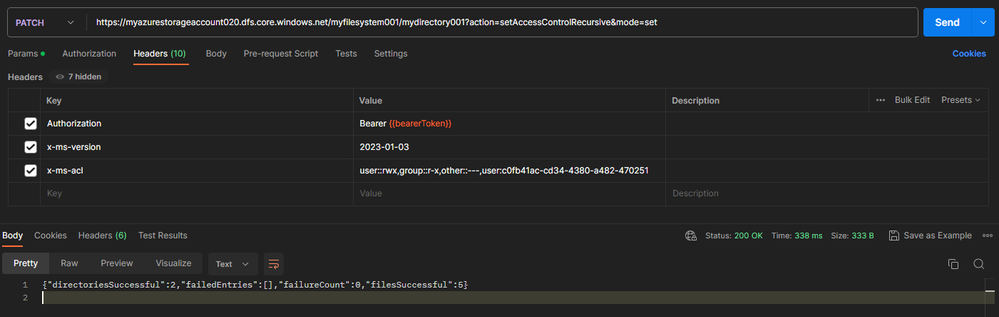
This example sets the ACL of a directory named mydirectory001 through the proper PATCH API call in Postman:
PATCH /myfilesystem001/mydirectory001?action=setAccessControlRecursive&mode=set HTTP/1.1
Authorization: Bearer (Redacted)
x-ms-version: 2023-01-03
x-ms-acl: user::rwx,group::r-x,other::---,user:c0fb41ac-cd34-4380-a482-470251b089c3:r-x
User-Agent: PostmanRuntime/7.32.3
Accept: */*
Postman-Token: 7ef695a6-c446-4b35-a0ce-b54ba08db51a
Host: myazurestorageaccount020.dfs.core.windows.net
Accept-Encoding: gzip, deflate, br
Connection: keep-alive
Content-Length: 0
HTTP/1.1 200 OK
Transfer-Encoding: chunked
Server: Windows-Azure-HDFS/1.0 Microsoft-HTTPAPI/2.0
x-ms-namespace-enabled: true
x-ms-request-id: fa55f148-001f-00db-76ff-ca21fc000000
x-ms-version: 2023-01-03
Date: Wed, 09 Aug 2023 20:26:05 GMT
{"directoriesSuccessful":2,"failedEntries":[],"failureCount":0,"filesSuccessful":5}
Recovering from failures
You may come across runtime or permission-related issues while attempting to modify ACLs recursively. In the event of a permission failure, you can obtain a continuation token by configuring the --continue-on-failure parameter to false. Once you rectify the errors, you can resume the process from the point of failure by re-running the command and setting the --continuation parameter to the previously received continuation token.
In the case of runtime errors (outages or connectivity issues), it's advisable to restart the process from the beginning, this is so because in such scenarios there won't be a continuation token available. It's important to note that reapplying ACLs to items won't result in any negative consequences. Even so, we suggest executing the recursive ACL process within an Azure Virtual Machine situated in the same region as your storage account, this approach will help minimizing latency and to optimize the process in general.
Bonus tip!
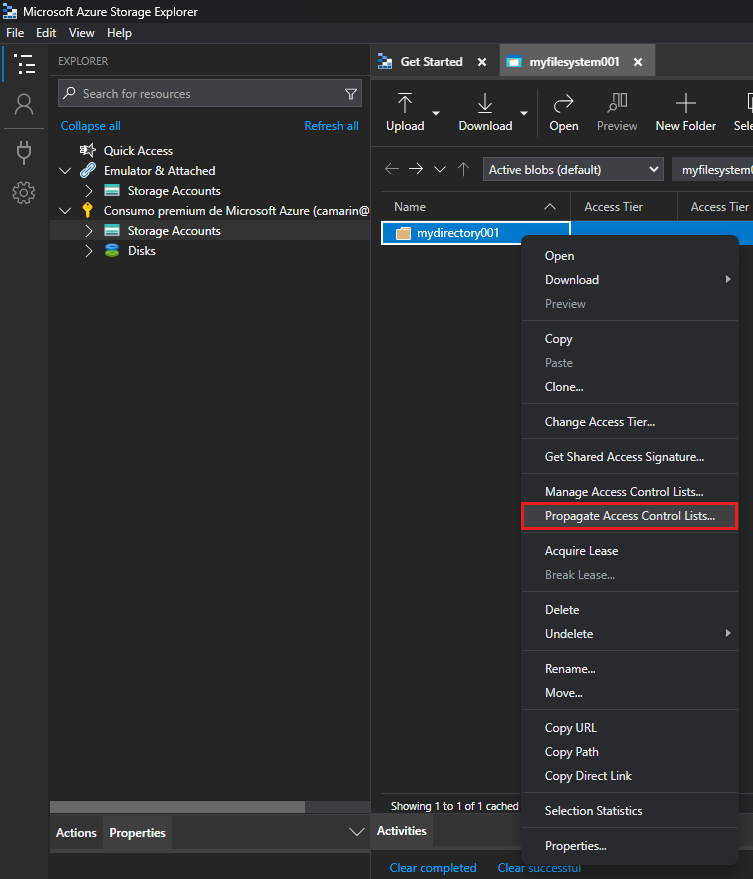
You can find this very same option through the Azure Storage Explorer tool, it's the one that says "Propagate Access Control Lists...". This feature gets the current ACLs assigned to the selected path and then executes a recursive REST API operation to assign the same permissions to the child objects:
I hope that helps on identifying different options to set ACLs recursively and to save some time and effort by not having to execute a different operation per child object.
References
=======
Use Azure CLI to manage ACLs in Azure Data Lake Storage Gen2
https://learn.microsoft.com/en-us/azure/storage/blobs/data-lake-storage-acl-cli
Use PowerShell to manage ACLs in Azure Data Lake Storage Gen2
https://learn.microsoft.com/en-us/azure/storage/blobs/data-lake-storage-acl-powershell
Use Azure Storage Explorer to manage ACLs in Azure Data Lake Storage Gen2
https://learn.microsoft.com/en-us/azure/storage/blobs/data-lake-storage-explorer-acl
Published on:
Learn moreRelated posts
Azure Storage - TLS 1.0 and 1.1 retirement
Overview TLS 1.0 and 1.1 retirement on Azure Storage was previously announced for Nov 1st, 2024, and it was postponed recently to 1 year later...
Efficient Management of Append and Page Blobs Using Azure Storage Actions
Overview In Azure Storage, Blob Lifecycle Management (BLM) allows you to automate the management of your data based on rules defined by...
[Azure AI Search] Internal Server Error when creating CMK encrypted objects
Scenario Customers follow the Microsoft doc to create CMK encrypted objects (data source, index etc.), but get the 500 Internal Serv...
Optimizing Azure Table Storage: Automated Data Cleanup using a PowerShell script with Azure Automate
Scenario This blog’s aim is to manage Table Storage data efficiently. Imagine you have a large Azure Table Storage that accumulates logs from ...
Optimizing Azure Table Storage: Automated Data Clean-up using a PowerShell script with Azure Automat
Scenario This blog’s aim is to manage Table Storage data efficiently. Imagine you have a large Azure Table Storage that accumulates logs from ...
Restoring Soft-Deleted Blobs with multithreading in Azure Storage Using C#
Blob soft delete is an essential feature that safeguards your data against accidental deletions or overwrites. By retaining deleted data for a...
Performing simple Azure Table Storage REST API operations using curl command.
The blog provides guidance to perform simple Table Storage REST API operations such as Create table, Delete Table, Insert entity, Delete entit...
Bulk delete all the old jobs from the batch account
Deleting a Job also deletes all Tasks that are part of that Job, and all Job statistics. This also overrides the retention period for Task dat...
Utilizing Azure Storage and Runbooks for scheduled automated backups of Azure SQL Databases
In this article, we are going to provide detailed steps to create a scheduled Azure SQL Database backup to storage account using automation. T...
[Azure Service Bus] JMS messages getting dead-lettered
The article discusses a problem where numerous messages end up in the dead letter queue (DLQ) when the JMS service bus consumer connects to th...