Loading...

Conditional Access Overview and Templates are now Generally Available!

Conditional Access Overview and Templates are now Generally Available!

Today, we are excited to announce the general availability of Conditional Access overview dashboard and templates. Conditional Access protects thousands of organizations across the globe daily and customers often ask us about best practices and how to improve security coverage. Conditional Access overview dashboard and templates empower Microsoft Entra ID customers to gain insights into their security posture, assess the impact of individual policies, and simplify deployment of Microsoft’s recommendations.


I’ve invited Krishna Venkit and Lisa Huang-North, product managers on the Identity Security team to share more details about these two features.


Best Regards,


Nitika Gupta

Group Product Manager, Identity Security

Microsoft Identity Division

------------------------------------------------------------


Hi everyone!


The Conditional Access overview is a built-in dashboard that offers a comprehensive view of your Conditional Access posture. As an administrator, it provides a concise summary of your policies, identifies any gaps in your policy coverage, and provides valuable insights based on sign-in activity within your tenant. This feature enables you to swiftly pinpoint areas where you can enhance the enforcement of Zero Trust principles, ultimately bolstering your defense mechanisms.


Figure 1 Conditional Access overviewFigure 1 Conditional Access overview


The dashboard is now the default landing page of Conditional Access. As the first entry point into Conditional Access, the overview page lets you quickly create new policies using one of the Conditional Access templates which capture commonly used policies and best practices.


The dashboard also offers the following insights and reporting capabilities:


  •  The “See all unprotected sign-ins” link under the Users tile helps you rapidly identify users that are signing in without the protections of a Conditional Access policy.


Figure 2 Sign-ins without CA coverage during the last 7 daysFigure 2 Sign-ins without CA coverage during the last 7 days


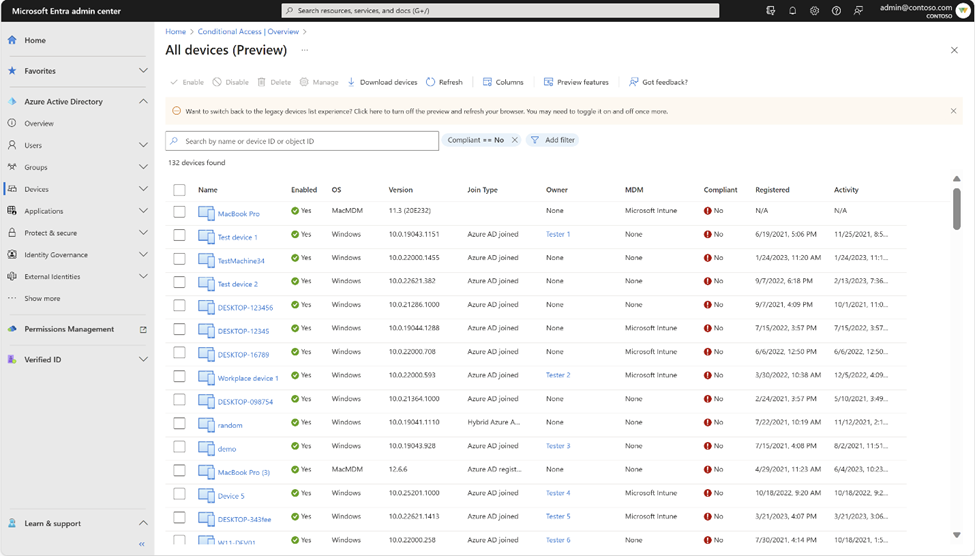
  • The ‘See all non-compliant devices’ and ‘See all unmanaged devices’ links under the Devices tile help you identify device compliance gaps.


Figure 3 Non-compliant devicesFigure 3 Non-compliant devices


  • You can discover the top 10 most accessed apps without Conditional Access coverage using the coverage tab and go one step further and identify the users without coverage for that app by clicking on the numbers in the ‘Users without coverage’ column.


Figure 4: Top accessed applications without CA coverageFigure 4: Top accessed applications without CA coverage


You can discover security alerts generated based on sign-in activity in your tenant and take quick action on the alerts by deploying recommended zero trust conditional access policies using the Conditional Access templates. Speaking of which, let’s take a brief walkthrough of Conditional Access templates.


Conditional Access templates are a pre-defined set of conditions and controls that provide a convenient method to deploy new policies aligned with Microsoft recommendations. Customers are assured that their policies reflect modern best practices for securing corporate assets, promoting secure, optimal access for their hybrid workforce.


Conditional Access templates are organized across five scenarios:


  • Secure foundation
  • Zero Trust
  • Remote work
  • Protect administrators
  • Emerging threats


Organizations can choose from 16 predefined Conditional Access templates based on their specific needs. Here is an example!


With the “Require phishing-resistant multifactor authentication for admins” Conditional Access template, customers can reduce the risk of compromise and phishing attacks on privileged users. This powerful template uses Conditional Access authentication strengths to help you choose the right authentication method requirements for specific scenarios, making it easier than ever for organizations to move their most critical users towards more secure, modern, and strong authentication.


Figure 5: Conditional Access template - Require phishing-resistant multifactor authentication for adminsFigure 5: Conditional Access template - Require phishing-resistant multifactor authentication for admins


Learn more about the Conditional Access overview dashboard: https://aka.ms/CAOverviewDashboard


Learn more about Conditional Access templates: https://aka.ms/ConditionalAccessTemplateDocs


Tell us what you think


Give it a try and let us know if you have questions or feedback at https://aka.ms/AzureADFeedback. We hope you will love it as much as we do!


Krishna Venkit

Product Manager

Microsoft Identity Division


Lisa Huang-North (@lisaychuang),

Senior Product Manager

Microsoft Identity Division


Learn more about Microsoft identity:   

Published on:

Learn more
Azure Active Directory Identity Blog articles

Azure Active Directory Identity Blog articles

Share post:

Related posts

Sync identities from Rippling to Microsoft Entra ID

Today, we’re thrilled to announce that customers using Rippling HCM can now automatically provision users to on-premises Active Directory and ...

1 year ago

Microsoft Entra ID Governance for government

I’m pleased to announce that as of November 1, 2024, Microsoft Entra ID Governance is available for federal agencies, state and local governme...

1 year ago

Update to security defaults

As part of the Secure Future Initiative, we’ve evolved our security approach to align with three security principles: secure by design, secure...

1 year ago

Meet Microsoft Entra at Ignite 2024: November 18-22

Microsoft Ignite is just around the corner, taking place from Monday, November 18, 2024 through Friday, November 22, 2024, in Chicago, Illinoi...

1 year ago

Manage Microsoft Entra ID role assignments with Microsoft Entra ID Governance

I’m excited to announce that we now support Microsoft Entra role assignments in Microsoft Entra ID Governance's Entitlement Management feature...

1 year ago

The latest enhancements in Microsoft Authenticator

Hi folks,   I'm thrilled to announce three major Microsoft Entra ID advancements that will help you protect your users with phishing-resi...

1 year ago

Microsoft Security announcements and demos at Authenticate 2024

The Microsoft Security team is excited to connect with you next week at Authenticate 2024 Conference, taking place October 14 to 16 in Carlsba...

1 year ago

What's new in Microsoft Entra - September 2024

We’re excited to announce the general availability of Microsoft Entra Suite—one of the industry’s most comprehensive secure access solutions f...

1 year ago

Explore the key benefits of Microsoft Entra Private Access

The traditional network security models are becoming increasingly ineffective in a world where remote work and cloud services are the norm. Co...

1 year ago

Join us at the Microsoft Entra Suite Showcase!

This fall, we are bringing the Microsoft Entra Suite Showcase to cities worldwide. Join us to explore how our latest advancements in secure id...

1 year ago

Newsletter

Get the latest Dynamics 365 and Power Platform content in your inbox

A curated digest of community blogs, product news, videos, and podcasts — delivered without the noise.

Weekly updates Unsubscribe anytime Fresh community picks
We use your email only for the newsletter and you can unsubscribe at any time.
By subscribing, you agree to the privacy policy.