
Leveraging Blob Inventory Report for Gaining Container Level Insights

The Blob Inventory feature provides an overview of your containers, blobs, snapshots, and blob versions within a storage account. You can make use of the inventory report to understand various attributes of blobs and containers such as your total data size, age etc. depending upon the available fields for the inventory reports.
When it comes to gaining insights on breakup of blobs based on the type, access tier etc., there are certain limitations when it comes to the current available metrics. However, you can make use of the inventory report and merging that with the power of running SQL queries in Synapse help you with further drilldown by parsing these reports to that can help you taking further decisions ahead.
By default, the Blob Inventory feature is disabled. You need to enable the feature and based on our requirement, we can either enable the feature for blob or container level. You can refer to the link for the detailed steps that you need to configure the inventory report and you can opt only for the fields that will help with your use case:
Azure Storage blob inventory | Microsoft Learn
Now, before we move further in this blog, there are 2 pre-requisites:
- Enable the Blob Inventory feature for blobs/container along with all the required fields.
- Create an Azure Synapse Workspace.
Please note that the Blob Inventory and Azure Synapse Workspace (used in this blog) are paid features.
Let’s take a look at sample use cases to gain insights on objects inside a container. You will need a blob inventory report having a prefix rule match of the target container. In case you want to use this for account level, that’s also feasible as well.
Case1: We need a count breakup based on Access Tier
Query
|
SELECT AccessTier AS Tier, COUNT(*) As TotalBlobCount FROM OPENROWSET( bulk '<URL to your inventory CSV file>', format='csv', parser_version='2.0', header_row=true ) AS Source GROUP BY AccessTier
|
Output:

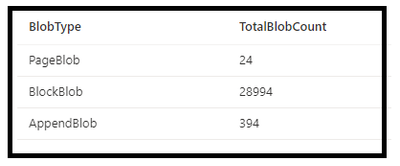
Case 2: We need a count breakup based on Blob Type
Query
|
SELECT BlobType AS BlobType, COUNT(*) As TotalBlobCount FROM OPENROWSET( bulk '<URL to your inventory CSV file>', format='csv', parser_version='2.0', header_row=true ) AS Source GROUP BY BlobType
|
Output:
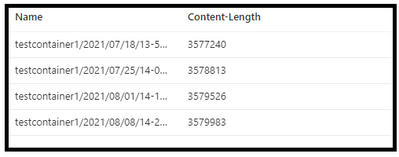
Case 3: We need to identify blobs over a particular size. In the below sample we took that as 2 MB for now
|
SELECT Name, [Content-Length] FROM OPENROWSET( bulk '<URL to your inventory CSV file>', format='csv', parser_version='2.0', header_row=true ) AS Source WHERE [Content-Length]>2000000
|
Output:
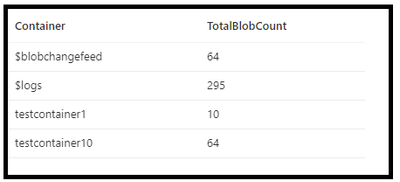
Case 4: We need to count the blobs that were created in the year 2023.
|
SELECT LEFT([Name], CHARINDEX('/', [Name]) - 1) AS Container, COUNT(Name) As TotalBlobCount FROM OPENROWSET( bulk '<URL to your inventory CSV file>', format='csv', parser_version='2.0', header_row=true ) AS Source where "Creation-Time" like '%2023-%' |
Output
Similarly, if you want breakup of counts on a particular field of the report, it can be done is similar fashion. In case, you need details on the account level then you can tweak your report configurations and leverage the same queries ahead.
Hope this helps!
Published on:
Learn moreRelated posts
Azure Storage - TLS 1.0 and 1.1 retirement
Overview TLS 1.0 and 1.1 retirement on Azure Storage was previously announced for Nov 1st, 2024, and it was postponed recently to 1 year later...
Efficient Management of Append and Page Blobs Using Azure Storage Actions
Overview In Azure Storage, Blob Lifecycle Management (BLM) allows you to automate the management of your data based on rules defined by...
[Azure AI Search] Internal Server Error when creating CMK encrypted objects
Scenario Customers follow the Microsoft doc to create CMK encrypted objects (data source, index etc.), but get the 500 Internal Serv...
Optimizing Azure Table Storage: Automated Data Cleanup using a PowerShell script with Azure Automate
Scenario This blog’s aim is to manage Table Storage data efficiently. Imagine you have a large Azure Table Storage that accumulates logs from ...
Optimizing Azure Table Storage: Automated Data Clean-up using a PowerShell script with Azure Automat
Scenario This blog’s aim is to manage Table Storage data efficiently. Imagine you have a large Azure Table Storage that accumulates logs from ...
Restoring Soft-Deleted Blobs with multithreading in Azure Storage Using C#
Blob soft delete is an essential feature that safeguards your data against accidental deletions or overwrites. By retaining deleted data for a...
Performing simple Azure Table Storage REST API operations using curl command.
The blog provides guidance to perform simple Table Storage REST API operations such as Create table, Delete Table, Insert entity, Delete entit...
Bulk delete all the old jobs from the batch account
Deleting a Job also deletes all Tasks that are part of that Job, and all Job statistics. This also overrides the retention period for Task dat...
Utilizing Azure Storage and Runbooks for scheduled automated backups of Azure SQL Databases
In this article, we are going to provide detailed steps to create a scheduled Azure SQL Database backup to storage account using automation. T...
[Azure Service Bus] JMS messages getting dead-lettered
The article discusses a problem where numerous messages end up in the dead letter queue (DLQ) when the JMS service bus consumer connects to th...