
How to be better at twitter - part 2

In one of my last blog posts, I covered How to be better at twitter, sharing some insight about tools and when to mention people and I got a lot of good feedback for that, which is why I want to share some more tips here in part 2.
De-clutter your feed
Are you following lots of people? Like, hundreds, or even thousands? Then most probably, your feed looks like this
- tweet of a person you follow
- advertisement
- reply to a tweet of a person you follow
- tweet of which twitter thinks it is interesting for you
- tweet of a person you follow
- tweet that is liked by a person you follow
- tweet by a person a lot of accounts you follow follow
If you are bit like me, not all of that is relevant to you. If you use the twitter web app, type into the search bar: filter:follows -filter:replies - which means that you only get tweets by accounts you follow, but not the replies into your feed. This of course does not mean that you can’t read replies.
You can now save this search
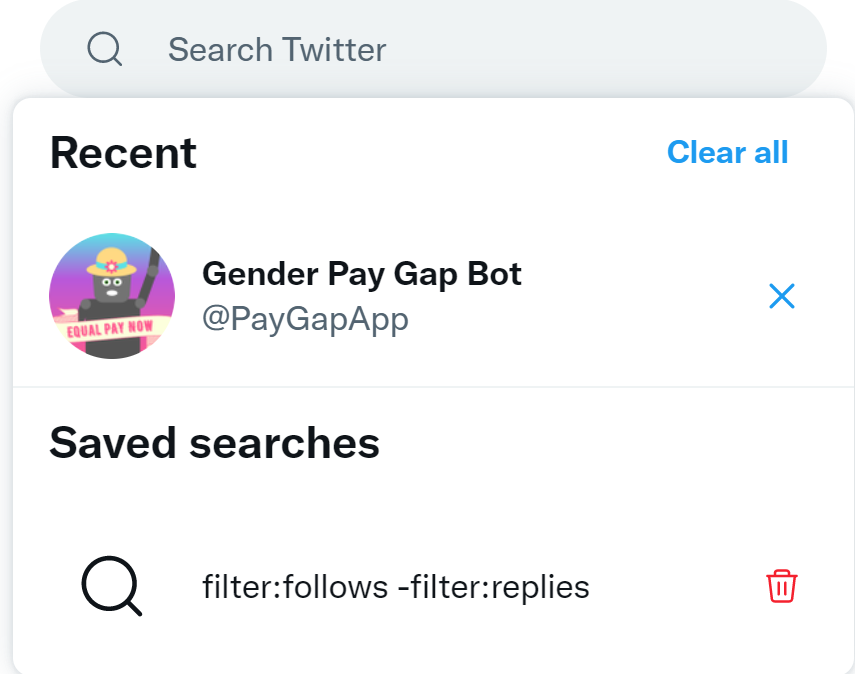
Alternative: type in this as the URL
https://twitter.com/search?q=filter%3Afollows%20-filter%3Areplies&src=saved_search_click
or
https://twitter.com/search?q=filter%3Afollows%20-filter%3Areplies&src=saved_search_click&f=live
if you want the latest tweets on top.
When to use what
Do you know when you should like, reply, retweet or quote-retweet (QT)?
The official consultant answer of course it - it depends
 (sticker by PimpYourOwnDevice.com)
💡 tl;dr: replies have the biggest impact
Lets explore our motivation and what we want to achieve:
like = support
With a like you show support for someone’s tweet or reply. You also let them know that you read their tweet. Those likes only shows up in people’s feed if they don’t filter their feed. If they do not filter, then those tweets do show up in their feeds, but most probably so do hundreds or thousands of other likes of people they follow. This means that they will be overwhelmed and don’t really read but doom-scroll.
A like therefore is a good way to show someone: I saw and support this, but it is not a good way to engage with an audience beyond the person who tweeted what you liked.
retweet = attention for a tweet
With a retweet, you share a tweet to your followers. This makes sense, if you feel a tweet doesn’t get enough or the attention of the right (?) people. Please be aware that if you overuse retweets by only retweeting other people’s tweets or by only retweeting tweets inside of a very focused filter-bubble, people will turn off your retweets
(select the ... on a person’s profile and select Turn of Retweets)
because it is too noisy. While retweets (depending on your follower count) bring attention, they don’t drive engagement, which means that you broadcast in a one-way manner without encouraging others to get involved or join the discussion.
quote-retweet = attention for yourself
With a quote-retweet you take the discussion out of its original context and make it about your thoughts. To give you an analogy: Imagine you are in a big room full of people, there are small groups everywhere and you discuss something with a few people. Now one person walks by, and decides to talk about the exactly same topic - but somewhere else and without the people that already joined your talk. This person separates the discussion (and the people) for the sake of leading the conversation. Use this very carefully and only if you feel you really give the conversation a new direction which you couldn’t do with a reply. Quote-retweets make it unnecessary hard for people to follow a conversation, as it now takes part in several threads.
reply = engagement
With a reply you add your thoughts to a tweet. This could be a validation of the original tweet, or you being in disagreement or also bringing in a new perspective. Without replies, twitter would be just a big rook where everyone just uses a megaphone to broadcast their opinions but without listening. If you want to show that you listen and are open for a two way-communication, this is what you should do mostly.
Also, the amount of replies is the primary reason so that the Twitter algorithm can rank this tweet higher and it will be displayed to more people - which increases reach and visibility.
A few tips for good replies
Don’t reply something like “cool/awesome/great”. It shows that you didn’t put any effort into your reply - and it doesn’t add value to the conversation as the discussion ends now.
Instead, share why you think the idea which wa share is cool/awesome/great. Also if you don’t agree, don’t be like “nah/meh/this is bad”, but share your reasons (respectfully).
Rule of thumbs: If you don’t have time/mental capacity to do this, yuo shouldn’t reply as you are only causing noise.
Also a good way to engage is asking questions, because that is what keeps a conversation going.
I want it all
Now what if you what attention for the original tweet and drive engagement? Well, you can combine the methods:
- add a reply, sharing what you think
- retweet (not quote tweet)
What do you think?
Published on:
Learn moreRelated posts
You are holding GitHub Copilot Wrong!
Most developers think that one can’t really use GitHub Copilot wrong. There is a chat interface that lets you also choose a model, so th...
You are holding GitHub Copilot Wrong!
Part 0 showed why constant prompting, re-prompting, and steering GitHub Copilot feels fragile. Not because Copilot is unreliable, but because ...
Building a Multi-Hierarchy Ticket Classification System (Because Keywords Aren't Enough)
Look, I love a good keyword-based system as much as the next developer. They’re fast, predictable, and when your user says “VPN,&r...
Secretless cross-tenant dataverse access
Client secrets are like hiding your house key under the mat; easy to grab and impossible to audit. Certificates are just slightly better, beca...
How Azure CLI handles your tokens and what you might be ignoring
Running az login feels like magic. A browser pops up, you pick an account, and from then on, everything just works. No more passwords, no more...
How Dev Proxy teaches you to make your apps more resilient
I added Microsoft Dev Proxy to my Mermaid → Dataverse converter, because I wanted to test how it handled rate limits and API errors. What I go...
Building Azure functions that never store secrets — ever
What if your function could hit Microsoft Graph with no client secrets, no certs, and no Key Vault entries? That is exactly what a Managed id...
Introducing Mermaid to Dataverse Converter
Why diagrams matter (and why they usually fail us) Entity-Relationship Diagrams (ERDs) are the universal shorthand for talking about data mode...
It’s OK to be seen trying
It’s OK to be seen trying Somewhere along the way, we started believing that you’re only allowed to speak after you’ve figured everything out....
Stuck in pilot - Part 1: no foundations, no future
“We just need to test the AI. We’ll figure out the data later.” That sentence has quietly killed more AI pilots than any model failure ever ...