
Building Azure functions that never store secrets — ever

What if your function could hit Microsoft Graph with no client secrets, no certs, and no Key Vault entries? That is exactly what a Managed identity is for: Azure issues short-lived tokens to your app on demand, and the platform rotates and protects the underlying credentials for you.
The problem: credential hell
// the old way — credential nightmare
const clientSecret = process.env.CLIENT_SECRET; // 🚨 secret in env vars
const certificatePath = './certs/app-cert.pfx'; // 🚨 cert lifecycle
const connectionString = "DefaultEndpointsProtocol=…"; // 🚨 another secret

// what goes wrong?
// - secrets expire; prod breaks
// - certificates need attention
// - secrets get committed to git (oops)
// - Key Vault becomes a hard dependency
// - drift across environments
💡 Secrets create operational drag and failure modes you do not need in Azure. Managed identity removes them.
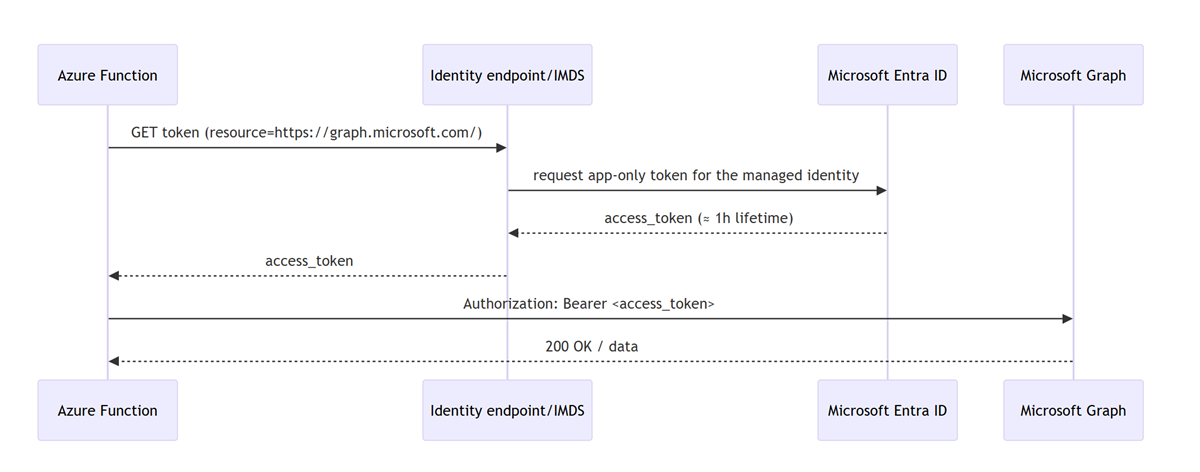
The solution: Managed identity in one picture
At runtime your function asks the platform for a token; Azure verifies the function’s identity and returns a short-lived OAuth 2.0 access token for Microsoft Graph, which your code uses as a bearer token. No app-held secret is involved.
Minimal code: fetch a token, call graph
import type { AzureFunction, Context, HttpRequest } from "@azure/functions";

const httpTrigger: AzureFunction = async (context: Context, req: HttpRequest) => {
 // IMDS pattern; works broadly, especially on VMs and newer stacks
 const tokenUrl = "http://169.254.169.254/metadata/identity/oauth2/token" +
 "?api-version=2018-02-01&resource=https://graph.microsoft.com/";
 const tokenResp = await fetch(tokenUrl, { headers: { "Metadata": "true" } });
 const { access_token } = await tokenResp.json();

 const resp = await fetch("https://graph.microsoft.com/v1.0/groups", {
 headers: { Authorization: `Bearer ${access_token}`, "Content-Type": "application/json" }
 });

 context.res = { status: resp.status, body: await resp.json() };
};
Why this is safe: the Instance Metadata Service (IMDS) lives at a non-routable address 169.254.169.254, is reachable only from inside the host, and communication to IMDS never leaves the host. The response includes expires_in (typically 3599 seconds), roughly an hour.
Production tip: on App Service/Functions prefer the local identity endpoint (
IDENTITY_ENDPOINT+X-IDENTITY-HEADER), which the runtime exposes for you. The Azure Identity SDK (DefaultAzureCredentialorManagedIdentityCredential) wraps this nicely.
// pattern for App Service/Functions local identity endpoint
const { IDENTITY_ENDPOINT, IDENTITY_HEADER } = process.env;

async function getGraphToken(): Promise<string> {
 if (IDENTITY_ENDPOINT && IDENTITY_HEADER) {
 const u = `${IDENTITY_ENDPOINT}?api-version=2019-08-01&resource=https://graph.microsoft.com/`;
 const r = await fetch(u, { headers: { "X-IDENTITY-HEADER": IDENTITY_HEADER } });
 const j = await r.json();
 return j.access_token;
 }
 // IMDS fallback
 const imds = "http://169.254.169.254/metadata/identity/oauth2/token" +
 "?api-version=2018-02-01&resource=https://graph.microsoft.com/";
 const r = await fetch(imds, { headers: { "Metadata": "true" } });
 const j = await r.json();
 return j.access_token;
}
The bootstrap: Who gives the function permission to call graph?
The Managed identity eliminates stored credentials, but it does not auto-grant API permissions. You must assign Microsoft Graph application permissions (app roles) to the function’s service principal at deploy time. Use the Graph app role assignment API and the least-privileged permissions to call it.
Required rights for the caller
Use AppRoleAssignment.ReadWrite.All plus Application.Read.All, or run under a directory role such as Cloud Application Administrator or Application Administrator. These are the least-privileged choices documented for assigning app roles.
Reliably target the Graph service principal
Do not search by display name. Address Microsoft Graph by its well-known appId and query its app roles:
servicePrincipals(appId='00000003-0000-0000-c000-000000000000')
Three IDs you need for each assignment
principalId: your function app’s managed identity service principal idresourceId: the Graph service principal idappRoleId: the specific Graph application permission you want (for example,Directory.Read.All), found in Graph’sappRolescollection
Example: assign Directory.Read.All and Group.Read.All to the function’s identity
$graphSp = az rest `
 --method GET `
 --uri "https://graph.microsoft.com/v1.0/servicePrincipals(appId='00000003-0000-0000-c000-000000000000')`?$select=id,appRoles" `
 --query "id" -o tsv

# function's managed identity service principal id
$miSpId = $principalId # e.g., from your Bicep output

# find the appRoleIds you need programmatically
$roles = az rest --method GET `
 --uri "https://graph.microsoft.com/v1.0/servicePrincipals/$graphSp?`$select=appRoles" `
 --query "appRoles[?value=='Directory.Read.All' || value=='Group.Read.All'].{value:value,id:id}" -o json

# assign each role
$roles | ConvertFrom-Json | ForEach-Object {
 $payload = @{ principalId = $miSpId; resourceId = $graphSp; appRoleId = $_.id } | ConvertTo-Json
 $tmp = New-TemporaryFile
 $payload | Out-File -FilePath $tmp -Encoding utf8

 az rest --method POST `
 --uri "https://graph.microsoft.com/v1.0/servicePrincipals/$miSpId/appRoleAssignments" `
 --headers "Content-Type=application/json" `
 --body "@$tmp" | Out-Null
 Remove-Item $tmp -Force
}
Security model; what is and is not leaving your app
- No long-lived credentials in your app. The underlying SP keys and certs are platform-managed; your code never handles them
- Token requests stay local to the host. Calls to IMDS use
169.254.169.254and never leave the host - Access tokens are bearer tokens. You do receive the access token in your app; protect it like any other bearer token. The win here is that it is short-lived and you do not store a secret. The platform rotates the identity for you
Why this matters
| traditional | zero-credential (managed identity) |
|---|---|
| secrets in code/config/Key Vault | no app-held secrets; platform-issued tokens |
| manual rotation of secrets/certs | platform rotates credentials; you request new tokens when needed |
| risk of leaks via git/logs | no long-lived secrets to leak; token request is host-local |
| secret management infra | none for Graph; you manage permissions, not secrets |
| outages from expired secrets | short-lived tokens; transparent renewal via the platform |
Grab-and-go snippets
-
IMDS token request (HTTP semantics, including
expires_in):GET http://169.254.169.254/metadata/identity/oauth2/token?api-version=2018-02-01&resource=https://graph.microsoft.com/with headerMetadata: true. -
App Service/Functions identity endpoint (raw HTTP example, required headers):
GET /MSI/token?resource=https://graph.microsoft.com/&api-version=2019-08-01with headerX-IDENTITY-HEADER: <IDENTITY_HEADER>to the host inIDENTITY_ENDPOINT. -
Assign Graph app role to a service principal and required permissions for the caller:
POST https://graph.microsoft.com/v1.0/servicePrincipals/{id}/appRoleAssignmentswithprincipalId,resourceId, andappRoleId; caller needsAppRoleAssignment.ReadWrite.All+Application.Read.All(or a suitable directory role).
And now, please stop using secrets if you don’t have to 😇
Published on:
Learn moreWe can help you with Building Azure functions that never store secrets — ever
If you want help implementing, troubleshooting, or improving this product, contact us and we’ll point you in the right direction.
Related posts
You are holding GitHub Copilot Wrong!
Most developers think that one can’t really use GitHub Copilot wrong. There is a chat interface that lets you also choose a model, so th...
You are holding GitHub Copilot Wrong!
Part 0 showed why constant prompting, re-prompting, and steering GitHub Copilot feels fragile. Not because Copilot is unreliable, but because ...
Building a Multi-Hierarchy Ticket Classification System (Because Keywords Aren't Enough)
Look, I love a good keyword-based system as much as the next developer. They’re fast, predictable, and when your user says “VPN,&r...
Secretless cross-tenant dataverse access
Client secrets are like hiding your house key under the mat; easy to grab and impossible to audit. Certificates are just slightly better, beca...
How Azure CLI handles your tokens and what you might be ignoring
Running az login feels like magic. A browser pops up, you pick an account, and from then on, everything just works. No more passwords, no more...
How Dev Proxy teaches you to make your apps more resilient
I added Microsoft Dev Proxy to my Mermaid → Dataverse converter, because I wanted to test how it handled rate limits and API errors. What I go...
Introducing Mermaid to Dataverse Converter
Why diagrams matter (and why they usually fail us) Entity-Relationship Diagrams (ERDs) are the universal shorthand for talking about data mode...
It’s OK to be seen trying
It’s OK to be seen trying Somewhere along the way, we started believing that you’re only allowed to speak after you’ve figured everything out....
Stuck in pilot - Part 1: no foundations, no future
“We just need to test the AI. We’ll figure out the data later.” That sentence has quietly killed more AI pilots than any model failure ever ...
The MVP trap: AI lets you do more, but often worse
There’s a narrative floating around right now: With AI, one person can do the work of a whole team. Code? Done. Design? Prompted. Copy? Gener...