
Synapse Spark Delta Time Travel
Liliam Leme is a Microsoft Engineer focused on SQL & Azure Analytics based in the United Kingdom.
Scenario
While working with a customer, they had a requirement to restore modified files to a specific point in time. They had built their architecture on top of a Data lake.
Looking for options
While working on this scenario, we explored some storage options available without any side customization, for example, Soft delete for blobs - Azure Storage | Microsoft Docs.
Soft delete with blob version enabled at the storage account could provide a version recovery file option, this will only work with a non-hierarchical namespace.
Another potential option was Delta files, which better suited our scenario and have the time travel functionality.
What is Delta?
Delta lake is an open-source storage framework that enables building a Lakehouse Architecture. Delta Lake is simple: Information about which objects are part of a Delta table is maintained in an ACID manner, using a write-ahead log that is itself stored in the cloud object store. The objects themselves are encoded in Parquet. Delta lake is becoming increasingly popular and you can use it inside of your Synapse Workspace.
To learn more, please visit Home | Delta Lake
What is Time travel using Delta?
Time travel enables point-in-time query snapshots or even rolls back erroneous updates.
Using Delta Time travel
The solution is very simple. The plan is to export a point in time to recover a change in a transaction. The steps are to be executed in an environment you already set up the Delta files.
For more information about Delta, please read: Overview of how to use Linux Foundation Delta Lake in Apache and Spark for Azure Synapse Analytics - Azure Synapse Analytics | Microsoft Docs
For example, here I have a FactCurrencyRate_join folder that contains parquet files using Delta format and it is stored as: /sqlserverlessanalitics/FactCurrencyRate_join:
FactCurrencyRate_join contains the following columns - Fig. 1 - Metadata:
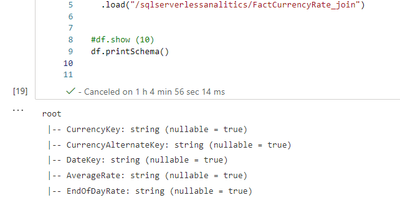
Fig. 1 - Metadata
Suppose I increased by "mistake" a few times the AverageRate values and now I need to travel back in time to bring back the last valid value before I changed. Following the code to travel in time based on the checkpoint where the information was in the state before the changes, which in my example is "2022-09-16 08:41:00". If you want to list the last checkpoint and versions, follow the code example. Fig. 2 - shows the results and Fig. 3 - checkpoints illustration:

Fig. 2 - shows the results

Fig. 3 - checkpoints illustration
Here I am using the timestamp, you can also use the version number if you prefer. Anyway, I want to travel back to "2022-09-16 at 08:41:00":
Now, I want to send the data to a different new folder to confirm the information:
I am working here with files in a Delta format, you can also do the same with Spark Delta tables if you prefer.
How can I make Delta Lake accessible for BI tools?
You can make Delta lake files accessible to BI tools using a Serverless SQL pool. Serverless SQL Pool supports Delta files and tables in your Spark pool. It enables you to easily query them or create views on top of them. You can even build a logical Data Warehouse or just explore the data. Below is a sample query of our persisted Delta table after time travel was applied, and the query results, Fig. 4 - Results:

Fig. 4 - Results
Creating Delta Tables
<Tables based on Delta format integrated to Serverless SQL Pool are currently in Public Preview>
The Serverless SQL pool has a service that ensures metadata stays synchronized with Spark. This enables external tables created and managed on the Lake Database to be available as external tables with the same name in the corresponding synchronized database on your Serverless SQL pool.
To learn more, please read Shared metadata tables - Azure Synapse Analytics | Microsoft Learn
For example, I am reading the files from my folder which contains a set parquet with information of FactCurrencyRate - called FactCurrencyRate_Parquet, and then I save them as Delta Table on the Lake Database Default:
Fig. 5 - Shows the Delta table created accessible from Synapse Studio - > Data:
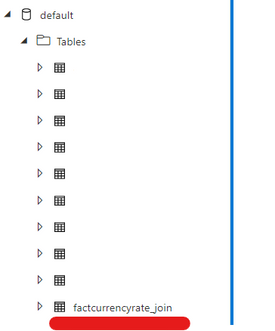
Fig. 5 - Shows the Delta table
Follow Fig. 6 - Results from Serverless SQL Pool:
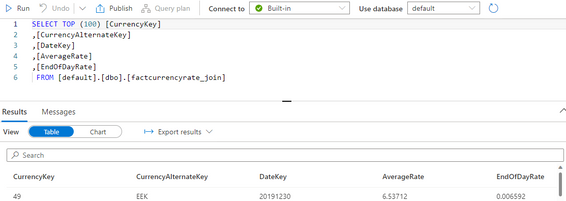
Fig. 6 - Results
Conclusion
Delta time travel can be used in Apache Spark for Synapse as an option to do a point-in-time recovery while building a Lakehouse architecture. This is very useful as it enables you to roll back changes, create snapshot scenarios, and manage the file versions and changes on top of your Data lake architecture. As Serverless SQL pools support Delta format and it is integrated with Spark you can use it to explore further as an end-to-end solution.
I hope this example helps you!
Published on:
Learn moreWe can help you with Synapse Spark Delta Time Travel
If you want help implementing, troubleshooting, or improving this product, contact us and we’ll point you in the right direction.
Related posts
We're moving!
We’re moving to the Analytics on Azure Tech Community! All new Azure Synapse Analytics content will be published there. In the next few days a...
Upgrade to Azure Synapse runtimes for Apache Spark 3.4 & previous runtimes deprecation
It is important to stay ahead of the curve and keep services up to date. That's why we encourage all Azure Synapse customers with Apache ...
ADF\Synapse Analytics - Replace Columns names using Rule based mapping in Mapping data flows
In real time, the column names from source might not be uniform, some columns will have a space in it, some other columns will not. For exampl...
Interpreting Script activity output json with Azure Data Factory\Synapse analytics
Script activity in Azure Data Factory\ Synapse analytics is very helpful to run queries against data sources mentioned here in this document.&...
Synapse Connectivity Series Part #4 - Advanced network troubleshooting and network trace analysis
Continuing the series of this blog posts I would like to go more advanced on troubleshooting connectivity issues. I would like to thank also&n...
Boost your CICD automation for Synapse SQL Serverless by taking advantage of SSDT and SqlPackage CLI
Introduction Azure Synapse Analytics Serverless SQL is a query service mostly used over the data in your data lake, for data discovery,...
Metadata-Based Ingestion in Synapse with Delta Lake
Overview The crucial first step in any ETL (extract, transform, load) process or data engineering program is ingestion, w...
Missing Fields Added to Dedicated SQL pool Diagnostic Settings Logs
Over the past year, customers have informed the team there were a set of key columns missing in the standalone Dedicated SQL pools (formerly S...
Using Azure DevOps with Synapse Workspaces to create hot fixes in production environments
Have you ever deployed a release to production only to find out a bug has escaped your testing process and now users are being severely impact...
Azure Synapse MVP Corner - March 2023
About this blog series Microsoft Most Valuable Professionals, or MVPs, are technology experts who passionately share their knowledge with the ...