
Azure Firewall Basic SKU is now Available in Public Preview
Microsoft has recently released in public preview the new Azure Firewall Basic SKU as announced on October 4, 2022.
Azure Firewall Basic is a new SKU of Azure Firewall designed to meet the needs of SMBs by providing enterprise-grade protection of their cloud environment at an affordable price point. It is a cloud-native, highly available, stateful firewall as a service offering that enables customers to centrally govern and log all their traffic flows with essential capabilities at scale.
Key features of Azure Firewall Basic
- Comprehensive, cloud-native network firewall security.
- Network and application traffic filtering
- Threat intelligence to alert on malicious traffic
- Built-in high availability
- Seamless integration with other Azure services
- Simple setup and easy to use
- Set up in just a few minutes.
- Automate deployment (deploy as code)
- Zero maintenance with automatic updates
- Central management via Azure Firewall Manager
- Cost-effective
- Designed to deliver essential, cost-effective Firewall protection for your resources within your virtual network
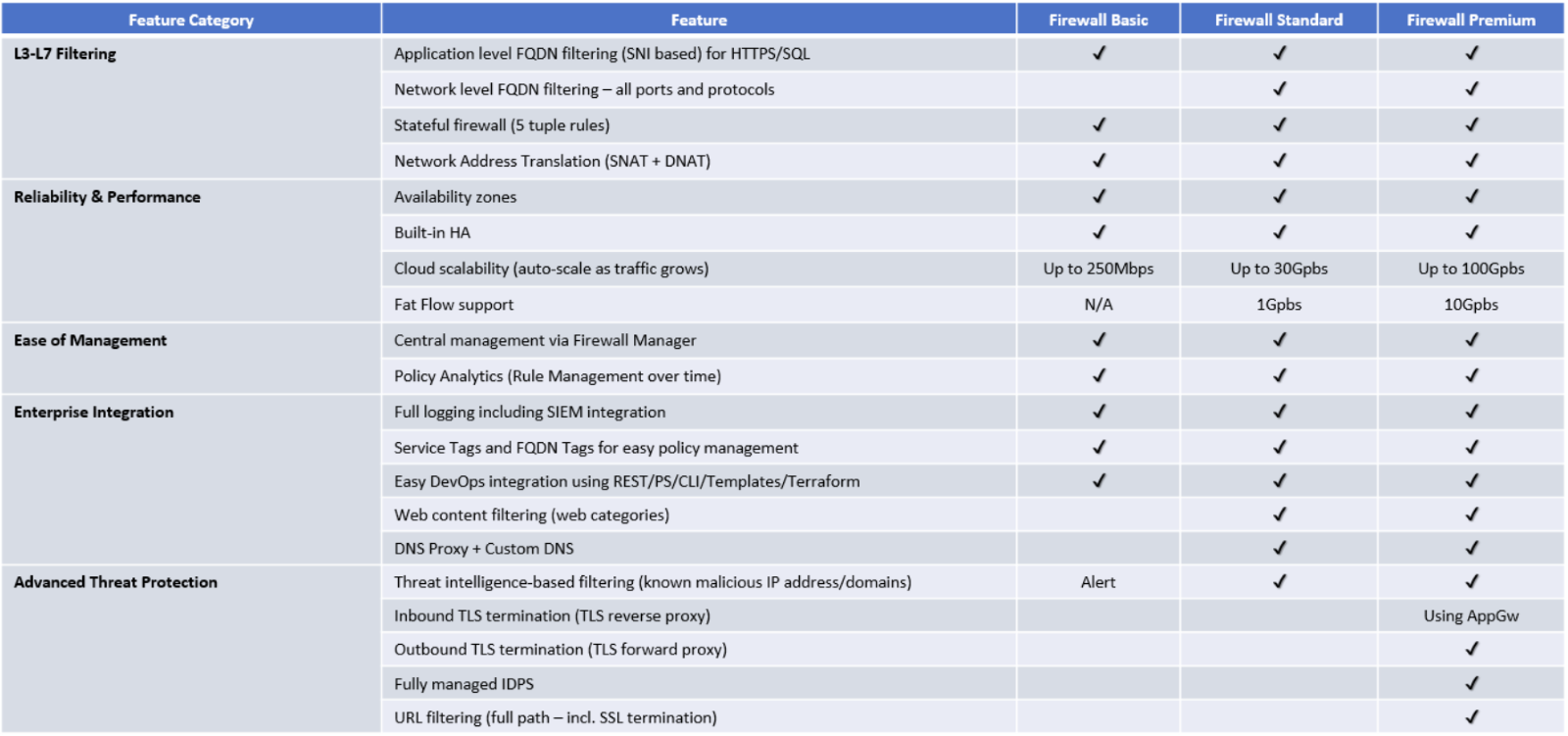
SKU Comparison
Azure Firewall now supports three different SKUs to cater to a wide range of customer use cases and preferences. Let’s take a closer look at the features across the three Azure Firewall SKUs.

Deploying Azure Firewall Basic
Next you will find all the steps required to deploy your Azure Firewall Basic via Azure Portal. Let’s start by talking about the VNet requirements as for Azure Firewall Basic deployment you will need 2 subnets /26.
- AzureFirewallSubnet for transit traffic
- AzureFirewallManagentSubnet for management traffic
The reason Azure Firewall Basic requires management subnet is to separate transit traffic from management traffic. This management traffic is needed mainly for updates that occur automatically to and from Microsoft. This requirement is different from Azure Firewall Standard/Premium, where you only need the “AzureFirewallManagementSubnet” when you are planning to use forced tunneling to send the Internet traffic to an upstream firewall.
Follow the steps below to create your new Azure Firewall Basic via Azure Portal:
- From the Azure Portal you will select create a new resource and type Firewall
- In the Basics/Project details, you will provide the subscription, resource group, name, region availability zone
- Next you need to select Basic in the Firewall SKU
- Select an existing Firewall Policy Basic or create new
- There is no option to use classic rules
- Choose an existing VNet or create new
- If using an existing VNet, make sure it has the “AzureFirewallManageSubnet” subnet
- The Public IP address will be assigned to the transit interface, but it is not required. Choose an existing Public IP or add a new one.
- The Management public IP address is required as it will be used for Microsoft automatic updates, but it will not be used for customer inbound or outbound traffic. Choose an existing Public IP or create a new one.
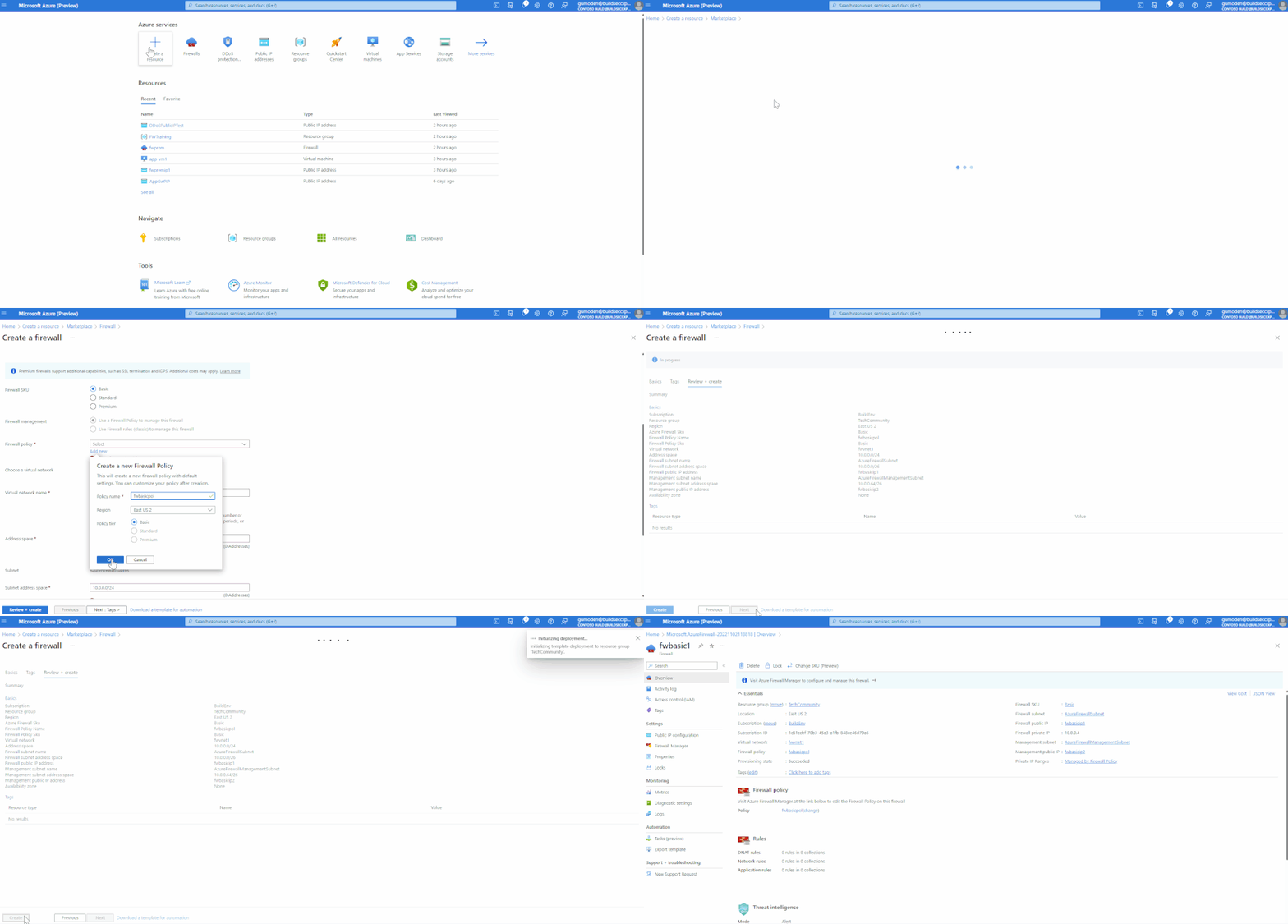
Once your Azure Firewall Basic is deployed, you will manage the configurations through the Azure Firewall Policy attached to your firewall. It is important to keep in mind that you cannot enable the features that are not available for Basic SKU like DNS Proxy and others. The options will still be shown as part of the Firewall Policy menu. However, it will be grayed out and you will see a message saying, “The feature is available only for premium and standard policies”.

In the GIF demo we created 2 Public IPs (1 per network interface). When you go to the Public IP configuration tab of your Firewall, you will see only the one attached to the transit interface, and that is because the Public IP attached to the management interface cannot be used for inbound/outbound traffic.

You can also create and manage the Azure Firewall Basic using PowerShell, Terraform, CLI and Bicep/ARM templates. You will find a Terraform template available in the Azure Network Security GitHub repository.
To deploy the Terraform template you will need to:
- Configure your Terraform environment. Example using Terraform on Windows with PowerShell: https://learn.microsoft.com/en-us/azure/developer/terraform/get-started-windows-powershell?tabs=bash
- Download the FwBasicTFMain.tf file
- Run the following commands:
- terraform init
- terraform plan -out FwBasicTFMain.tfplan
- terraform apply FwBasicTFMain.tfplan
Note: Username and password to log in into the Windows VM are hard coded within the template at lines 231 and 232. Please, consider changing the password in the template before you start the deployment or after the VM is deployed.
Once the deployment is complete you will find the following resources within the resource group AzureFW-Basic.
- Disk - myosdisk1
- Firewall - FWBasic
- Firewall Policy - FwBasicPolicy
- NIC - AppVm1Nic1
- Public IP - FWBasicManagementIP
- Public IP - FWBasicTransitIP
- Route Table - Spoke1RT
- VM (Windows 11 Pro) - AppVm1
- VNet - HubVnet
- Vnet - SpokeVnet1
Pricing
For more details, visit the Azure Firewall pricing page.
Conclusion
Microsoft is constantly innovating to help secure customers’ digital assets in an evolving threatened landscape and help SMB customers with their cloud adoption journey.
Learn More
Published on:
Learn moreRelated posts
IPv6 Adoption: Enhancing Azure WAF on Front Door
The transition to IPv6 is a significant step for enterprise corporations, reflecting the evolution of internet technology and the need for a l...
Azure WAF’s Bot Manager 1.1 and JavaScript Challenge (Preview): Navigating the Bot Threat Terrain
Introduction Bots are a common presence on the internet, serving a range of functions from automating customer service to indexing page...
Private IP DNAT Support (Preview) and Scenarios with Azure Firewall
Introduction Azure Firewall is a cloud native security service to protect your workloads running in Azure. It is a stateful firewall as a serv...
Getting Started with Azure DDoS Protection REST API: A Step-by-Step Guide
REST API is a cornerstone in the management of resources on Azure, providing a streamlined and efficient approach for executing create, read, ...
Monitoring Azure DDoS Protection Mitigation Triggers
Monitoring Azure DDoS Protection Mitigation Triggers In today’s digital landscape, Distributed Denial of Service (DDoS) attacks pose a signifi...
Azure WAF’s Bot Manager 1.1 and JavaScript Challenge: Navigating the Bot Threat Terrain
Introduction Bots are a common presence on the internet, serving a range of functions from automating customer service to indexing page...
Utilizing Azure DDoS Protection Workbook for DDoS attack traffic Analysis
In today's digital age, the security of applications, servers, and networks is paramount. One of the most significant threats to this security...
Independent Configuration of Size Enforcement and Inspection Limits in Application Gateway WAF
Introduction In the constantly changing world of cybersecurity, both flexibility and effective security are essential for safeguarding ...
Private IP DNAT Support and Scenarios with Azure Firewall
Introduction Azure Firewall is a cloud native security service to protect your workloads running in Azure. It is a stateful firewall as a serv...
Monitoring traffic flows in Azure Firewall using Virtual Network Flow Logs
Azure Firewall is a managed service designed to protect your Azure Virtual Network resources, providing advanced threat protection and advance...