
Build high confidence migration plans using Azure Migrate

Build high confidence migration plans using Azure Migrate’s software inventory and agentless dependency analysis
Authored by Vikram Bansal, Senior PM, Azure Migrate
Migrating a large & complex IT environment from on-premises to the cloud can be quite daunting. Customers are often challenged with the problem of unknown where they may not have complete visibility of applications running on their servers or the dependencies between them, as they start planning their migration to cloud. This results not only in leaving behind dependent servers causing the application to break, but also adds up to the migration cost that the customers want to reduce. Azure Migrate aims at helping customers build a high-confidence migration plan with features like software inventory and agentless dependency analysis.
Software inventory provides the list of applications, roles and features running on Windows and Linux servers, discovered using Azure Migrate. Agentless dependency analysis helps you analyze the dependencies between the discovered servers which can be easily visualized with a map view in Azure Migrate project and can be used to group related servers for migration to Azure.
Today, we are announcing the public preview of at-scale, software inventory and agentless dependency analysis for Hyper-V virtual machines and bare-metal servers.
How to get started?
- To get started, create a new Azure Migrate project or use an existing one.
- Deploy and configure the Azure Migrate appliance for Hyper-V or for bare-metal servers.
- Enable software inventory by providing server credentials on the appliance and start discovery. For Hyper-V virtual machines, appliance lets you enter multiple credentials and will automatically map each server to the appropriate credential.

The credentials provided on the appliance are encrypted and stored on the appliance server locally and are never sent to Microsoft.
- As servers start getting discovered, you can view them in the Azure Portal.
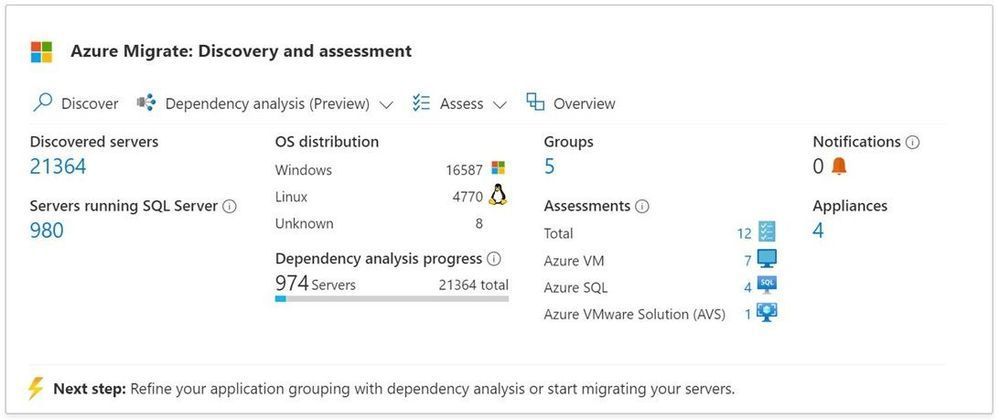
Software inventory
- Using the credentials provided, the appliance gathers information on the installed applications, enabled roles and features on the on-premises Windows and Linux servers.
- Software inventory is completely agentless and does not require installing any agents on the servers.
- Software inventory is performed by directly connecting to the servers using the server credentials added on the appliance. The appliance gathers the information about the software inventory from Windows servers using PS remoting and from Linux servers using SSH connectivity.
- Azure Migrate directly connects to the servers to execute a list of queries and pull the required data once every 12 hours.
- A single Azure Migrate appliance can discover up to 5000 Hyper-V VMs or 1000 physical servers and perform software inventory across all of them.

Agentless dependency analysis
- Agentless dependency analysis feature helps in visualizing the dependencies between your servers and can be used to determine servers that should be migrated together.
- The dependency analysis is completely agentless and does not require installing any agents on the servers.
- You can enable dependency analysis on those servers where the prerequisite validation checks succeed during software inventory.
- Agentless dependency analysis is performed by directly connecting to the servers using the server credentials added on the appliance. The appliance gathers the dependency information from Windows servers using PS remoting and from Linux servers using SSH connection.
- Azure Migrate directly connects to the servers to execute a list of ‘ls’ and ‘netstat’ queries and pull the required data every 5 mins. The appliance aggregates the 5 min data points and sends it to Azure every 6 hours.
- Using the built-in dependency map view, you can easily visualize dependencies between servers. You can also download the dependency data including process, application, and port information in a CSV format for offline analysis.
- Dependency analysis can be performed concurrently on up to 1000 servers discovered from one appliance in a project. To analyze dependencies on more than 1000 servers from the same appliance, you can sequence the analysis in multiple batches of 1000.
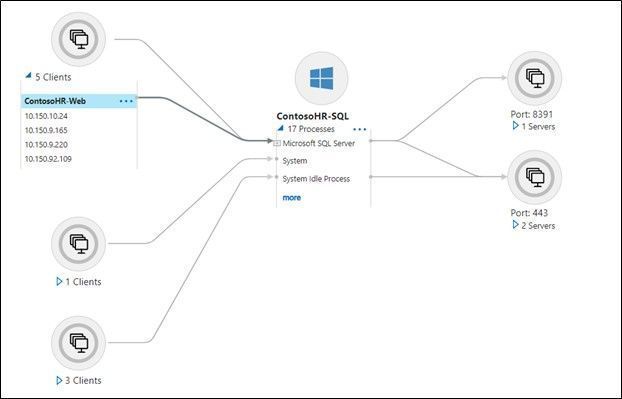
Workflow and architecture
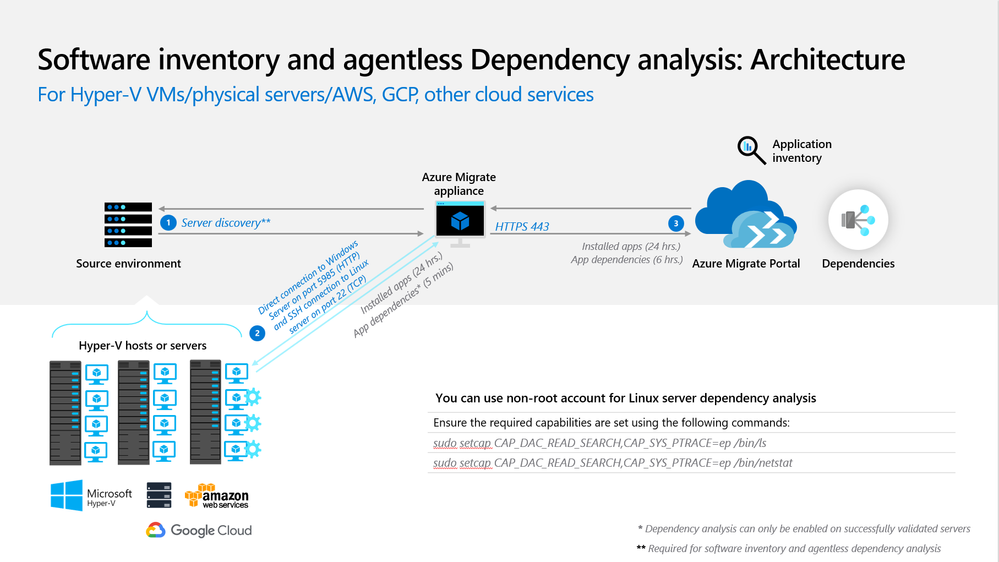
The architecture diagram below shows how software inventory and agentless dependency analysis works. The appliance:
- discovers the Windows and Linux servers using the source details provided on configuration manager
- collects software inventory (installed applications, roles and features) information from discovered servers
- performs a validation of all prerequisites required to enable dependency analysis on a server. The validation is done when appliance performs software inventory. Users can enable dependency analysis only on those servers where the validation succeeds, so that they are less prone to hit errors after enabling the dependency analysis.
- collects the dependency data from servers where dependency analysis was enabled from the portal.
- periodically sends collected information to the Azure Migrate project via HTTPS port 443 over a secure encrypted connection.
Resources to get started
Published on:
Learn moreRelated posts
VMware HCX Design with Azure VMware Solution
Overview VMware HCX is one of the Azure VMware Solution components that generates a large number of service requests from our customers. The A...
Azure Backup and DR: Cross-Region Restore - Exploring Solutions
Azure Backup and DR: Cross-Region Restore - Exploring Solutions When building a Disaster Recovery (DR) plan, customers often face chall...
Microsoft is headed to VMware Explore 2024 in Barcelona!
Microsoft is headed to VMware Explore 2024 in Barcelona! If you want to know about running VCF Private Clouds in Azure, the work we ar...
IBM Power Virtual Server and Microsoft Azure Multi-cloud Integration Patterns
IBM Power Virtual Server and Microsoft Azure Multi-cloud Integration Patterns &nbs...
Enhancing Disaster Recovery and Ransomware Protection with Azure VMware Solution and JetStream
Enhancing Disaster Recovery and Ransomware Protection with Azure VMware Solution and JetStream Software Disaster Recovery (DR) ...
Microsoft is headed to VMware Explore 2024 in Las Vegas
If you want to know about Azure, the work we are doing in partnership with VMware by Broadcom, or have a conversation about your VMwar...
Azure VMware Solution using a public IP down to the NSX-T Edge; configure SNAT, No-SNAT & DNAT
Azure VMware Solution How To Series: Configuring NSX-T SNAT, No-SNAT & DNAT rules Overview Requirements Lab Environment NAT Rules K...
Azure VMware Solution now available in India Central
Azure VMware Solution has expanded its reach and is now available in India Central, marking it as the 33rd Azure region where this particular ...
Azure Migrate - Build 2024 Announcements
Microsoft Build introduced exciting new announcements for Azure Migrate. Cost optimization remains a top priority for customers when selecting...
Azure VMware Solution - Using Log Analytics With NSX-T Firewall Logs
Azure VMware Solution How To Series: Monitoring Azure VMware Solution Overview Requirements Lab Environment Tagging & Groups Kusto ...