
Raising the Baseline Security for all Organizations in the World

Today, I am so incredibly excited to announce that we’re beginning the rollout of security defaults to existing Microsoft customers who haven’t yet rolled out security defaults or Azure AD Conditional Access.
The Identity security team blocks tens of millions of attacks every day and sadly, some get through. Each compromised account gives attackers access that can cause real harm. Most of these attacks could be stopped with good security hygiene. Chief among these is multifactor authentication (MFA) at login and requiring modern authentication protocols. When we look at hacked accounts, more than 99.9% don’t have MFA, making them vulnerable to password spray, phishing, and password reuse.
Unfortunately, many companies lack a team of security experts to address these issues, and often have no IT team at all. So, even though the industry is clear on the importance of MFA, there’s no one to hear or execute on these security mandates. These organizations are often the most vulnerable and experience the most compromised accounts.
To address this, we introduced security defaults in October 2019 for new tenants, ensuring that new customers would be created and maintained with basic security hygiene in place – especially MFA and modern auth requirements – regardless of license. A few years later, we now have more than 30 million organizations protected by security defaults. These organizations experience 80 percent less compromise than the overall tenant population. Most tenants simply leave it on, while others add even more security with Conditional Access when they’re ready.
We are delighted with the success of this program, but tenants created before October 2019 were not included in security defaults and were vulnerable unless they explicitly enabled features like Conditional Access, Identity Protection, and MFA. Many organizations aren’t even aware of these capabilities – or the increasingly dangerous wave of attacks they prevent.
That’s why we’re so excited to announce the rollout of security defaults to existing tenants, targeting those who haven’t changed any security settings since deployment. When complete, this rollout will protect an additional 60 million accounts (roughly the population of the United Kingdom!) from the most common identity attacks.
What to expect?
Security defaults challenge users with MFA when necessary, based on factors such as location, device, role, and task. Due to the power admins have to make changes to your environment, they’re required to perform MFA every time they sign in.
Based on usage patterns, we’ll start with organizations that are a good fit for security defaults. Specifically, we will start with customers who aren’t using Conditional Access, haven’t used security defaults before, and aren’t actively using legacy authentication clients.
Global admins of eligible tenants will be notified through email and the Microsoft 365 Message Center. Then, starting in late June, they’ll receive the following prompt during sign-in:
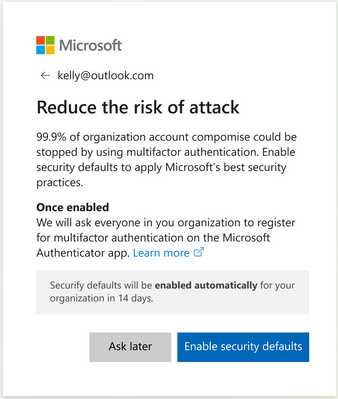
Global admins can opt into security defaults right away or snooze for as many as 14 days. They can also explicitly opt out of security defaults in this time.
After security defaults are enabled, all users in the tenant are asked to register for MFA. Again, there is a grace period of 14 days for registration. Users are asked to register using the Microsoft Authenticator app, and Global administrators are additionally asked for a phone number.


And that’s it! Kapow - a massively improved security posture against Identity-related attacks.
If you can’t stand waiting, you can use this step-by-step guidance to select and enable the right MFA method for your organization in the Microsoft 365 admin center now, or follow the steps described in our documentation to turn on security defaults.
What if a customer wants to accept the risks and want to leave security defaults disabled?
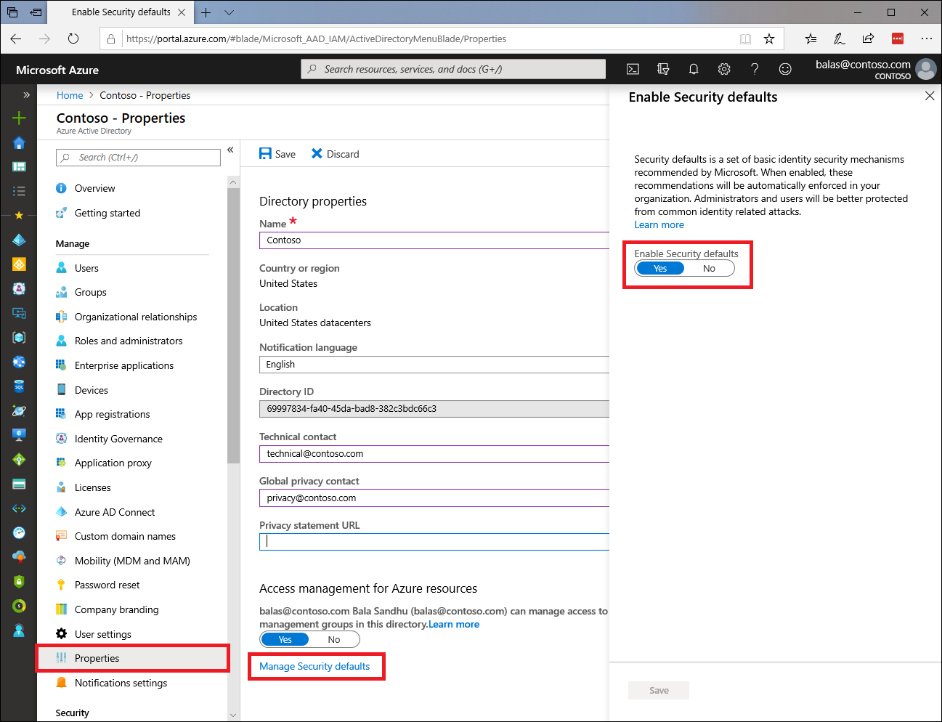
If you understand and accept the risks of not using a baseline level of security for your organization, you can disable security defaults through the Azure Active Directory properties or through the Microsoft 365 admin center. As you disable security defaults, we’d like to learn why and how to make the product better, so please share your feedback in a comment below or through our Feedback Forum!
We are incredibly excited to begin this journey and improve the security for so many organizations and users! Please let us know what you think!
Thanks,
Alex Weinert, Director of Identity Security, Microsoft
(Twitter:@alex_t_weinert)
Learn more about Microsoft identity:
- Related Articles: Introducing security defaults - Microsoft Tech Community
- Return to the Azure Active Directory Identity blog home
- Join the conversation on Twitter and LinkedIn
- Share product suggestions on the Azure Feedback Forum
Published on:
Learn moreRelated posts
Sync identities from Rippling to Microsoft Entra ID
Today, we’re thrilled to announce that customers using Rippling HCM can now automatically provision users to on-premises Active Directory and ...
Microsoft Entra ID Governance for government
I’m pleased to announce that as of November 1, 2024, Microsoft Entra ID Governance is available for federal agencies, state and local governme...
Update to security defaults
As part of the Secure Future Initiative, we’ve evolved our security approach to align with three security principles: secure by design, secure...
Meet Microsoft Entra at Ignite 2024: November 18-22
Microsoft Ignite is just around the corner, taking place from Monday, November 18, 2024 through Friday, November 22, 2024, in Chicago, Illinoi...
Manage Microsoft Entra ID role assignments with Microsoft Entra ID Governance
I’m excited to announce that we now support Microsoft Entra role assignments in Microsoft Entra ID Governance's Entitlement Management feature...
The latest enhancements in Microsoft Authenticator
Hi folks, I'm thrilled to announce three major Microsoft Entra ID advancements that will help you protect your users with phishing-resi...
Microsoft Security announcements and demos at Authenticate 2024
The Microsoft Security team is excited to connect with you next week at Authenticate 2024 Conference, taking place October 14 to 16 in Carlsba...
What's new in Microsoft Entra - September 2024
We’re excited to announce the general availability of Microsoft Entra Suite—one of the industry’s most comprehensive secure access solutions f...
Explore the key benefits of Microsoft Entra Private Access
The traditional network security models are becoming increasingly ineffective in a world where remote work and cloud services are the norm. Co...
Join us at the Microsoft Entra Suite Showcase!
This fall, we are bringing the Microsoft Entra Suite Showcase to cities worldwide. Join us to explore how our latest advancements in secure id...