
Introducing Microsoft Dev Box

Maintaining a developer workstation that can build, run, and debug your application is critical to keeping up with the pace of modern development teams. As developers, we need the flexibility to set up and maintain our workstation, but even ‘small changes’ can unexpectedly poison our dev environments, interrupting our flow and costing hours to undo.
At the same time, many IT organizations are struggling to provide dev teams with the flexibility they need to stay productive. Hardware requirements for developer workstations can change rapidly as projects evolve, and an increase in hybrid development teams means it’s more difficult than ever to get developers the resources they need.
Today, we are excited to announce Microsoft Dev Box, a new cloud service that provides developers with secure, ready-to-code developer workstations for hybrid teams of any size. Microsoft Dev Box empowers developers to focus on the code only they can write, making it easy for them to access the tools and resources they need without worrying about workstation configuration and maintenance. Dev teams preconfigure Dev Boxes for specific projects and tasks, enabling devs to get started quickly with an environment that’s ready to build and run their app in minutes. At the same time, Microsoft Dev Box ensures unified management, security, and compliance stay in the hands of IT by leveraging Windows 365 to integrate Dev Boxes with Intune and Microsoft Endpoint Manager.
You can sign up for the waiting list to evaluate the private preview at http://aka.ms/devbox-signup and to see demos of the service watch the Build session, Delivering developer velocity through the entire engineering system.
Transforming the developer workstation
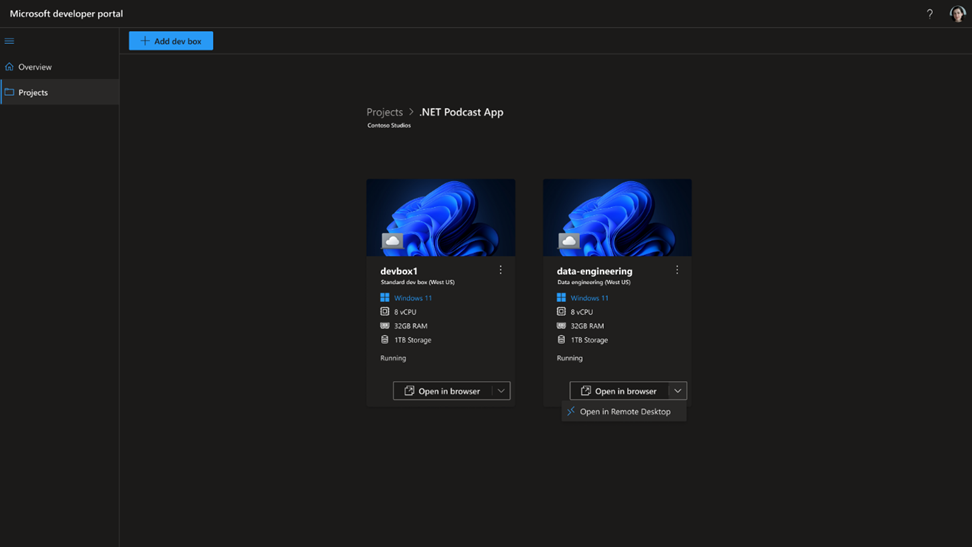
Contemporary dev workstations come with a plethora of challenges. New developers can spend days setting up a working environment and weeks before they make their first commit. Senior developers often work across multiple projects that can bring conflicting dependencies and bog down their dev workstation. And we’ve all made a change that unexpectedly left us with a broken environment.
With Microsoft Dev Box, dev teams create and maintain Dev Box images with all the tools and dependencies their devs need to build and run their applications. Teams can include their application source code and nightly built binaries, enabling devs to immediately start running and understanding the code without having to wait for long re-builds.
Developers stay in control of their Dev Boxes with a developer portal that enables them to create and delete their Dev Boxes for any of their projects. Developers can create Dev Boxes to experiment on a proof-of-concept, keep their projects separate, or even parallelize tasks across multiple Dev Boxes to avoid bogging down their primary environment. For devs working on legacy apps, they can maintain Dev Boxes for older versions of an application to quickly create an environment that can reproduce and diagnose critical customer issues as they emerge.
Microsoft Dev Box supports any developer IDE, SDK, or internal tool that runs on Windows. Dev Boxes can target any development workload you can build from a Windows desktop and are particularly well-suited for desktop, mobile, IoT, and gaming. You can even build cross-platform apps using Windows Subsystem for Linux.
And because Microsoft Dev Boxes are hosted in the Microsoft cloud, you can access them from anywhere: Windows, MacOS, Android, iOS, or your web browser.
Empowering Dev Teams
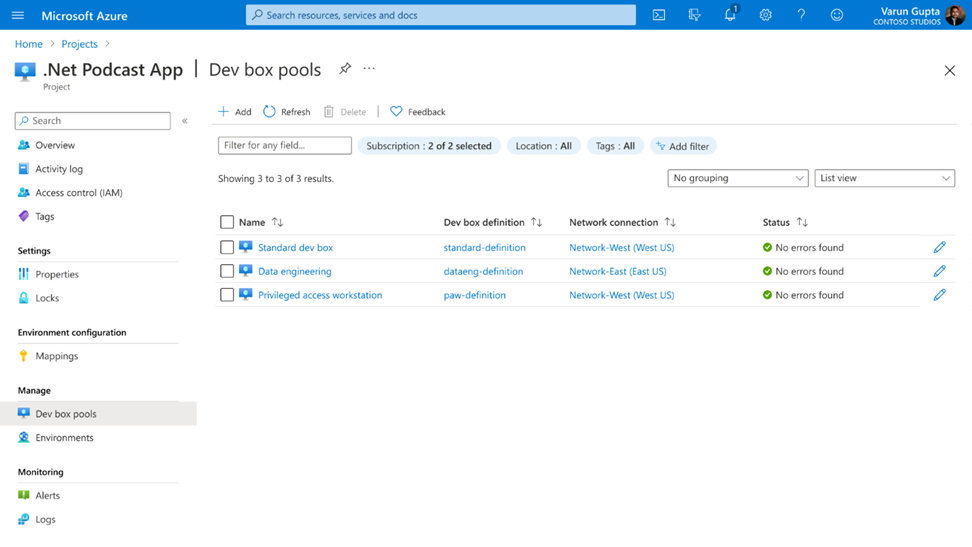
Microsoft Dev Box ensures developers always have the right tools and resources based on project, task, and even role. When building Dev Boxes, dev teams select from a range of SKUs to define the right level of compute for each project and instantly scale up aging physical hardware. Thanks to Azure Active Directory integration, teams can rapidly onboard new team members by assigning them to Azure Active Directory groups that grant access to the Dev Boxes they need for their projects.
By deploying Dev Boxes in the developer’s local region and connecting via the Azure Global Network, dev teams ensure remote team members have a high-fidelity experience and gigabit connection speeds wherever they are in the world. When outsourcing to external teams, dev teams can tighten up network security by establishing role-based permissions that provide greater flexibility for internal developers while limiting access for external contractors.
To keep costs under control, teams can use start/stop schedules to spin up Dev Boxes at the beginning of the day and automatically hibernate them when devs go home. Developers can always wake up their Dev Boxes when needed and pick up right where they left off. Teams also get a single view of all costs from one place to understand costs across projects and teams.
Built-in security and management

Critically, Microsoft Dev Box doesn’t just benefit developers—because the service integrates with Windows 365, it’s easy for IT administrators to manage Dev Boxes together with Cloud PCs in Microsoft Intune and Microsoft Endpoint Manager. Using Intune’s expedited quality updates, IT admins can deploy zero-day patches to all devices across their organization. If a Dev Box is compromised, IT admins can isolate the Dev Box while helping the developer get back up and running on a new Dev Box.
To maximize Dev Box security, IT admins can set comprehensive access controls in Azure Active Directory. IT admins can establish conditional access polices that require users to connect via a compliant device, require multifactor authentication (MFA) sign-in, or configure risk-based sign-in polices for Dev Boxes that access sensitive source code and customer data.
Getting Started with Microsoft Dev Box
Microsoft Dev Box is in private preview today and will be in public preview in the next few months. To learn more about Microsoft Dev Box and see demos of the service go to https://aka.ms/devbox-build22.
Sign up to get on the list to evaluate Microsoft Dev Box at https://aka.ms/devbox-signup.
Published on:
Learn moreRelated posts
This Month in Azure Static Web Apps | 09/2024
We are back with another edition of the Azure Static Web Apps Community! :party_popper: September was yet another month ...
GitHub Copilot for Azure: 6 Must-Try Features
As developers, we are constantly seeking tools that streamline our workflows and boost productivity. … Enter GitHub Copilot for Azure, now in ...
Responsible AI Mitigation Layers
Generative AI is increasingly being used in various kinds of systems to augment humans and infuse intelligent behavior into existing and new a...
Streamline Your Azure Workflow: Introducing GitHub Copilot for Azure in VS Code
I'm excited to announce the public preview of GitHub Copilot for Azure - a new addition to your toolkit that seamlessly integrates with G...
Build Intelligent Apps Code-First with Prompty and Azure AI
Building Generative AI applications can feel daunting for traditional app developers. What does the end-to-end applicati...
Certificación AI-900 (Fundamentos de IA) con Chicas en IA
La inteligencia artificial ha llegado para quedarse, ¡y más aún con la revolucionaria IA generativa! Para ayudar a los profesionales a especia...
Get certified with Learn Live GitHub series!
GitHub Universe is coming, and Microsoft and GitHub are partnering to offer a new special Learn Live series in Brazilian Portuguese, English a...
Certifícate con Learn Live GitHub en Español
Microsoft y GitHub se han unido para ofrecer una nueva serie especial de Learn Live en inglés y español: GitHub 2024. Del 10 al 24 de Octubre,...
Evaluating generative AI: Best practices for developers
As a developer working with generative AI, you've likely marveled at the impressive outputs your models can produce. But how do you ensure the...
Introducing Azure Product Retirement Livestreams
The Azure Retirements team, in collaboration with key partner groups, is excited t...