
Streamline Amazon Business access with Microsoft Azure AD

Hello! I’m Sue Bohn, Vice President of Product Management for Identity and Network Access at Microsoft. Microsoft and Amazon Business have collaborated to deliver simplified single sign on integration to support mutual customers. In this special blog post, we’ll look at some advantages that come with pairing Amazon Business Solution with Azure Active Directory (now part of the new Microsoft Entra). We’ll also discuss why migrating from Active Directory Federation Services (ADFS) to Entra can give your business a competitive edge, lower costs, and increase security. Finally, we’ll walk you through the process of adding Amazon Business to your list of managed apps.
Identity and access management (IAM) is the foundation for a Zero Trust security strategy. But IAM can get complicated when you’re dealing with a mix of remote, onsite, and hybrid employees all accessing scores of apps across a multicloud, multiplatform environment. Our goal is to provide secure, seamless access to all apps and services for your employees and partners—on any device, from any location.
With that goal in mind, we’re proud to provide single sign-on (SSO) for Amazon Business with one-click SSO. Available as a pre-integrated app in the Azure Active Directory (Azure AD) app gallery, Amazon Business digitizes and automates procurement with powerful management controls and analytic tools—all within the familiar experience of Amazon. Users can find hundreds of millions of business-relevant products, from office supplies to professional-grade equipment specific to their industry. Other benefits include business-only pricing, quantity discounts, customized shipping and delivery and built-in analytics and budgeting.
Key benefits of SSO with Amazon Business and Azure AD include:
- Improved Corporate Security - Reduce the risk of compromised credentials by eliminating insecure password management practices such using simple, easy-to-remember passwords, writing passwords down and password reuse. In addition, one credential can be used for all applications.
- Centrally control access - Centrally enable and disable buyer access through your organization's SSO provider. Automatically block access when buyers leave your organization.
- One-click secure buyer access - Maintain the same secure, one-click experience as with your existing SSO integrated corporate applications. Use existing corporate credentials to purchase from Amazon Business without creating a new password.
- Accelerate program adoption - Simplify the buyer onboarding experience to increase adoption and help achieve your savings goals. Remove the manual process of inviting new buyers to your account.
- Reducing configuration efforts & human error - Automate some of the configuration experience to simplify and streamline deployment by utilizing one-click SSO.
Amazon Business combines the selection, convenience, and value customers expect from Amazon with special features designed to meet the needs of business procurement professionals. Azure AD SSO for Amazon Business delivers streamlined access controls for both individual buyers and groups alike. With reduced user friction, procurement professionals can focus on what they do best. Additionally, Azure AD empowers Amazon Business customers to manage access for employee and partner procurement scenarios.
Add Amazon Business app to Azure AD
Azure AD provides a single identity system for your software-as-a-service (SaaS), cloud, on-premises, or custom-built apps. Cloud-based Azure AD provides a more accessible and cost-effective identity solution than Windows Server-based Active Directory Federation Services (ADFS). Even better, AzureAD is pre-integrated with Microsoft 365, allowing Amazon Business customers to reduce complexity and infrastructure costs while delivering a frictionless user experience.
By moving to Azure AD, your organization can implement Zero Trust security controls with support for Passwordless Authentication, Conditional Access, and the Microsoft Graph API . Your organization can easily enable streamlined SSO for Amazon Business or any of the pre-integrated SaaS apps by adding it from the Azure AD app gallery. Adding Amazon Business to your list of managed apps in Azure AD only takes a few minutes:
1. Sign in to the Azure portal.
2. On the left navigation pane, select the Azure Active Directory.
3. Navigate to Enterprise Applications and then select All Applications.
4. To add Amazon Business, select New application.

5. In the Browse Azure AD Gallery section, type “Amazon Business” in the search box.
6. Click Amazon Business in the results panel to add the app.
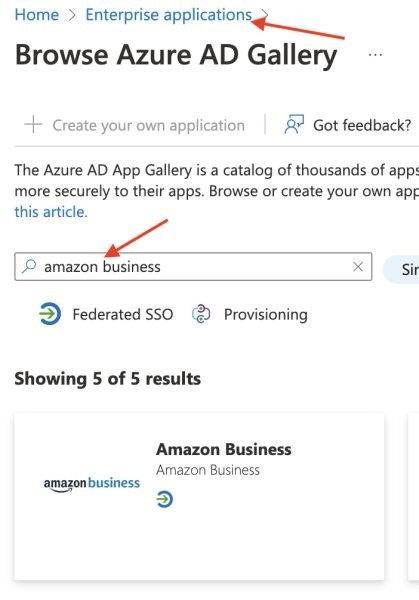
Once you have Amazon Business added to Azure AD’s list of SaaS apps, follow this tutorial to configure SSO for Amazon Business.
Azure AD for Amazon Business—and your entire enterprise
SSO integration gives your users secure, centralized access to Amazon Business. And as part of the new Microsoft Entra product family, Azure AD also safeguards your organization by enabling smarter, real-time access decisions for all identities across hybrid and multicloud environments. Safeguard your organization while connecting employees, customers, and partners to their apps, devices, and data—learn more.
Leverage advanced Azure AD capabilities
- Enable/disable SSO for specific users or groups according to business needs
- Increase employee productivity with seamless access to apps
- Empower customers to manage employee and guest identities’ authentication
- Enable stronger security through Security Assertion Markup Language (SAML) 2.0
- Enhance Zero Trust security with multifactor authentication and Conditional Access
- Support passwordless authentication
- Use the Microsoft Graph API to access cloud service resources
- Integrate with ServiceNow, Cisco AnyConnect, Salesforce, and other popular SaaS apps
Learn more about Microsoft identity:
- Get to know Microsoft Entra – a comprehensive identity and access product family
- Return to the Microsoft Entra (Azure AD) blog home
- Join the conversation on Twitter and LinkedIn
- Share product suggestions on the Entra (Azure AD) forum
Published on:
Learn moreRelated posts
Sync identities from Rippling to Microsoft Entra ID
Today, we’re thrilled to announce that customers using Rippling HCM can now automatically provision users to on-premises Active Directory and ...
Microsoft Entra ID Governance for government
I’m pleased to announce that as of November 1, 2024, Microsoft Entra ID Governance is available for federal agencies, state and local governme...
Update to security defaults
As part of the Secure Future Initiative, we’ve evolved our security approach to align with three security principles: secure by design, secure...
Meet Microsoft Entra at Ignite 2024: November 18-22
Microsoft Ignite is just around the corner, taking place from Monday, November 18, 2024 through Friday, November 22, 2024, in Chicago, Illinoi...
Manage Microsoft Entra ID role assignments with Microsoft Entra ID Governance
I’m excited to announce that we now support Microsoft Entra role assignments in Microsoft Entra ID Governance's Entitlement Management feature...
The latest enhancements in Microsoft Authenticator
Hi folks, I'm thrilled to announce three major Microsoft Entra ID advancements that will help you protect your users with phishing-resi...
Microsoft Security announcements and demos at Authenticate 2024
The Microsoft Security team is excited to connect with you next week at Authenticate 2024 Conference, taking place October 14 to 16 in Carlsba...
What's new in Microsoft Entra - September 2024
We’re excited to announce the general availability of Microsoft Entra Suite—one of the industry’s most comprehensive secure access solutions f...
Explore the key benefits of Microsoft Entra Private Access
The traditional network security models are becoming increasingly ineffective in a world where remote work and cloud services are the norm. Co...
Join us at the Microsoft Entra Suite Showcase!
This fall, we are bringing the Microsoft Entra Suite Showcase to cities worldwide. Join us to explore how our latest advancements in secure id...