
Public Preview: Strictly Enforce Location Policies with Continuous Access Evaluation
Greetings! At the recent Microsoft Secure event, we provided an early look at a new feature of conditional access which lets you strictly enforce location policies with continuous access evaluation (CAE), allowing you to rapidly invalidate tokens which violate your IP based location policies. Today, we’re delighted to announce this feature is in public preview.
Previously, in the event of an access token theft, attackers could take advantage of the refresh interval to replay the token, regardless of whether it fell outside the location range permitted by a conditional access policy. With our ability to strictly enforce location policies and CAE, CAE enabled applications like Exchange Online, SharePoint, Teams, and Microsoft Graph can now revoke tokens in near real-time in response to network change events noticed by the app – preventing stolen tokens from being replayed outside the trusted network.
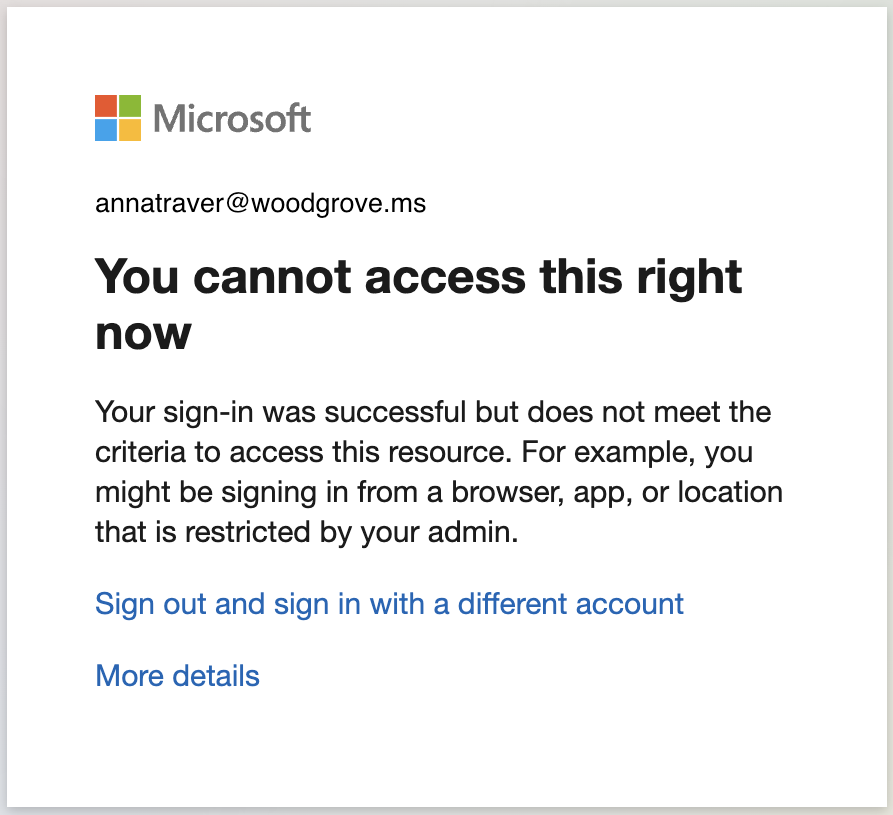
When a client’s access to a resource is blocked due to CAE’s strictly enforce location policies being triggered, the client will be blocked.
Here’s a brief overview of how you can enable this capability
Enabling Strict Location Enforcement:
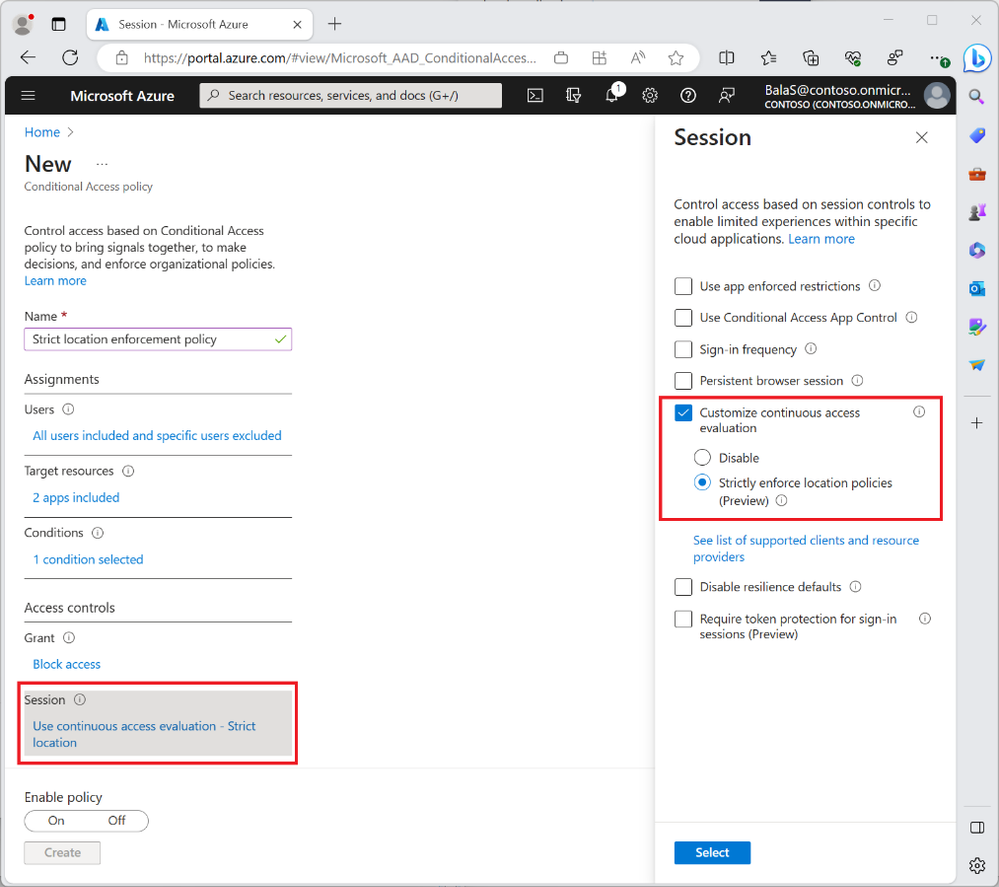
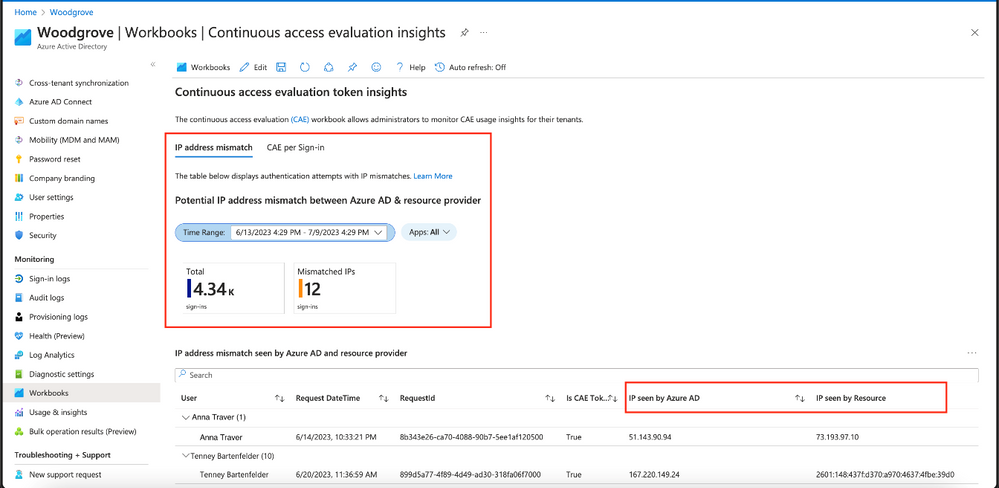
Before turning on strictly enforce location policies in CA you must ensure that all IP addresses from which your users can access Microsoft Entra ID and resource providers are included in the IP-based named locations policy. Otherwise, you may accidentally block your users. You can use the CAE Workbook or Sign-in logs to determine which IP addresses are seen by CAE resource providers.
CAE Workbook:
Sign-in Logs:

While troubleshooting and testing how to configure your strictly enforce location policies, use the filter “IP (seen by resource)” to find scenarios where strictly enforce location policies could be blocking users with an unallowed IP seen by the CAE resource provider.
Strictly enforce location policies is a step forward for session management. As you enable this feature, carefully consider including safe and trusted IP addresses from which your users access Microsoft Entra ID and resource providers to avoid unintentional blocks by leveraging the CAE Workbook and Sign-in logs for precise configuration.
Alex Weinert (@Alex_T_Weinert)
VP Director of Identity Security, Microsoft
Read more about Strict Location Policies and Continuous Access Evaluation:
- Continuous access evaluation strict location enforcement in Azure AD - Microsoft Entra | Microsoft Learn
- Continuous access evaluation in Azure AD - Microsoft Entra | Microsoft Docs
Learn more about Microsoft Entra:
- See recent Microsoft Entra blogs
- Dive into Microsoft Entra technical documentation
- Join the conversation on the Microsoft Entra discussion space and Twitter
- Learn more about Microsoft Security
Published on:
Learn moreRelated posts
Sync identities from Rippling to Microsoft Entra ID
Today, we’re thrilled to announce that customers using Rippling HCM can now automatically provision users to on-premises Active Directory and ...
Microsoft Entra ID Governance for government
I’m pleased to announce that as of November 1, 2024, Microsoft Entra ID Governance is available for federal agencies, state and local governme...
Update to security defaults
As part of the Secure Future Initiative, we’ve evolved our security approach to align with three security principles: secure by design, secure...
Meet Microsoft Entra at Ignite 2024: November 18-22
Microsoft Ignite is just around the corner, taking place from Monday, November 18, 2024 through Friday, November 22, 2024, in Chicago, Illinoi...
Manage Microsoft Entra ID role assignments with Microsoft Entra ID Governance
I’m excited to announce that we now support Microsoft Entra role assignments in Microsoft Entra ID Governance's Entitlement Management feature...
The latest enhancements in Microsoft Authenticator
Hi folks, I'm thrilled to announce three major Microsoft Entra ID advancements that will help you protect your users with phishing-resi...
Microsoft Security announcements and demos at Authenticate 2024
The Microsoft Security team is excited to connect with you next week at Authenticate 2024 Conference, taking place October 14 to 16 in Carlsba...
What's new in Microsoft Entra - September 2024
We’re excited to announce the general availability of Microsoft Entra Suite—one of the industry’s most comprehensive secure access solutions f...
Explore the key benefits of Microsoft Entra Private Access
The traditional network security models are becoming increasingly ineffective in a world where remote work and cloud services are the norm. Co...
Join us at the Microsoft Entra Suite Showcase!
This fall, we are bringing the Microsoft Entra Suite Showcase to cities worldwide. Join us to explore how our latest advancements in secure id...