
Ten Azure networking tips that may simplify your life

Hi,
Azure networking can sometimes give headaches. Here are a few tips which may make your life easier.
1. Private link effect - episode 1 - route tables
When enabling Azure Private Link for a given resource, say a Storage Account, you may end up with the following configuration

where you have routed all traffic to Azure Firewall (or an NVA) and noticed that the VM (or anything else) is directly connecting to the private endpoint, bypassing the firewall...This might come as a surprise to you but this is due to the fact that whenever you enable private link for a given resource, a direct (more specific) route is propagated to the underlying NICs. In the above example, Azure will write the 10.1.5.4/32 route to the NIC(s) of the VM pointing directly to the InterfaceEndpoint of the resource. Because this route is more specific than 0.0.0.0/0, the firewall will be bypassed. To overcome this, you have to write a /32 route to the subnet's route table to overwrite the one written by Azure, which can be itself challenging because of the 400 routes limit per route table. Microsoft wrote a good guidance on that topic.
2. Private link effect - episode 2 - route tables
Ok, now you think you understood private link routing, right? So what about this?
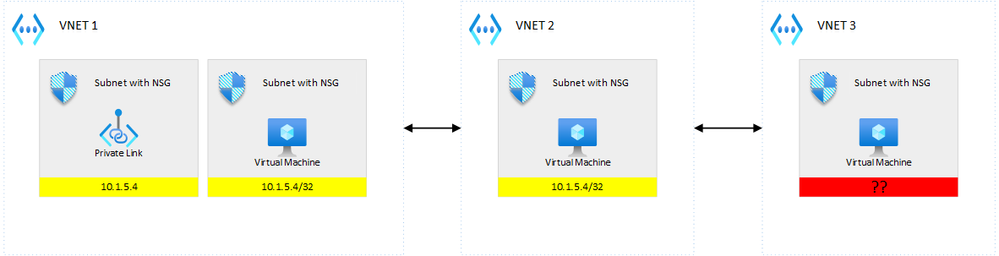
You thought Azure was pushing a route to underlying NICs but you realize that the VM in VNET 3 does not have such a route...Why is that? Well, it makes sense but you do not especially think about it. The reason why VNET 3's VM does not get the route is because VNET 3 is not peered with VNET 1. Because peering is non-transitive, writing such a route would anyway lead to a dead-end. So, if you had a 0.0.0.0/0 UDR on VNET 3's subnet, this would this time be correctly routed to the firewall...So as you guessed it, if you put a private endpoint in an intermediate VNET:

this time, the /32 route is propagated to all peered VNETs. Long story short, putting private endpoints into the hub, would propagate into every spoke, and thus, you'd better follow the guidance if you want to route that to the firewall.
3. Private link effect episode 3 - Network Security Groups
Ok great, that's for routing but fortunately, we don't have to worry about NSGs. Well...
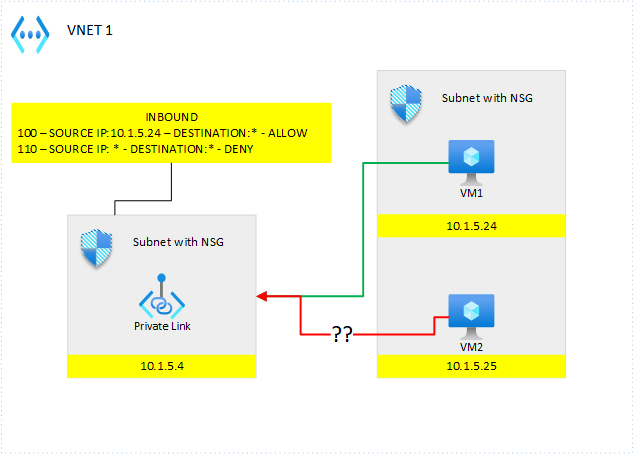
How come VM2 is able to connect to my private endpoint??? My deny all rule should have kicked in..What's going on here? Well, for the same reason as before, the InterfaceEndpoint is non-sensitive to NSGs. So, you must make sure to route things correctly to make sure, the InterfaceEndpoint is not used.
4. Private link effect episode 4 - forget the first 3 episodes?
Well, I'm sorry for you if you read the first 3 episodes because all of that is *almost* part of the past...but you will surely still likely see this for quite a while. Microsoft has revamped the way private link works, and there is a preview (UDR) and preview (NSG) available (not in all regions), which allows you to deal with private link traffic, like with any other type of traffic, but meanwhile, you'd better still understand how it currently works :).
5. Private link and outbound traffic
Repeat after me:
- Private link is inbound traffic only
- Private link is inbound traffic only
- Private...(well you got it, right?)
I still see a huge confusion with many folks about private link, where people think that enabling private link for an app service, APIM, etc. will give them access to the resources sitting in a given VNET. That is wrong, to gain access to such resources, you have to focus on outbound traffic, not inbound!
6. Private link and public traffic
Remember one rule of thumb: private link does not automatically deny public traffic for all services. It does for some but not for all. So, remember to always double-check that public traffic is indeed correctly denied.
7. The propagate gateway routes effect
Whenever you establish private connectivity between your datacenter and Azure, you will use the hub vnet to bridge both worlds. You're likely going to have (not mandatory) a VPN Gateway to establish a S2S and/or Expressroute connection. From there on, each spoke VNET should be able to connect to your on-premises systems and vice-versa. You, of course, want to make sure, traffic is routed through your firewall. If you encounter a different behavior (traffic directly flying from on-prem to spoke and vice versa), you're likely forgot to deactivate the "propagate gateway routes" property of the route table.

So, make sure to turn it off :).
8. The Kubenet effect of NSGs
Many companies struggle to decide whether they want to implement Azure CNI (now BYO CNI is available) or Kubenet for their AKS clusters. The main reason is the shortage of IP addresses. Kubenet is IP-friendly because it only allocates IPs to nodes, while CNI allocates one IP per pod, which results in many more consumed IPs. You can use Kubenet if you're willing to fully embrace a programmable network approach such as the use of Service Meshes and internet Network Policies (Calico for ex. which also works with Kubenet). However, if you plan to rely on Azure networking capabilities, such as using NSGs and the likes, then you'd better switch to CNI. Consider the following scenario:

where you want to share the same cluster for multiple tenants but you want to isolate tenants in their own node pool. So, in the above scenario, you only want system to be able to connect to tenants but tenant 1 and tenant 2 cannot talk together. You do not trust logical isolation (K8s network policies & service meshes) and want to rule this with Network Security Groups instead, or even combine both. Easy, you simply add the following inbound rules to tenant 1 & tenant 2's NSGs:
- Priority: 100 - source IP: 10.0.0.0/28 destination: * - ALLOW (let's skip the ports for sake of simplicity)
- Priority: 110 - source IP: * destination: * - DENY
So, that way, this should fly...Well, it appears that this won't fly at all. Why is that? Because Kubenet makes use of network address translation (NAT) to allocate POD CIDRs dynamically, and what the NSGs see are not the subnet ranges but the POD CIDRs..., which can change at any time. Indeed, Azure rewrites the route tables associated to the subnets to map POD CIDRs with nodes, whenever the cluster restarts or whenever a node gets added/removed to/from a node pool. Therefore, you can't predict how this allocation will be done, which defeats the use of NSGs to rule internal traffic. Of course, you could still use them to rule what comes from outside.
9. Localhost in APIM policies
Did you know that you can use the keyword localhost in APIM policies? If you have a set of APIs and want APIM to let them call each other while never leaving the boundaries of APIM itself (not resolve again the IP through the DNS), you can use localhost...
10. The troubleshooting tool
Whenever you encounter a network issue in Azure, I recommend you to use Network Watcher and more specifically, its next hop feature. It helped me already a few times figure out what was misconfigured.
Published on:
Learn moreRelated posts
This Month in Azure Static Web Apps | 09/2024
We are back with another edition of the Azure Static Web Apps Community! :party_popper: September was yet another month ...
GitHub Copilot for Azure: 6 Must-Try Features
As developers, we are constantly seeking tools that streamline our workflows and boost productivity. … Enter GitHub Copilot for Azure, now in ...
Responsible AI Mitigation Layers
Generative AI is increasingly being used in various kinds of systems to augment humans and infuse intelligent behavior into existing and new a...
Streamline Your Azure Workflow: Introducing GitHub Copilot for Azure in VS Code
I'm excited to announce the public preview of GitHub Copilot for Azure - a new addition to your toolkit that seamlessly integrates with G...
Build Intelligent Apps Code-First with Prompty and Azure AI
Building Generative AI applications can feel daunting for traditional app developers. What does the end-to-end applicati...
Certificación AI-900 (Fundamentos de IA) con Chicas en IA
La inteligencia artificial ha llegado para quedarse, ¡y más aún con la revolucionaria IA generativa! Para ayudar a los profesionales a especia...
Get certified with Learn Live GitHub series!
GitHub Universe is coming, and Microsoft and GitHub are partnering to offer a new special Learn Live series in Brazilian Portuguese, English a...
Certifícate con Learn Live GitHub en Español
Microsoft y GitHub se han unido para ofrecer una nueva serie especial de Learn Live en inglés y español: GitHub 2024. Del 10 al 24 de Octubre,...
Evaluating generative AI: Best practices for developers
As a developer working with generative AI, you've likely marveled at the impressive outputs your models can produce. But how do you ensure the...
Introducing Azure Product Retirement Livestreams
The Azure Retirements team, in collaboration with key partner groups, is excited t...