
Multi-Column Distribution for Dedicated SQL pools is now GA!

We are excited to announce that Multi-Column Distribution (MCD) for Azure Synapse Dedicated SQL pools is now Generally Available in the latest DW release! MCD is highly desirable for easing migrations, promotes faster query performance and reduces data skew.
To get the latest DW release, pause and resume your instance or wait for your maintenance window to start using MCD.

What is a hash distributed table?
Dedicated SQL pools in Azure Synapse Analytics distribute table rows across 60 distributions. Data from these distributions is abstracted to be viewed as a single table. Hash-distribution of one of the algorithms to distribute data improving query performance on large fact tables.
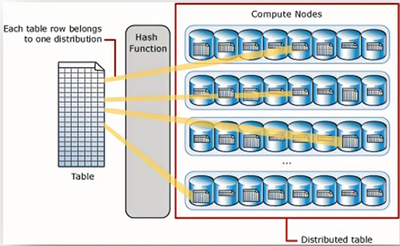
To learn more about data distribution read Distributed tables design guidance - Azure Synapse Analytics.
What is Multi-Column Distributed Tables?

You can choose to distribute data on multiple columns to balance the data distribution in your tables and reduce data movement during query execution. Choose MCD columns based on the query structures that are common in your workloads and are causing either base table or intermediate query execution data skew. For example, GROUP BY and/or JOIN on multiple columns can cause data skew when distributed on single column.
Multi-Column distribution will allow you to choose up to eight columns for distribution. This not only reduces the data skew over time but can also improve query performance in some cases.
How can you create Multi-Column Distributed Objects?
To enable MCD, change the database's compatibility level to 50 with this command. For more information on setting the database compatibility level, see ALTER DATABSE SCOPED CONFIGURATION.
ALTER DATABASE SCOPED CONFIGURATION SET DW_COMPATIBILITY_LEVEL = 50;
To load data into an MCD table, use CTAS statement and the data source needs to be Synapse SQL tables.
Multi-Column Distribution is supported with the following commands:
For example:
How can you check which columns are set as Distribution Columns in an Object?
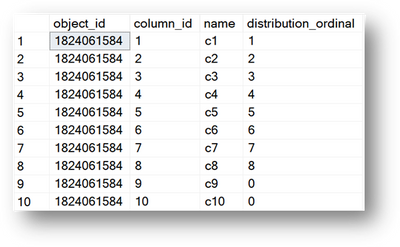
To check if a column is a distribution column, use sys.pdw_column_distribution_properties.
Distribution ordinal (1-based),
- Ordinal = 0: not a distribution
- Ordinal >= 1: distribution columns
You can use the following script to determine distribution columns for an object:
The image below is what the result will look like. If the value in the distribution_ordinal column is >= 1, the column is a distribution column.
Known limitations
- DacFx support for MCD tables will be added soon.
- Currently we only support two data loading paths to load data into multi-column distribution tables:
|
Loading option |
Supported |
|
CTAS from regular Azure Synapse SQL table |
Yes |
|
COPY statement using polybase |
No |
|
CTAS from External Table |
No |
|
Insert from External Table |
No |
Thanks for reading and hope you enjoy using Multi-Column Distribution in Azure Synapse Dedicated SQL pools!
Reach out to me via Twitter @maariyali or LinkedIn at https://www.linkedin.com/in/alimariya
Mariya Ali
Product Manager
Azure Synapse Analytics
Published on:
Learn moreRelated posts
We're moving!
We’re moving to the Analytics on Azure Tech Community! All new Azure Synapse Analytics content will be published there. In the next few days a...
Upgrade to Azure Synapse runtimes for Apache Spark 3.4 & previous runtimes deprecation
It is important to stay ahead of the curve and keep services up to date. That's why we encourage all Azure Synapse customers with Apache ...
ADF\Synapse Analytics - Replace Columns names using Rule based mapping in Mapping data flows
In real time, the column names from source might not be uniform, some columns will have a space in it, some other columns will not. For exampl...
Interpreting Script activity output json with Azure Data Factory\Synapse analytics
Script activity in Azure Data Factory\ Synapse analytics is very helpful to run queries against data sources mentioned here in this document.&...
Synapse Connectivity Series Part #4 - Advanced network troubleshooting and network trace analysis
Continuing the series of this blog posts I would like to go more advanced on troubleshooting connectivity issues. I would like to thank also&n...
Boost your CICD automation for Synapse SQL Serverless by taking advantage of SSDT and SqlPackage CLI
Introduction Azure Synapse Analytics Serverless SQL is a query service mostly used over the data in your data lake, for data discovery,...
Metadata-Based Ingestion in Synapse with Delta Lake
Overview The crucial first step in any ETL (extract, transform, load) process or data engineering program is ingestion, w...
Missing Fields Added to Dedicated SQL pool Diagnostic Settings Logs
Over the past year, customers have informed the team there were a set of key columns missing in the standalone Dedicated SQL pools (formerly S...
Using Azure DevOps with Synapse Workspaces to create hot fixes in production environments
Have you ever deployed a release to production only to find out a bug has escaped your testing process and now users are being severely impact...
Azure Synapse MVP Corner - March 2023
About this blog series Microsoft Most Valuable Professionals, or MVPs, are technology experts who passionately share their knowledge with the ...