
Expansion of FIDO standard and new updates for Microsoft passwordless solutions

Howdy folks,
Happy World Password Day! Today, I’m super excited to share some great news with you: Together, with the FIDO Alliance and other major platforms, Microsoft has announced support for the expansion of a common passwordless standard created by the FIDO Alliance and the World Wide Web consortium. These multi-device FIDO credentials, sometimes referred to as passkeys, represent a monumental step toward a world without passwords. We also have some great updates coming to our passwordless solutions in Azure Active Directory (Azure AD) and Windows that will expand passwordless to more use cases.
Passwords have never been less adequate for protecting our digital lives. As Vasu Jakkal reported earlier today, there are over 921 password attacks every second. Lots of attackers want your password and will keep trying to steal it from you. It’s better for everyone if we just cut off their supply.
Replacing passwords with passkeys
Passkeys are a safer, faster, easier replacement for your password. With passkeys, you can sign in to any supported website or application by simply verifying your face, fingerprint or using a device PIN. Passkeys are fast, phish-resistant, and will be supported across leading devices and platforms. Your biometric information never leaves the device and passkeys can even be synced across devices on the same platform – so you don’t need to enroll each device and you’re protected in case you upgrade or lose your device. You can use Windows Hello today to sign in to any site that supports passkeys, and in the near future, you’ll be able to sign in to your Microsoft account with a passkey from an Apple or Google device.
We enthusiastically encourage website owners and app developers to join Microsoft, Apple, Google, and the FIDO Alliance to support passkeys and help realize our vision of a truly passwordless world.

Going passwordless
We’re proud to have been one of the earliest supporters of the FIDO standards, including FIDO2 certification for Windows Hello. We’re thrilled to evolve the FIDO standards ecosystem to support passkeys and that passwordless authentication continues to gain momentum.
Since we started introducing passwordless sign-in nearly 5 years ago, the number of people across Microsoft services signing in each month without using their password has reached more than 240 million. And in the last six months, over 330,000 people have taken the next step of removing the password from their Microsoft Account. After all, you’re completely safe from password-based attacks if you don’t have one.
Today, we’re also announcing new capabilities that will make it easier for enterprises to go completely passwordless:
Passwordless for Windows 365, Azure Virtual Desktop, and Virtual Desktop Infrastructure
Now that remote or hybrid work is the new norm, lots more people are using a remote or virtualized desktop to get their work done. And now, we’ve added passwordless support for Windows 365, Azure Virtual Desktop, and Virtual Desktop Infrastructure. This is currently in preview with Windows 11 Insiders, and is on the way for Windows 10 as well.
Windows Hello for Business Cloud Trust
Windows Hello for Business Cloud Trust simplifies the deployment experience of Windows Hello for hybrid environments. This new deployment model removes previous requirements for public key infrastructure (PKI) and syncing public keys between Azure AD and on-premises domain controllers. This improvement eliminates delays between users provisioning Windows Hello for Business and being able to authenticate and makes it easier than ever to use Windows Hello for Business for accessing on-premises resources and applications. Cloud Trust is now available in preview for Windows 10 21H2 and Windows 11 21H2.
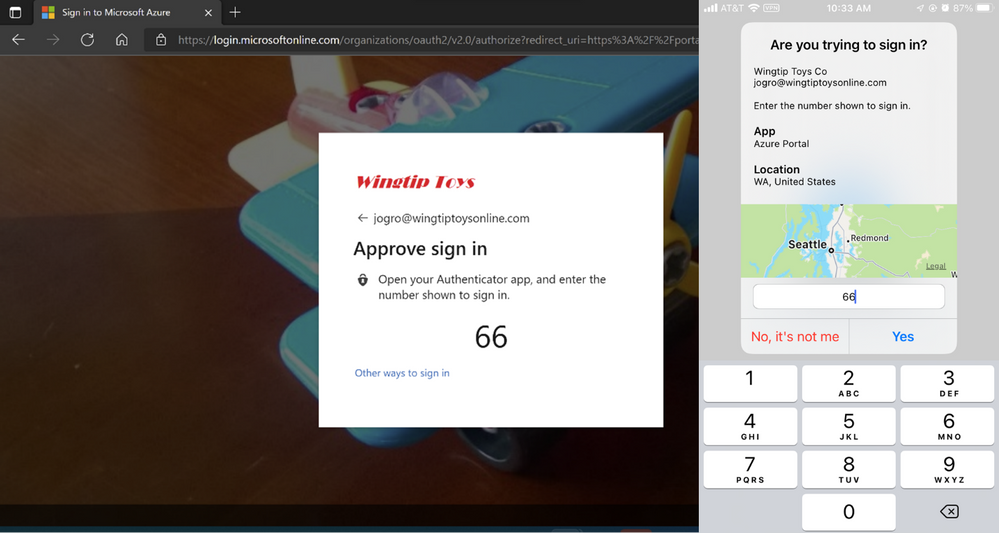
Multiple passwordless accounts in Microsoft Authenticator
When we first introduced passwordless sign-in for Azure AD (work or school accounts), Microsoft Authenticator could only support one passwordless account at a time. Now that limitation has been removed and you can have as many as you want. iOS users will start to see this capability later this month and the feature will be available on Android afterwards.
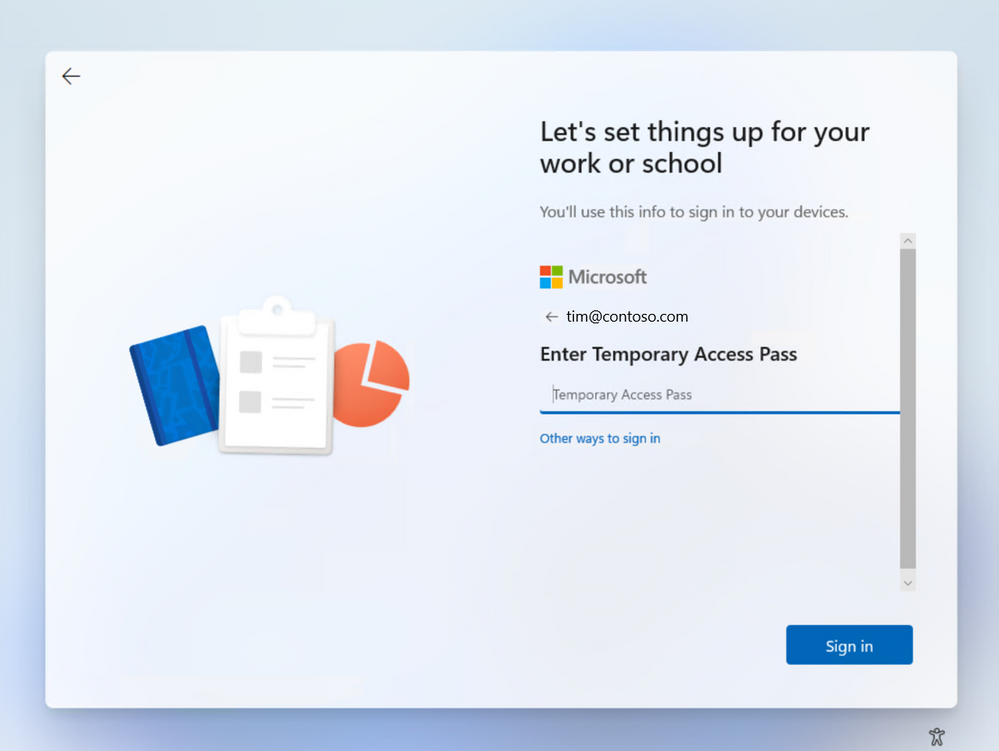
Temporary Access Pass in Azure AD
Temporary Access Pass in Azure AD, a time-limited passcode, has been a huge hit with enterprises since the public preview, and we’ve been adding more ways to use it as we prepare to release the feature this summer. Lots of customers have told us they want to distribute Temporary Access Passes instead of passwords for setting up new Windows devices. You’ll be able to use a Temporary Access Pass to sign in for the first time, to configure Windows Hello, and to join a device to Azure AD. This update will be available next month.
Customers implementing passwordless today
We already have several great examples of large Microsoft customers implementing passwordless solutions, including Avanade, who went passwordless with help from Feitian to protect their clients’ data against security breaches. Amedisys, a home healthcare and hospice care provider, went passwordless to keep patient personal information secured. Both organizations are committed to using passwordless authentication not only to strengthen security, but also to make the sign-in experience easier for end users.
We’d love to hear your feedback, so please leave a comment, check out the documentation, and visit aka.ms/gopasswordless for more information.
Best regards,
Alex Simons (Twitter: @Alex_A_Simons)
Corporate Vice President of Program Management
Microsoft Identity Division
Learn more about Microsoft identity:
- Return to the Azure Active Directory Identity blog home
- Join the conversation on Twitter and LinkedIn
- Share product suggestions on the Azure Feedback Forum
Published on:
Learn moreRelated posts
Sync identities from Rippling to Microsoft Entra ID
Today, we’re thrilled to announce that customers using Rippling HCM can now automatically provision users to on-premises Active Directory and ...
Microsoft Entra ID Governance for government
I’m pleased to announce that as of November 1, 2024, Microsoft Entra ID Governance is available for federal agencies, state and local governme...
Update to security defaults
As part of the Secure Future Initiative, we’ve evolved our security approach to align with three security principles: secure by design, secure...
Meet Microsoft Entra at Ignite 2024: November 18-22
Microsoft Ignite is just around the corner, taking place from Monday, November 18, 2024 through Friday, November 22, 2024, in Chicago, Illinoi...
Manage Microsoft Entra ID role assignments with Microsoft Entra ID Governance
I’m excited to announce that we now support Microsoft Entra role assignments in Microsoft Entra ID Governance's Entitlement Management feature...
The latest enhancements in Microsoft Authenticator
Hi folks, I'm thrilled to announce three major Microsoft Entra ID advancements that will help you protect your users with phishing-resi...
Microsoft Security announcements and demos at Authenticate 2024
The Microsoft Security team is excited to connect with you next week at Authenticate 2024 Conference, taking place October 14 to 16 in Carlsba...
What's new in Microsoft Entra - September 2024
We’re excited to announce the general availability of Microsoft Entra Suite—one of the industry’s most comprehensive secure access solutions f...
Explore the key benefits of Microsoft Entra Private Access
The traditional network security models are becoming increasingly ineffective in a world where remote work and cloud services are the norm. Co...
Join us at the Microsoft Entra Suite Showcase!
This fall, we are bringing the Microsoft Entra Suite Showcase to cities worldwide. Join us to explore how our latest advancements in secure id...