
How to Migrate Schema Registry from Confluent to Azure Event Hub

In many event streaming and messaging scenarios, the event or message payload contains structured data. Schema-driven formats such as Apache Avro are often used to serialize or deserialize such structured data. As we know, Confluent is a general platform that we can use Confluent Registry Schema to implement this functionality. Meanwhile, Azure Event Hub supports Azure Schema Registry as well.
The target audience for this blog is the developers who were using Confluent Schema Registry and planning to migrate Confluent Schema Registry to Azure Schema Registry in Azure Event hub. This blog won’t introduce common basic Confluent/ Kafka client implementation mostly. If you’d like to integrate KafkaProducer into your event-driven application, you could learn from this tutorial. Instead, this blog points to showing the key steps/differences while migrating Schema Registry from Confluent to Azure Event Hub.
Overview:
Confluent Schema Registry: https://docs.confluent.io/platform/current/schema-registry/schema_registry_tutorial.html#sr-benefits
Apache Kafka producers write data to Kafka topics and Kafka consumers read data from Kafka topics. There is an implicit “contract” that producers write data with a schema that can be read by consumers, even as producers and consumers evolve their schemas. Schema Registry helps ensure that this contract is met with compatibility checks.
Azure Schema Registry: https://docs.microsoft.com/en-us/azure/event-hubs/schema-registry-overview
An event producer uses a schema to serialize event payload and publish it to an event broker such as Event Hubs. Event consumers read event payload from the broker and de-serialize it using the same schema. So, both producers and consumers can validate the integrity of the data with the same schema.
Confluent Schema Registry:
1.Configuration
We could refer to the sample configuration file from this link.
2.Parameter definition and Initialize Kafka client
It loads the above configuration file automatically and put all of properties into props object.
3.Authentication:
As observed above, Confluent client is using basic auth to connect with target Schema Registry. You could refer to the Step3 from this guidance to generate the API KEY and API Secret.
4.Produce event
Here, the producer supports two basic types of Avro records a specific code-generated class, or a generic record.
Using a specific code-generated class requires you to define and compile a Java class for your schema, but it easier to work with in your code.
However, in other scenarios where you need to work dynamically with data of any type and do not have Java classes for your record types, use GenericRecord <streams-data-avro>.
Migration from Confluent to Azure Event Hub
There isn’t direct way or tool to migrate schema registry to azure schema registry from external server. The azure schema registry needs to be recreated into schema group in the Azure Event Hub namespace.
Before moving forward, you need to create the Schema Registry in your event hub namespace over azure portal.
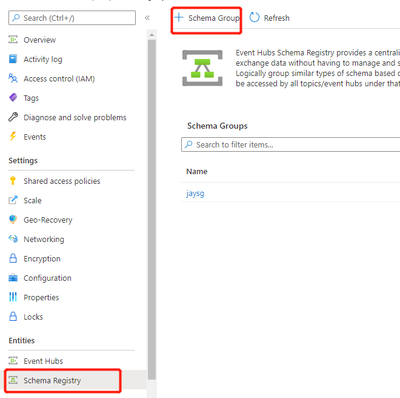
Generally, we use Kafka-Integrated Apache Avro serializers and deserializers to utilize Registry Schema as well. The good news is we can use this Azure Registry Schema for Kafka SDK to use Registry Schema which is compatible with native Kafka-Integrated client mostly. The most of code which is used to utilize Confluent Registry Schema can be reused. However, please kindly notice following key points and differences.
1.Configuration
Please refer to the following configuration which is retrieved from this link in the same repository.
The following Event Hub configurations are required:
bootstrap.servers – Event Hub namespace
sasl.jaas.config - JAAS configuration for SASL - Event Hub namespace, SAS key name, and SAS key value should be replaced
topic - Event Hub topic for produce and consume operations
The following Schema Registry configurations are required:
schema.registry.url - Event Hub namespace with Schema Registry enabled.
schema.group - Schema Registry group with serialization type 'Avro' (must be created before the application runs)
use.managed.identity.credential - indicates that MSI credentials should be used, should be used for MSI-enabled VM
tenant.id - sets the tenant ID of the application
client.id - sets the client ID of the application
client.secret - sets the client secret for authentication
2.Parameter definition
Please refer to the snippet of sample code from App.java.
The value of schema.registry.url does not have to be the same as the accessed event hub namespace which is set in the property bootstrap.servers. That means we can use the azure schema registry from different event hub namespace in another azure subscription. We only need to make sure that we have sufficient permission to access target schema registry via AAD credentials.
3.Authentification
As we mentioned above, we need to make sure that we have permission to access schema registry. It’s different with the basic auth way in the Confluent. When accessing the azure schema registry programmatically, we need to register an application in Azure Active Directory (Azure AD) and add the security principal of the application to one of the Azure role-based access control (Azure RBAC) roles:

If you want to know the instructions on creating registering an application using the Azure portal, see Register an app with Azure AD. Then you could note down the client ID (application ID), tenant ID, and the secret to use in the above configuration file: tenant.id, client.id and client.secret.
We need to create ToeknCredential via Azure AD SDK to acquire access token to connect with target Scheme Registry in Event Hub namespace. Please refer to sample code below.
4.Initialize Kafka client
The following sample code indicates that it’s built based on native Kafka client SDK. If your previous code is based on native Kafka client, they should be compatible so that you don’t need to change the properties definition except the following credential section. However, if your previous code is packed in a high level against native Kafka API, you might need to refer to this repository to rebuild the application code.
5.Produce event
Azure Schema Registry supports two basic types of Avro records which is similar to Confluent. You could use specific Jave module class above. Or you could use generic record definition via following code.
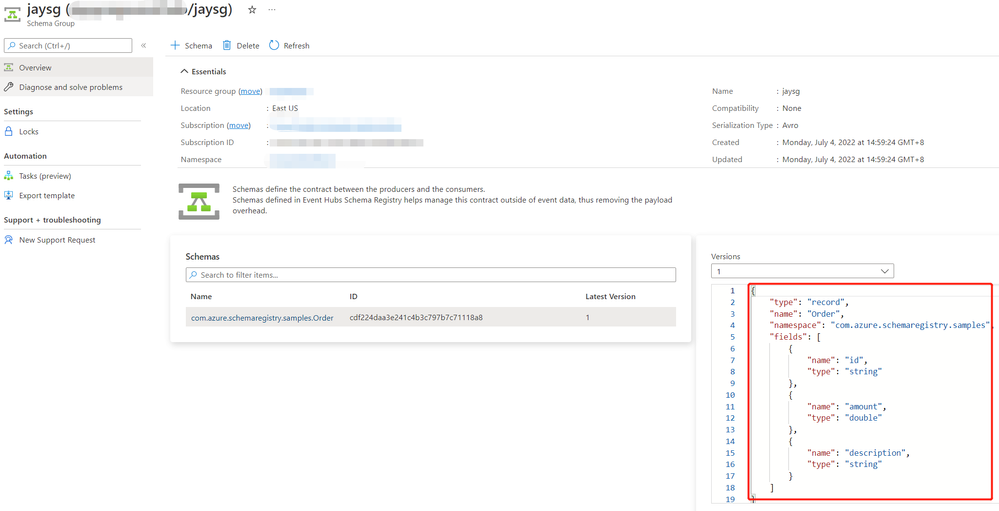
After running the code successfully, you could verify the Schema pattern from azure portal. If you encounter 401 unauthorized error, please grant Schema Registry Contributor (or Reader) RBAC role to your login account.
Published on:
Learn moreRelated posts
Azure Storage - TLS 1.0 and 1.1 retirement
Overview TLS 1.0 and 1.1 retirement on Azure Storage was previously announced for Nov 1st, 2024, and it was postponed recently to 1 year later...
Efficient Management of Append and Page Blobs Using Azure Storage Actions
Overview In Azure Storage, Blob Lifecycle Management (BLM) allows you to automate the management of your data based on rules defined by...
[Azure AI Search] Internal Server Error when creating CMK encrypted objects
Scenario Customers follow the Microsoft doc to create CMK encrypted objects (data source, index etc.), but get the 500 Internal Serv...
Optimizing Azure Table Storage: Automated Data Cleanup using a PowerShell script with Azure Automate
Scenario This blog’s aim is to manage Table Storage data efficiently. Imagine you have a large Azure Table Storage that accumulates logs from ...
Optimizing Azure Table Storage: Automated Data Clean-up using a PowerShell script with Azure Automat
Scenario This blog’s aim is to manage Table Storage data efficiently. Imagine you have a large Azure Table Storage that accumulates logs from ...
Restoring Soft-Deleted Blobs with multithreading in Azure Storage Using C#
Blob soft delete is an essential feature that safeguards your data against accidental deletions or overwrites. By retaining deleted data for a...
Performing simple Azure Table Storage REST API operations using curl command.
The blog provides guidance to perform simple Table Storage REST API operations such as Create table, Delete Table, Insert entity, Delete entit...
Bulk delete all the old jobs from the batch account
Deleting a Job also deletes all Tasks that are part of that Job, and all Job statistics. This also overrides the retention period for Task dat...
Utilizing Azure Storage and Runbooks for scheduled automated backups of Azure SQL Databases
In this article, we are going to provide detailed steps to create a scheduled Azure SQL Database backup to storage account using automation. T...
[Azure Service Bus] JMS messages getting dead-lettered
The article discusses a problem where numerous messages end up in the dead letter queue (DLQ) when the JMS service bus consumer connects to th...