
Updates to Azure AD Conditional Access report-only mode, insights & reporting, and troubleshooting

Howdy folks,
As organizations adjust to employees working from home, they’ve told us their priority is enabling employees to work remotely while maintaining security, productivity, and collaboration. Azure AD Conditional Access can ensure that the right people have the access to resources they need from wherever they are. Earlier this month, we answered some frequently asked questions about using Azure AD Conditional Access to secure remote access, and today we’re announcing three updates to help you understand the impact of Azure AD Conditional Access policies from testing through deployment.
- Report-only mode is now generally available
- Insights and reporting workbook is now generally available
- New policy details blade is now in public preview
Report-only mode is generally available
Report-only mode for Azure AD Conditional Access lets you evaluate the result of a policy without enforcing access controls. You can test report-only policies across your organization and understand their impact before enabling them, making deployment safer and easier. Over the past few months, we’ve seen strong adoption of report-only mode—over 26M users are already in scope of a report-only policy. With the announcement today, new Azure AD Conditional Access policies will be created in report-only mode by default. This means you can monitor the impact of your policies from the moment they’re created. And for those of you who use the MS Graph APIs, you can manage report-only policies programmatically as well.
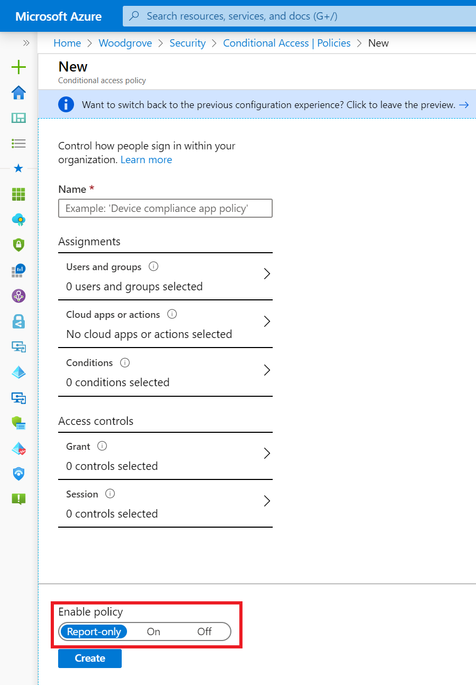
For example, suppose you want to block legacy authentication across your organization but you’re not sure who will be impacted. Simply create a new report-only policy that blocks access to legacy client apps following this step-by-step tutorial. Once you save the policy, the policy will be evaluated for each sign-in and report the result in the sign-in logs without impacting users.
Azure AD Conditional Access insights and reporting workbook is generally available
The insights and reporting workbook gives admins a summary view of Azure AD Conditional Access in their tenant. With the capability to select an individual policy, admins can better understand what each policy does and monitor any changes in real time. The workbook streams data stored in Azure Monitor, which you can set up in a few minutes following these instructions. To make the dashboard more discoverable, we’ve moved it to the new insights and reporting tab within the Azure AD Conditional Access menu.
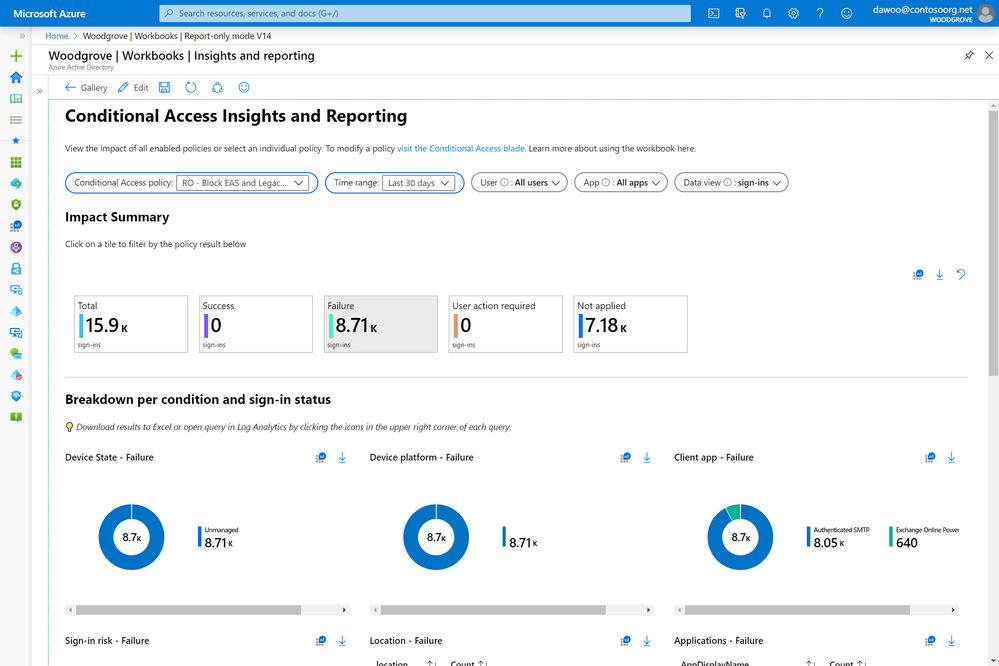
Using the dashboard, you can see the impact of Azure AD Conditional Access policies over the selected time period. You can even drill into the successes and failures and see the breakdown by device platform, device state, location, client app, sign-in risk, and application. We hope that this aggregate view will help you monitor your policies and understand which policies are applying during sign-in.
With the previous example of blocking legacy authentication, you can use the insights and reporting workbook to see the number of legacy authentication sign-ins that would be blocked by your policy. Clicking on the Failure tile will even let you drill down to see a summary of which client apps were used.
New policy details blade for Conditional Access troubleshooting in public preview
Lastly, we’ve heard from Azure AD support that customers want to know exactly why a policy resulted in success, failure, or wasn’t applied. The new policy details blade displays which conditions and access controls were satisfied during sign-in. This granular information makes it easy to troubleshoot failures and re-configure policies if necessary.

In this example, we can see that the report-only policy “Block access outside trusted locations” applied to Lisa Smith’s sign-in because she satisfied the user, application, and location conditions in the policy when signing in from Bellevue. Therefore, if the policy had been enabled, Lisa would have been denied access to the MyApps portal since the policy’s grant controls were configured to block access.
As always, we’d love to hear any feedback or suggestions you may have. Please let us know what you think in the comments below or on the Azure AD feedback forum. You can also send an email to [email protected].
Best regards,
Alex Simons (Twitter: @Alex_A_Simons)
Corporate Vice President of Program Management
Microsoft Identity Division
Published on:
Learn moreRelated posts
Sync identities from Rippling to Microsoft Entra ID
Today, we’re thrilled to announce that customers using Rippling HCM can now automatically provision users to on-premises Active Directory and ...
Microsoft Entra ID Governance for government
I’m pleased to announce that as of November 1, 2024, Microsoft Entra ID Governance is available for federal agencies, state and local governme...
Update to security defaults
As part of the Secure Future Initiative, we’ve evolved our security approach to align with three security principles: secure by design, secure...
Meet Microsoft Entra at Ignite 2024: November 18-22
Microsoft Ignite is just around the corner, taking place from Monday, November 18, 2024 through Friday, November 22, 2024, in Chicago, Illinoi...
Manage Microsoft Entra ID role assignments with Microsoft Entra ID Governance
I’m excited to announce that we now support Microsoft Entra role assignments in Microsoft Entra ID Governance's Entitlement Management feature...
The latest enhancements in Microsoft Authenticator
Hi folks, I'm thrilled to announce three major Microsoft Entra ID advancements that will help you protect your users with phishing-resi...
Microsoft Security announcements and demos at Authenticate 2024
The Microsoft Security team is excited to connect with you next week at Authenticate 2024 Conference, taking place October 14 to 16 in Carlsba...
What's new in Microsoft Entra - September 2024
We’re excited to announce the general availability of Microsoft Entra Suite—one of the industry’s most comprehensive secure access solutions f...
Explore the key benefits of Microsoft Entra Private Access
The traditional network security models are becoming increasingly ineffective in a world where remote work and cloud services are the norm. Co...
Join us at the Microsoft Entra Suite Showcase!
This fall, we are bringing the Microsoft Entra Suite Showcase to cities worldwide. Join us to explore how our latest advancements in secure id...