
Microsoft Azure Cosmos DB for PostgreSQL w/ React Quickstart

Cosmos DB for PostgreSQL and React
Introduction
I’m so excited to ‘introduce’ you to a new addition to Azure Cosmos DB service. At Ignite 2022, Microsoft made an announcement for PostgreSQL in CosmosDB!
In this blog we will show you how to connect your Front end app to the Azure Cosmos DB for PostgreSQL service in Azure.
This is the beginning of a larger series so not all the features you see on the app are complete. We will walk this journey together as we add more production level of deployment into the repo. (Aka. Key-Vault for secrets, Managed Identity and Infrastructure As Code. :))
What is Azure Cosmos DB for PostgreSQL?
Azure Cosmos DB - is a fast, distributed NoSQL database. Scalable with 99.999% availability! (Get started)
PostgreSQL - Here are some reasons why you might want to use PostgreSQL –
- Free and Open-Source
- Runs on wide range of Operating Systems (But this could be a moot point Azure Cosmos DB for PostgreSQL will be hosted on the cloud)
- Many data types (eg. Boolean, range)
- More info here
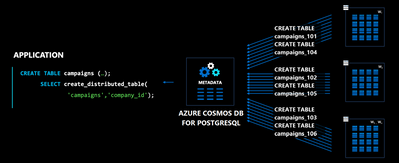
Azure Cosmos DB for PostgreSQL has combined these two technologies and extended with Citus extension to bring distributed tables for PostgreSQL. Combining Azure Cosmos DB’s high scalability and Citus’s distributed tables allows for maximum performance with PostgreSQL.
Let’s Get Started!
Azure
Let's go to the Azure Portal and click ‘+ Create a resource’. Then search for ‘Azure Cosmos DB’
Once you select Azure Cosmos DB you will see these options:

Select ‘Azure Cosmos DB for PostgreSQL’

Choose your ‘Cluster name’ and ‘Password’. (You will use these values in the next step.)
Code
Go and clone/fork this repo: GitHub - i-am-dan/CosmosDb-PostgreSQL-Quickstart - Repo contains both the front-end and the back-end.
Once you clone the repo, go to ‘Server/db/citus.js’
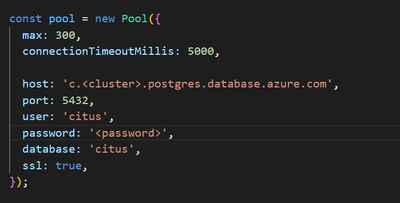
Please replace ‘<cluster>’ and ‘<password>’ with the values you put in from the previous step.
Go to your favorite cli tool then go to the React folder and run:
You will see:

Now go to the Server folder and run:
‘Reset’ will create the table of Pharmacy in the Citus Database with seed data.
‘Load’ will load the dataset into the view.
‘Delete All’ will drop the table.
(I haven’t worked on the ‘Add Pharmacy’ and ‘Delete Selected’, YET, so they are disabled… lol)
It’s easy as that! You’ve created your first React app with Azure Cosmos DB for PostgreSQL.
I hope this set a good foundation for anyone to go start making something awesome!
|
Side note: Please be advised that Azure Cosmos DB’s cost could go up fast if you want to really leverage the full power of it’s scalability and multi-region support. (We always recommend using the Azure Pricing Calculator to get a transparent estimate) |
Published on:
Learn moreRelated posts
This Month in Azure Static Web Apps | 09/2024
We are back with another edition of the Azure Static Web Apps Community! :party_popper: September was yet another month ...
GitHub Copilot for Azure: 6 Must-Try Features
As developers, we are constantly seeking tools that streamline our workflows and boost productivity. … Enter GitHub Copilot for Azure, now in ...
Responsible AI Mitigation Layers
Generative AI is increasingly being used in various kinds of systems to augment humans and infuse intelligent behavior into existing and new a...
Streamline Your Azure Workflow: Introducing GitHub Copilot for Azure in VS Code
I'm excited to announce the public preview of GitHub Copilot for Azure - a new addition to your toolkit that seamlessly integrates with G...
Build Intelligent Apps Code-First with Prompty and Azure AI
Building Generative AI applications can feel daunting for traditional app developers. What does the end-to-end applicati...
Certificación AI-900 (Fundamentos de IA) con Chicas en IA
La inteligencia artificial ha llegado para quedarse, ¡y más aún con la revolucionaria IA generativa! Para ayudar a los profesionales a especia...
Get certified with Learn Live GitHub series!
GitHub Universe is coming, and Microsoft and GitHub are partnering to offer a new special Learn Live series in Brazilian Portuguese, English a...
Certifícate con Learn Live GitHub en Español
Microsoft y GitHub se han unido para ofrecer una nueva serie especial de Learn Live en inglés y español: GitHub 2024. Del 10 al 24 de Octubre,...
Evaluating generative AI: Best practices for developers
As a developer working with generative AI, you've likely marveled at the impressive outputs your models can produce. But how do you ensure the...
Introducing Azure Product Retirement Livestreams
The Azure Retirements team, in collaboration with key partner groups, is excited t...