
Automated Detection and Response for Azure WAF with Sentinel

Introduction:
Web applications are increasingly targeted by malicious attacks that exploit commonly known vulnerabilities. SQL injection and Cross-site scripting are among the most common attacks. Preventing such attacks in application code is challenging. It can require rigorous maintenance, patching, and monitoring at multiple layers of the application topology. A WAF solution can react to a security threat faster by centrally patching a known vulnerability, instead of securing each individual web application. Azure Web Application Firewall (WAF) is a cloud-native service that protects web apps from common web-hacking techniques. This service can be deployed in a matter of minutes to get complete visibility into the web application traffic and block malicious web attacks.
Integrating Azure WAF with Microsoft Sentinel (Cloud Native SIEM/SOAR solution) for automated detection and response to threats/incidents/alerts would be an added advantage and reduces the manual intervention needed to update the WAF policy. In this blog, we will discuss about WAF detection templates in Sentinel, deploying a Playbook, and configuring the detection and response in Sentinel using these templates and the Playbook.
SQLi and XSS WAF Detection templates:
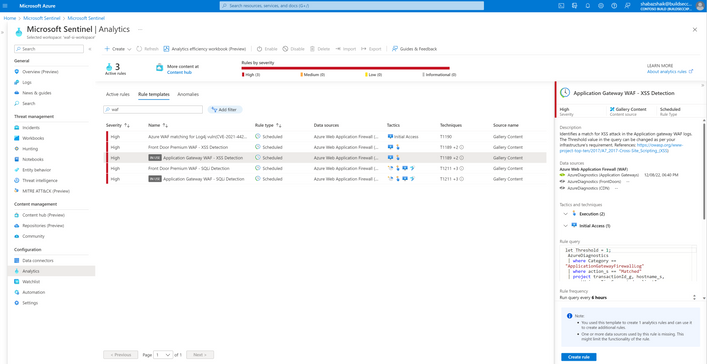
We now have built in detection query templates for SQLi and XSS attacks in Sentinel for Azure WAF. If we navigate to the respective Log Analytics workspace in Sentinel, we can find these templates under the Analytics tab in the Configuration section as shown below. By using these templates, we can create analytic rules that detect specific type of attack patterns in the WAF logs and further notify the security analyst by creating an incident. The automation section of these rules can help us respond to this incident by blocking the source IP of the attacker on the WAF Policy which in turn stops subsequent attacks upfront from these source Ips. We are continuously working to include additional Detection Templates for more detection and response scenarios.

Playbook Deployment:
A Sentinel Playbook ‘Block-IPAzureWAF’ gets executed in response to WAF Incidents. The goal of this Playbook is to create or modify a custom rule in a WAF Policy to block requests from a certain IP address. This is accomplished using the Azure REST API. This Playbook can be deployed from our GitHub repository. Playbook Link

i. Logic Implemented:
The Playbook template needs the following inputs during the deployment:
- User Id to authorize the Api connection
- App Gateway Resource ID
- Front Door Resource ID
This Playbook can work with both App Gateway and Front door WAF Policies in the following scenarios.
- If only App Gateway Resource is provided, the WAF policy related to the specified App Gateway will be updated.
- If only Front Door Resource is provided, the WAF policy related to the specified Front Door will be updated.
- If both App Gateway and Front Door Resources are provided, only the WAF policy related to the Front Door is updated as it will block the IP at a global level.
ii. Prerequisites:
For this playbook to work as expected, follow the below steps:
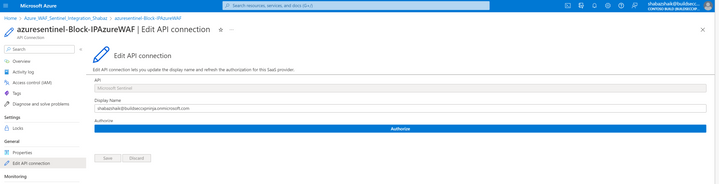
- Authorize the API connection ‘azuresentinel-Block-IPAzureWAF' which is created as part of this deployment as shown below. Make sure to authenticate against Azure AD.
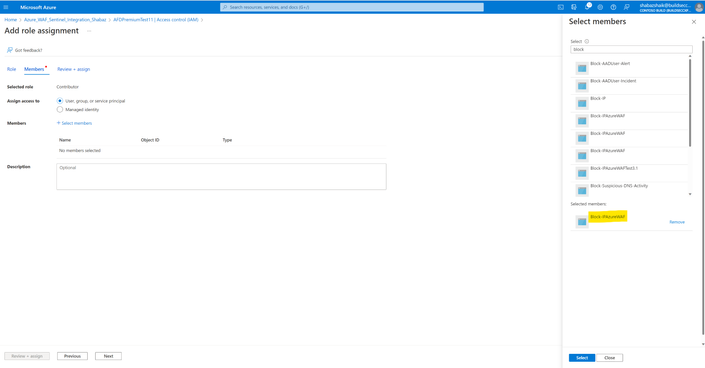
- The Playbook must have the necessary permissions to query and modify the existing WAF policy via the REST API. This can be obtained via assigning the Playbook a system-assigned Managed Identity with Contributor permissions on the App GW/Front Door resources along with their associated WAF policies. Note that you can assign permissions only if your account has been assigned Owner or User Access Administrator roles to the underlying resource. This can be done using the IAM section in the respective resource by adding a new role assignment to this Playbook as shown below:
Configuring Detection and Response:
The following steps need to be implemented to complete the setup.
- Create a new Analytic rule by selecting the respective rule template for SQLi or XSS detection and clicking on ‘Create rule’ as shown in the below image.
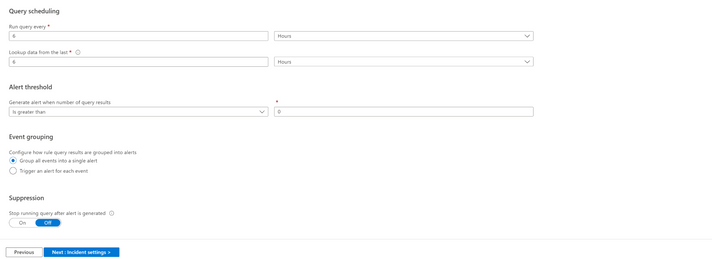
- Configure the rule by setting the Query Schedule, Alert Threshold, Event Grouping, Incident settings and other parameters as required. Refer to the below image for an example.

- Under the Automated response section, create a new Automation rule to run the playbook to block attacker source IP on the WAF Policy. The automation rule can be modelled as shown in the below image.
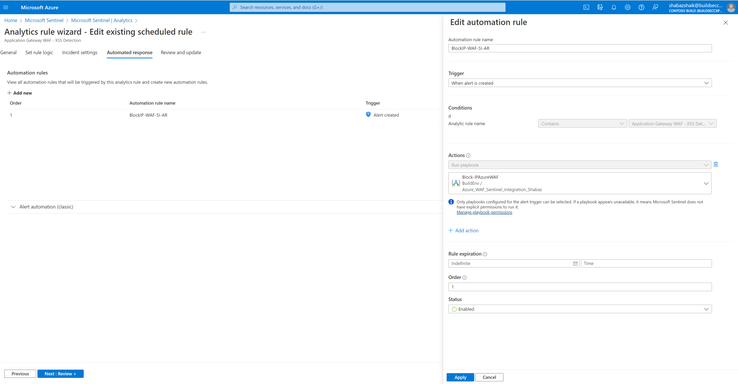
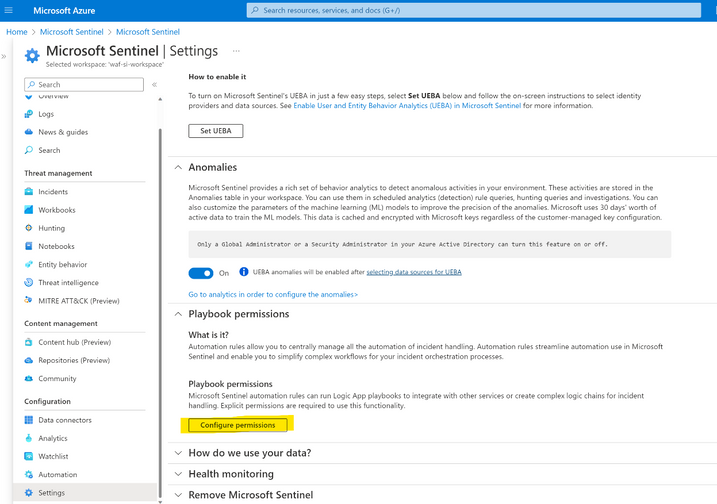
- Provide required access to Sentinel for the resource group which contains the Playbook. This is needed for Sentinel to run this Playbook via Automation rule. This can be done using ‘Manage playbook permissions’ when you configure the Automation rule or in the Settings tab in Sentinel by configuring the Playbook permissions as shown below.
Once the Analytic rule is created with respective Automation rule settings, we are now ready for Detection and Response. The following flow of events happen during an attack:
- When an attacker tries to target one of the web apps behind Azure WAF, the traffic is logged by the Azure WAF and the logs are ingested by Sentinel.
- The Analytic/Detection rule that we configured will detect the pattern for this attack and generate an Incident to notify an analyst.
- The automation rule that is part of the analytic rule will trigger the respective playbook that we configured above.
- The playbook will create a custom rule called ‘SentinelBlockIP’ on the respective WAF policy which will include the source IP of the attacker as shown in the below image.
- The consequent attack attempts will be blocked by WAF and if the attacker tries to use another source IP, the same flow will happen again, and the respective source IP will also be appended to this Block rule.
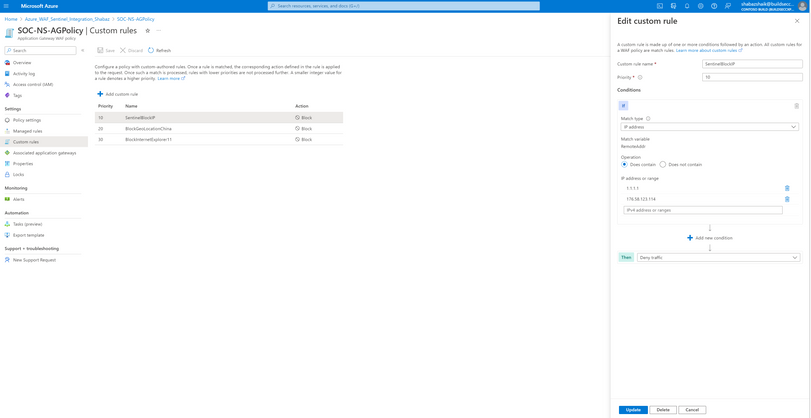
An important point to note here is that by default Azure WAF will block any malicious web attacks with the help of core ruleset of the Azure WAF engine. However, this automated detection and response configuration will further enhance the security by modifying or adding new Custom block rules on the Azure WAF policy for the respective source IPs. This will make sure that the traffic from these source IPs get blocked before it even hits the Azure WAF engine ruleset.
Conclusion:
As we have seen above, the newly added detection rule templates simplify the process of setting up automated Detection and Response for Attacks like SQL Injection and Cross Site Scripting on Azure WAF, which will indeed help us strengthening our Security Posture.
Published on:
Learn moreRelated posts
IPv6 Adoption: Enhancing Azure WAF on Front Door
The transition to IPv6 is a significant step for enterprise corporations, reflecting the evolution of internet technology and the need for a l...
Azure WAF’s Bot Manager 1.1 and JavaScript Challenge (Preview): Navigating the Bot Threat Terrain
Introduction Bots are a common presence on the internet, serving a range of functions from automating customer service to indexing page...
Private IP DNAT Support (Preview) and Scenarios with Azure Firewall
Introduction Azure Firewall is a cloud native security service to protect your workloads running in Azure. It is a stateful firewall as a serv...
Getting Started with Azure DDoS Protection REST API: A Step-by-Step Guide
REST API is a cornerstone in the management of resources on Azure, providing a streamlined and efficient approach for executing create, read, ...
Monitoring Azure DDoS Protection Mitigation Triggers
Monitoring Azure DDoS Protection Mitigation Triggers In today’s digital landscape, Distributed Denial of Service (DDoS) attacks pose a signifi...
Azure WAF’s Bot Manager 1.1 and JavaScript Challenge: Navigating the Bot Threat Terrain
Introduction Bots are a common presence on the internet, serving a range of functions from automating customer service to indexing page...
Utilizing Azure DDoS Protection Workbook for DDoS attack traffic Analysis
In today's digital age, the security of applications, servers, and networks is paramount. One of the most significant threats to this security...
Independent Configuration of Size Enforcement and Inspection Limits in Application Gateway WAF
Introduction In the constantly changing world of cybersecurity, both flexibility and effective security are essential for safeguarding ...
Private IP DNAT Support and Scenarios with Azure Firewall
Introduction Azure Firewall is a cloud native security service to protect your workloads running in Azure. It is a stateful firewall as a serv...
Monitoring traffic flows in Azure Firewall using Virtual Network Flow Logs
Azure Firewall is a managed service designed to protect your Azure Virtual Network resources, providing advanced threat protection and advance...