
Collaborate securely across organizational boundaries and Microsoft clouds
Hello friends,
Today I’m super excited to announce that the capability to collaborate across Microsoft clouds is generally available! This means there’s now support for Azure Active Directory (Azure AD) B2B collaboration across the following Microsoft clouds:
- Azure Commercial and Azure Government clouds
- Azure Commercial and Azure China clouds (operated by 21Vianet)
Many of you are already using Microsoft Entra Azure AD B2B to collaborate with external users like suppliers, partners, and vendors within a Microsoft cloud. We heard you also need to share and collaborate with organizations hosted by Microsoft clouds that are different from the cloud hosting your organization. Until now, to do this, you’ve had to go through the complex process of setting up tenants in multiple clouds and issuing different accounts to the same user. But now, your users can collaborate seamlessly across Microsoft clouds using their primary identities, whether your organizations are in the Azure Commercial, Government, or China clouds.
Start collaborating across Microsoft clouds in three simple steps
Let’s walk through an example of how Contoso Industries, an organization in the Azure Government cloud, collaborates with their partners in the Azure Commercial cloud.
Contoso Industries supplies mission critical equipment to government agencies and commercial organizations. Given the sensitive nature of business, the government requires Contoso Industries to be hosted in the Government cloud.
Contoso Industries also has commercial partners like Woodgrove, which provides software for the equipment that Contoso Industries manufactures. Now, with the capability to collaborate across Microsoft clouds, Contoso Industries users can invite Woodgrove users to collaborate with them and give them access to the inventory application or SharePoint documents.
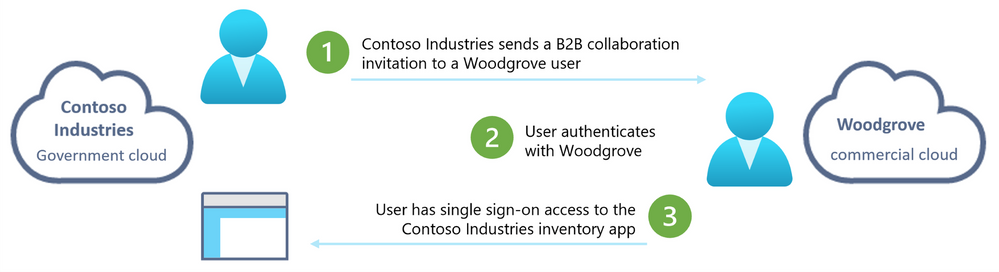
Let’s look at how to make this happen!
Step 1: Enable Microsoft cloud settings for External Identities
The Contoso Industries admin, Dean, enables the setting to collaborate with the Azure Commercial cloud by navigating to External Identities cross-tenant access settings in the Azure portal.
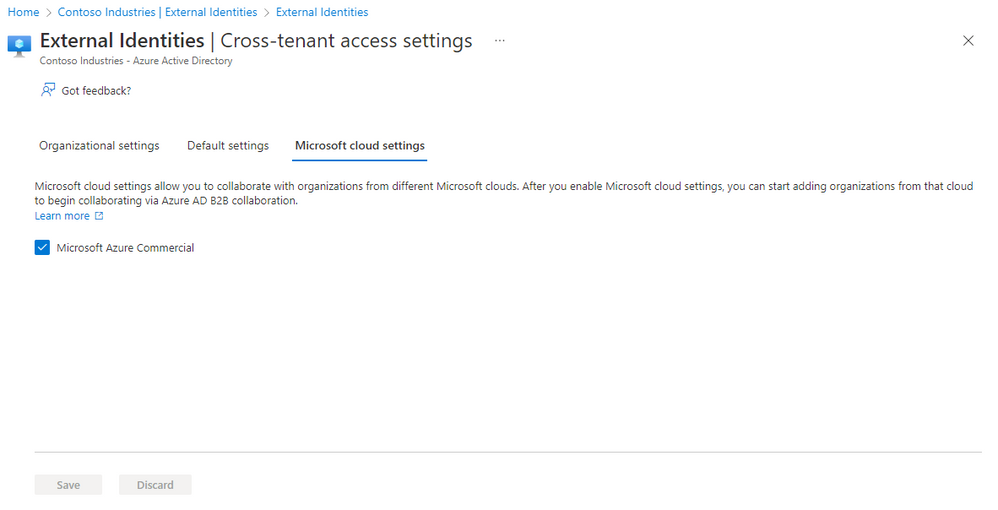
Dean then adds Woodgrove tenant to their list of partners in cross-tenant access settings. The admin at Woodgrove also makes corresponding changes in the Azure portal.
Dean can make additional changes, like leveraging granular controls to only allow specific users to access specific applications. This can further secure these collaborations. After completing these changes, Contoso Industries users can now invite users from Woodgrove to collaborate on the line-of-business apps, SaaS apps, Power BI reports, and SharePoint Online sites, documents, and files that are hosted by Contoso Industries.
Learn more about how to enable collaboration across Microsoft clouds.
Step 2: Govern external users from other Microsoft clouds on Day 1
Contoso Industries wants to ensure users from different clouds are governed so that the external users only have access to Contoso Industries resources for a limited time. Dean adds Woodgrove as a trusted connected organization.

Dean can now assign access packages that include specific resources, access reviews, and sponsors for approvals. This makes it easy for Woodgrove users to self-service onboard and to be governed by Contoso Industries access policies immediately.
Learn more about how to use connected organizations and access packages to onboard and govern users from a different Microsoft cloud.
Step 3: Secure and monitor external collaboration across Microsoft clouds
Dean wants to secure the resources that are shared with Woodgrove users. Because Woodgrove users are guest users in Contoso Industries, all Conditional Access policies can be applied to Woodgrove users, like requiring multi-factor authentication (MFA) before accessing Contoso Industries resources.
Contoso Industries can also leverage cross-tenant access settings to trust MFA or compliant Azure AD joined devices from Woodgrove, which enables a seamless collaboration experience for Woodgrove users while keeping their security posture intact.

When a Woodgrove user accesses resources in Contoso Industries, Dean can monitor the user’s activities using sign-in logs. Dean can also use the cross-tenant access activity workbook to get visibility into the resources Woodgrove users are accessing.
What customers are saying
We got some great feedback from customers like you during the previews:
“Collaboration across Microsoft clouds will enable us to finally migrate the last dozen or so apps from ADFS to Azure AD. ADFS has historically been our solution to provide SSO for both our corporate and China users to apps that they all need. Once this migration is complete, it will help us deprecate ADFS, greatly reducing cost, increasing reliability, and minimizing our security footprint.”
-Customer in financial services industry
“We’ve been unable to move our users to our government tenant due to lack of collaboration, and this feature will unblock that move!”
-Customer in engineering and construction industry
We love hearing from you, so please share your feedback on these updates through the Azure forum or by tagging @AzureAD on Twitter.
Robin Goldstein
Director of Product Management, Microsoft identity
Twitter: @RobinGo_MS
LinkedIn: Robin Goldstein | LinkedIn
Learn more about Microsoft identity:
- Return to the Azure Active Directory Identity blog home
- Join the conversation on Twitter and LinkedIn
- Share product suggestions on the Azure Feedback Forum
Published on:
Learn moreRelated posts
Sync identities from Rippling to Microsoft Entra ID
Today, we’re thrilled to announce that customers using Rippling HCM can now automatically provision users to on-premises Active Directory and ...
Microsoft Entra ID Governance for government
I’m pleased to announce that as of November 1, 2024, Microsoft Entra ID Governance is available for federal agencies, state and local governme...
Update to security defaults
As part of the Secure Future Initiative, we’ve evolved our security approach to align with three security principles: secure by design, secure...
Meet Microsoft Entra at Ignite 2024: November 18-22
Microsoft Ignite is just around the corner, taking place from Monday, November 18, 2024 through Friday, November 22, 2024, in Chicago, Illinoi...
Manage Microsoft Entra ID role assignments with Microsoft Entra ID Governance
I’m excited to announce that we now support Microsoft Entra role assignments in Microsoft Entra ID Governance's Entitlement Management feature...
The latest enhancements in Microsoft Authenticator
Hi folks, I'm thrilled to announce three major Microsoft Entra ID advancements that will help you protect your users with phishing-resi...
Microsoft Security announcements and demos at Authenticate 2024
The Microsoft Security team is excited to connect with you next week at Authenticate 2024 Conference, taking place October 14 to 16 in Carlsba...
What's new in Microsoft Entra - September 2024
We’re excited to announce the general availability of Microsoft Entra Suite—one of the industry’s most comprehensive secure access solutions f...
Explore the key benefits of Microsoft Entra Private Access
The traditional network security models are becoming increasingly ineffective in a world where remote work and cloud services are the norm. Co...
Join us at the Microsoft Entra Suite Showcase!
This fall, we are bringing the Microsoft Entra Suite Showcase to cities worldwide. Join us to explore how our latest advancements in secure id...