
Deploy secret-less Conditional Access policies with Microsoft Entra ID Workload Identity Federation

Background
Many customers face challenges in managing their Conditional Access (CA) policies. Over time, they accumulate more and more policies that are created ad-hoc to solve specific business scenarios, resulting in a loss of overview and increased troubleshooting efforts. Microsoft has provided guidance on how to structure your Conditional Access policies in a way that follows the Zero Trust principles, using a persona-based approach. The guidance includes a set of Conditional Access policies that can serve as a starting point. These CA policies can be automated from a CI/CD pipeline using various tools. One such tool is Microsoft365DSC, an open-source tool developed by members of the Microsoft Graph Product Group, who are still actively involved in its maintenance.
Microsoft365DSC can automate the configuration of various Microsoft 365 workloads, including Microsoft Entra ID Conditional Access policies. The diagram below illustrates the role of Microsoft365DSC as a tool for automating Microsoft 365, complementing the automation of Azure that’s typically achieved using Azure Resource Manager (ARM) and/or Bicep templates.
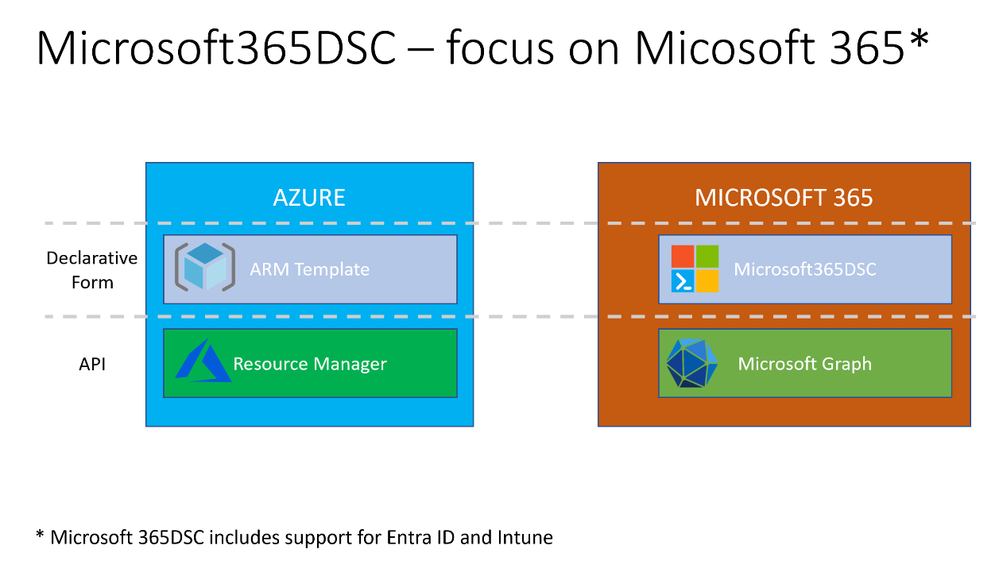
It has already been documented how you can use Microsoft365DSC to automate and maintain your Conditional Access policies. Two such sources are:
These solutions work, but they need to either use a self-hosted agent with a managed identity in Azure DevOps or use a shared secret, and neither of the two solutions are optimal.
We aim at being able to do the automation from Azure DevOps using a Microsoft-managed agent for the CI/CD pipeline and no shared secrets. The introduction of Workload Identity Federation with Azure DevOps can help us do exactly that.
Getting Started
The solution we’re aiming at is depicted in the figure below:
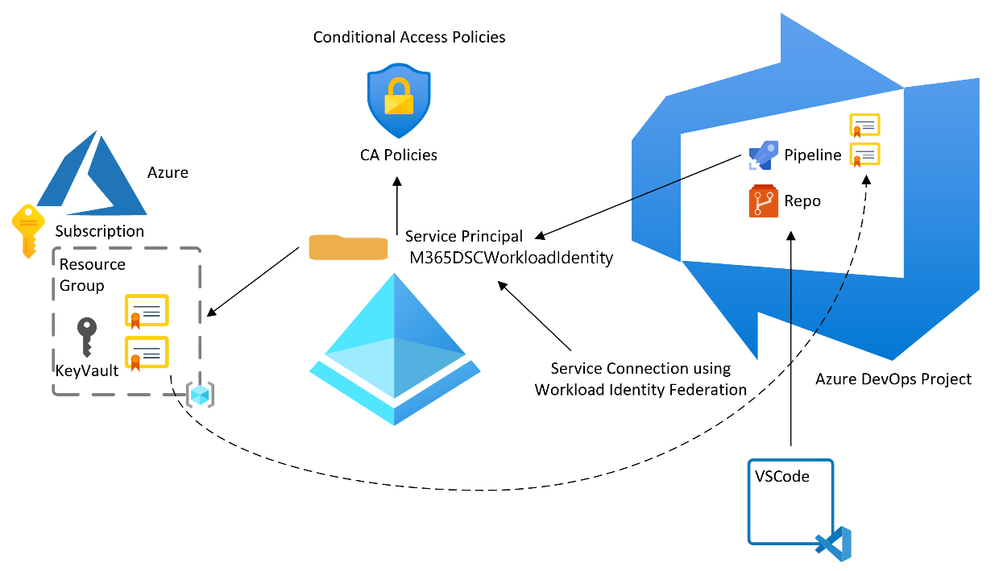
The idea is to have our CI/CD pipeline files hosted in the Azure DevOps repository and make values in an Azure Key Vault available in the pipeline based on configuring Workload Identity Federation between the Azure DevOps project and Entra ID.
The steps to do this are:
1. Configure a service connection the Azure DevOps project settings as shown below

The recommended choice can be selected; however, it would automatically create a service principal in Entra ID with permission to the whole Azure subscription that you specify in the settings. To adhere to the principle of least privileged, we suggest using the manual configuration, which means that you manually create the service principal and only assign it permission to the Key Vault.
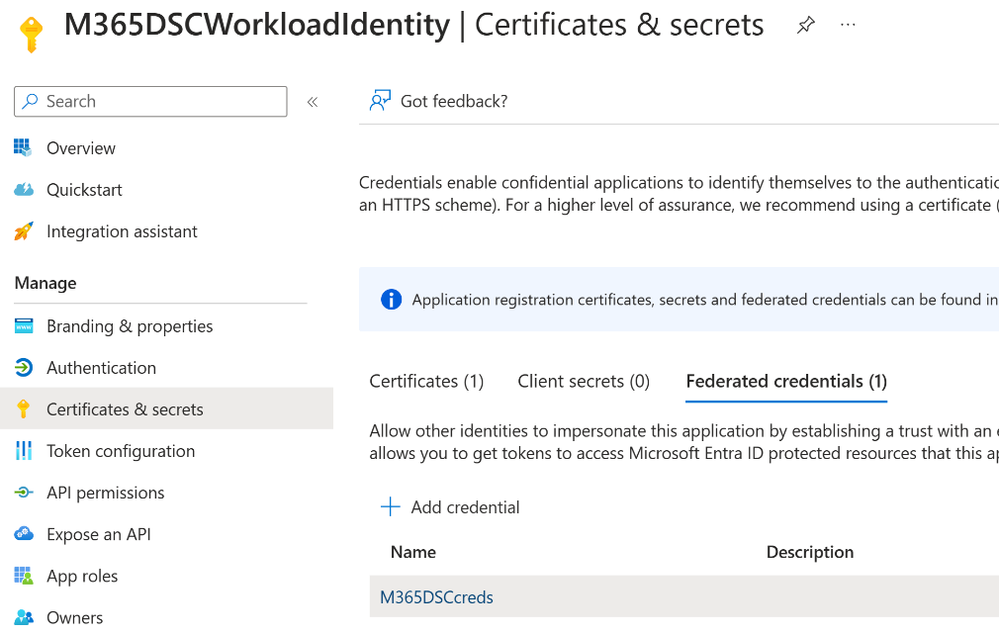
2. Create an Entra ID App Registration using Federated credentials as shown below:
3. Add application permissions to the service principal for it to be able to create and update Conditional Access policies. Permissions may include: Policy.Read.All, Policy. ReadWrite.ConditionalAccess, Application,Read.All.
4. Create a Key Vault in a distinct resource group in an Azure subscription. This subscription should be specifically designed to manage sensitive identity-related workloads. Ideally, it should be located under the “Platform” management group within the “Identity” subscription, provided are adhering to the Enterprise Scale landing zone architecture as documented here.
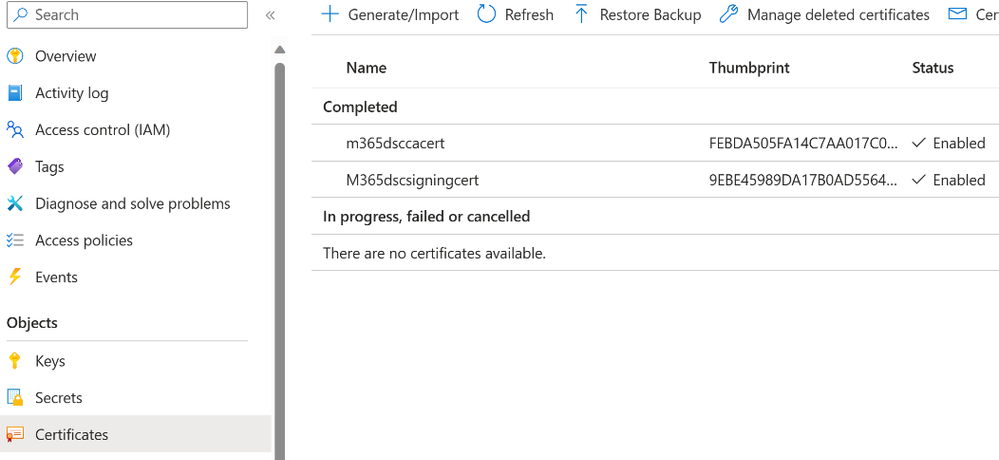
5. Create two certificates in the Key Vault, one certificate that will be used to sign Microsoft365 configurations and one that will be used to authenticate Microsoft365DSC tools to Entra ID. See below.
6. In the Key Vault access control, assign M365DSCWorkloadIdentity the “Key Vault Secret User” role for it to be able to read secrets that you create.
Now you should have the basic prerequisites in place for you to create or change your CI/CD pipeline to take advantage of this.
Azure DevOps CI/CD pipeline definition
We suggest using a multi-stage pipeline defined in an YML file in your repo, specified in this example YML file. When utilizing Microsoft365DSC, the Conditional Access policies that we aim to configure or enforce within our Entra ID tenant should be clearly defined in our repository. Also, as a prerequisite, you need to configure the groups that you refer to in the Conditional Access policies definition either manually in the portal or using automation described in the referenced GitHub resource.
This information should be contained within a file, which could potentially be named ‘ConfigureCAPolicy.ps1’. The content for this file can be generated through various methods.
- Create your Conditional Access policies in the Entra ID portal and use export-m365DSCConfiguration as documented here: Taking a Snapshot of Existing Tenant - Microsoft365DSC - Your Cloud Configuration.
- Create it manually using any editor.
Here’s a sample of a Conditional Access policy. You will notice that the file must define that we want to authenticate using the certificate. You can get a full list of the Conditional Access policies in Microsoft365DSC format based on the persona-based approach configured for Zero Trust here.
Build Stage
The pipeline for building the solution is divided into two scripts. First, we import the certificates from the Key Vault into the Windows based CI/CD pipeline agent and compile a Microsoft365DSC configuration file into a MOF file that is to be pushed to our Entra ID tenant in the deploy stage. The reason for having this is two scripts is just for ease of debugging. You may choose to combine them into one script as shown here and the second script here.
Deploy stage
We now have our artifacts stored in Azure DevOps and would like to deploy them to our Entra ID tenant. This is done in the deploy stage where the deploy.ps1 is called. The content if deploy.ps1 is located here.
Final comments
Based on the information provided, you should now have a clear understanding of how to automate your Conditional Access policies within Entra ID and manage changes using Azure DevOps, all without the need to store shared secrets within Azure DevOps. We strongly recommend that you experiment with this process and utilize the resources mentioned in the article for more detailed information about the configuration.
While we primarily focus on implementing this process through Azure DevOps, it's important to note that GitHub Actions also supports Workload Identity Federation. This provides an alternative solution if you prefer GitHub over Azure DevOps.
Claus Jespersen, Principal Security Consultant
@claus_jespersen
Learn more about Microsoft Entra:
- Related Articles:
- See recent Microsoft Entra blogs
- Dive into Microsoft Entra technical documentation
- Join the conversation on the Microsoft Entra discussion space and Twitter
- Learn more about Microsoft Security
Published on:
Learn moreRelated posts
Sync identities from Rippling to Microsoft Entra ID
Today, we’re thrilled to announce that customers using Rippling HCM can now automatically provision users to on-premises Active Directory and ...
Microsoft Entra ID Governance for government
I’m pleased to announce that as of November 1, 2024, Microsoft Entra ID Governance is available for federal agencies, state and local governme...
Update to security defaults
As part of the Secure Future Initiative, we’ve evolved our security approach to align with three security principles: secure by design, secure...
Meet Microsoft Entra at Ignite 2024: November 18-22
Microsoft Ignite is just around the corner, taking place from Monday, November 18, 2024 through Friday, November 22, 2024, in Chicago, Illinoi...
Manage Microsoft Entra ID role assignments with Microsoft Entra ID Governance
I’m excited to announce that we now support Microsoft Entra role assignments in Microsoft Entra ID Governance's Entitlement Management feature...
The latest enhancements in Microsoft Authenticator
Hi folks, I'm thrilled to announce three major Microsoft Entra ID advancements that will help you protect your users with phishing-resi...
Microsoft Security announcements and demos at Authenticate 2024
The Microsoft Security team is excited to connect with you next week at Authenticate 2024 Conference, taking place October 14 to 16 in Carlsba...
What's new in Microsoft Entra - September 2024
We’re excited to announce the general availability of Microsoft Entra Suite—one of the industry’s most comprehensive secure access solutions f...
Explore the key benefits of Microsoft Entra Private Access
The traditional network security models are becoming increasingly ineffective in a world where remote work and cloud services are the norm. Co...
Join us at the Microsoft Entra Suite Showcase!
This fall, we are bringing the Microsoft Entra Suite Showcase to cities worldwide. Join us to explore how our latest advancements in secure id...