
Azure DDoS Protection for BYOIPs now available

Author: Alethea Toh
Following the announcement of the general availability of the Bring Your Own IP addresses (BYOIP) function to Azure in all public regions, we’re excited to share that public IP ranges brought to Azure via Custom IP Prefixes can be protected with Azure DDoS Protection Standard.
What is Azure DDoS Protection Standard?
Azure DDoS Protection Standard provides DDoS mitigation features to defend against DDoS attacks. It is automatically tuned to help protect public IP addresses in virtual networks. Protection is simple to enable on any new or existing virtual network and requires no application or resources changes.
What are BYOIPs?
When planning a potential migration of on-premises infrastructure to Azure, you may want to retain your existing public IP addresses due to your customers' dependencies (for example, firewalls or other IP hardcoding) or to preserve an established IP reputation.
Using the Custom IP Prefix resource, you can now bring your own public IPv4 ranges to Azure and use them like any other Azure-owned public IP ranges. Once onboarded, these BYOIPs can be associated with Azure resources, interact with private IPs and VNETs within Azure’s network, and reach external destinations by egressing from Microsoft’s Wide Area Network.
With BYOIP functionality, onboarded IPs can be associated with any resource that supports Standard SKU public IPs, such as virtual machines, Standard Public Load Balancers, Azure Firewalls, and more.
Why is DDoS protection important for BYOIPs?
Whether in the cloud or on-premises, Distributed Denial-of-Service (DDoS) attacks can be targeted at any endpoint that is publicly reachable through the Internet.
BYOIPs are public IP ranges that are exposed to the internet and are susceptible to DDoS attacks. Enabling DDoS Protection Standard on virtual networks will protect any publicly exposed IP ranges that reside within the virtual network.
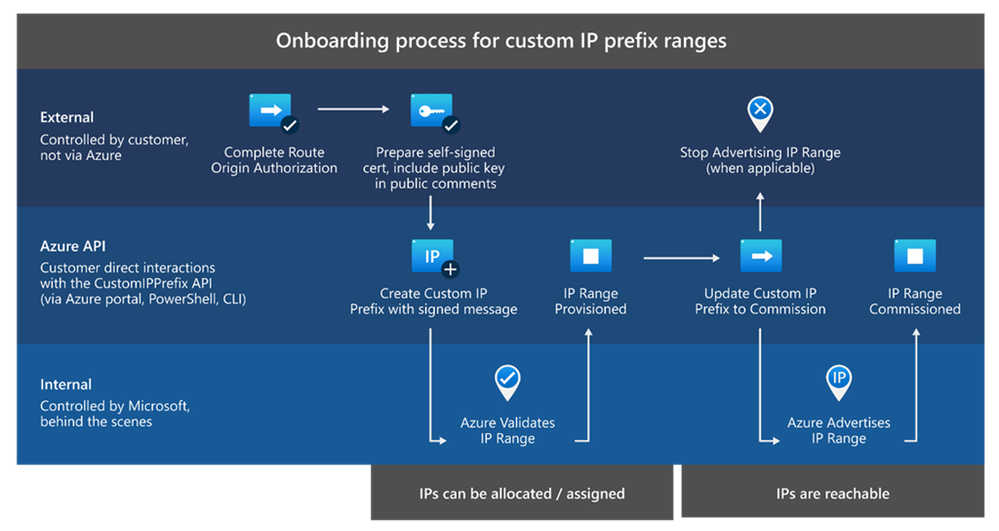
How can I onboard IP ranges to Azure?
Refer to this guide for the onboarding process of bringing your IP addresses to Azure. Key takeaways:
- The ability to bring your own IP addresses (BYOIP) to Azure is currently available in all regions.
- The minimum size of an onboarded range is /24 (256 IP addresses).
- Onboarded IPs are put in a Custom IP Prefix resource for management, from which Public IP Prefixes can be derived and utilized across subscriptions.
- You are not charged for the hosting or management of onboarded ranges brought to Azure.
Read more
- Bring your own IP addresses (BYOIP) to Azure with Custom IP Prefix | Azure Blog and Updates | Microsoft Azure
- Custom IP address prefix (BYOIP) - Azure Virtual Network | Microsoft Docs
- Azure DDoS Protection Standard Overview | Microsoft Docs
- Azure DDoS Protection reference architectures | Microsoft Docs
Published on:
Learn moreRelated posts
IPv6 Adoption: Enhancing Azure WAF on Front Door
The transition to IPv6 is a significant step for enterprise corporations, reflecting the evolution of internet technology and the need for a l...
Azure WAF’s Bot Manager 1.1 and JavaScript Challenge (Preview): Navigating the Bot Threat Terrain
Introduction Bots are a common presence on the internet, serving a range of functions from automating customer service to indexing page...
Private IP DNAT Support (Preview) and Scenarios with Azure Firewall
Introduction Azure Firewall is a cloud native security service to protect your workloads running in Azure. It is a stateful firewall as a serv...
Getting Started with Azure DDoS Protection REST API: A Step-by-Step Guide
REST API is a cornerstone in the management of resources on Azure, providing a streamlined and efficient approach for executing create, read, ...
Monitoring Azure DDoS Protection Mitigation Triggers
Monitoring Azure DDoS Protection Mitigation Triggers In today’s digital landscape, Distributed Denial of Service (DDoS) attacks pose a signifi...
Azure WAF’s Bot Manager 1.1 and JavaScript Challenge: Navigating the Bot Threat Terrain
Introduction Bots are a common presence on the internet, serving a range of functions from automating customer service to indexing page...
Utilizing Azure DDoS Protection Workbook for DDoS attack traffic Analysis
In today's digital age, the security of applications, servers, and networks is paramount. One of the most significant threats to this security...
Independent Configuration of Size Enforcement and Inspection Limits in Application Gateway WAF
Introduction In the constantly changing world of cybersecurity, both flexibility and effective security are essential for safeguarding ...
Private IP DNAT Support and Scenarios with Azure Firewall
Introduction Azure Firewall is a cloud native security service to protect your workloads running in Azure. It is a stateful firewall as a serv...
Monitoring traffic flows in Azure Firewall using Virtual Network Flow Logs
Azure Firewall is a managed service designed to protect your Azure Virtual Network resources, providing advanced threat protection and advance...