
Introducing Azure Deployment Environments

Over the last several years, DevOps has fundamentally changed the way we develop software. New processes and tools have empowered developers to do more in less time, all while working towards increasingly complex applications. Yet for many organizations, providing developers with the complex infrastructure needed to deploy, test, and run their apps remains a challenge due to the difficulty of balancing agility with security and compliance.
Today, we are excited to announce Azure Deployment Environments, a new cloud service that empowers development teams to quickly spin up their app infrastructure with self-service of project-based infrastructure-as-code templates that minimize set-up time while maximizing security, compliance, and cost efficiency.
You can sign up for the waiting list to evaluate the private preview at https://aka.ms/environments-signup and to see demos of the service watch the Build session, Delivering developer velocity through the entire engineering system.

Figure 1: Azure Deployment Environments overview.
Self-serve repeatable environments
With Deployment Environments, developers can set up and create environments with self-serviced infrastructure-as-code templates that deploy in minutes. Devs pick from a catalog of curated templates, maintained by their team, and deploy them directly from where they live - local CLI or custom developer portal. These templates allow developers to focus on coding and testing their application instead of dealing with the intricacies of provisioning the environment.

Figure 2: Create environments from catalog of curated templates.
Developers can set up environments to provision as part of their automated CI/CD deployment pipelines. They can create a new dev environment with each feature branch to ensure that they see their changes in a prod-like environment and use dev environments when creating PR’s for higher quality code reviews. Leverage environment specific templates that provision into separate subscriptions to test changes before they merge into production. Configure environments to auto-expire so that the resources are deleted once an environment is no longer needed. Template environments let developers code with confidence by bringing them closer to production.
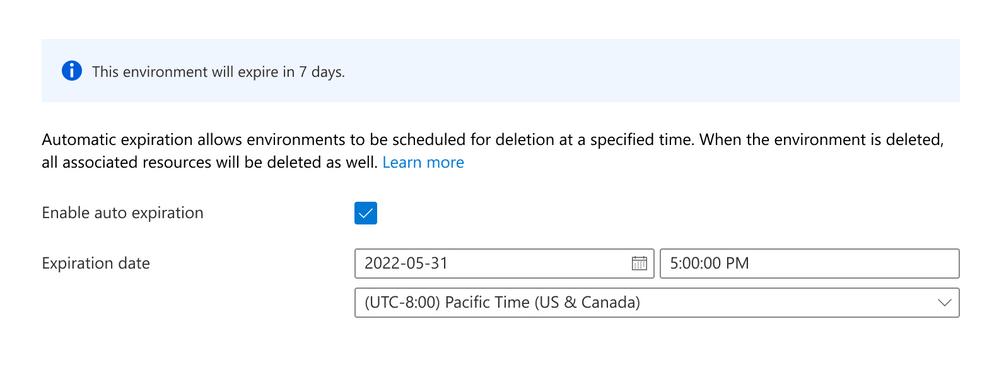
Figure 3: Set auto-expiry of environments.
Environments provisioned from the “catalog” of templates are already built around standardized enterprise configurations and governance, eliminating any compliance worry. Templates are built as ARM (and eventually Terraform and Bicep) files and kept in source control repositories with versioning, access control, and pull request processes, making it easy for developers to collaborate across teams.
Secure with confidence
Azure Deployment Environments provide developers flexibility while keeping compliance, security, and cost control in the hands of IT. Dev infra admins and IT organizations manage a catalog of standard templates that ensure consistency across your enterprise. Templates ensure environments conform to the architecture, policies, and best practices they establish for apps across the organization.
Azure Deployment Environments allows you to set up a managed identity to provision resources on behalf of authorized developers in a project. Developers get the necessary permissions to create and destroy their own environments without providing broad contributor access to create resources outside the environment. Establish comprehensive access controls to your environments by project and user type with Azure RBAC and Azure AD security authentication.
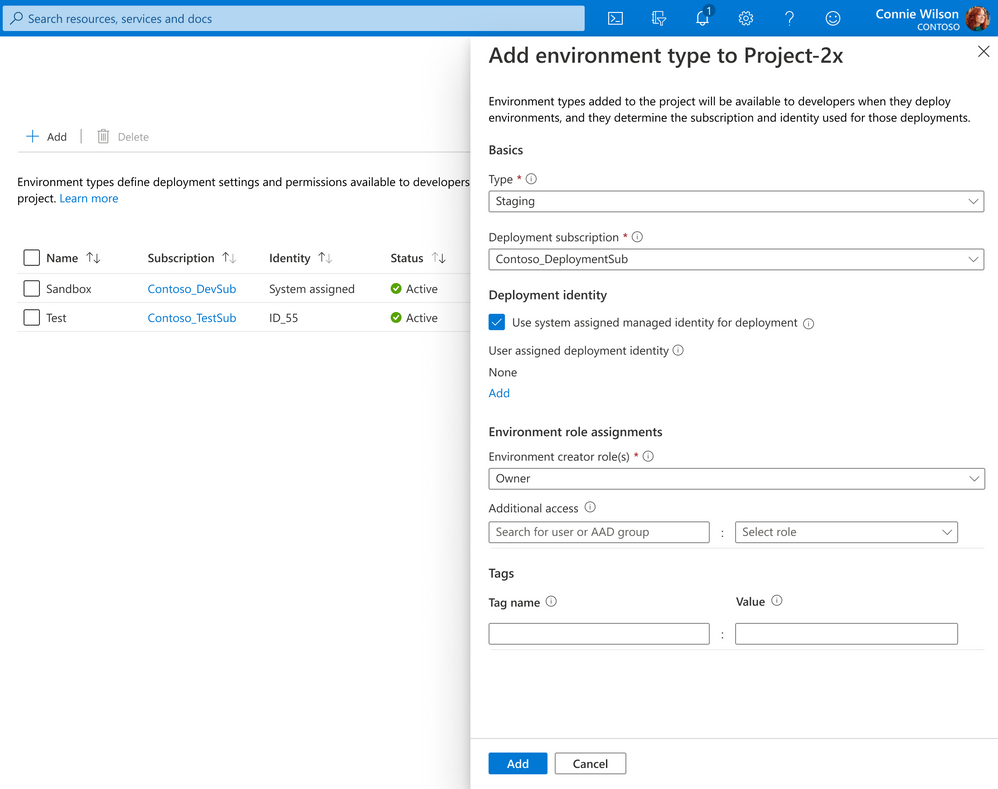
Figure 4: Set Azure mappings for a project.
IT and dev infra admins can use environment types to give more flexible controls for developers in sandbox environments while maintaining greater control and security over production environments. Use separate environment templates for dev, test, staging, and production to manage costs in dev environments while scaling up resources in production environments. Each environment type is mapped to its subscription so you can isolate environments and track costs across your organization.
At the end of the day, you can also spin down idle environments with custom schedules to reduce the cost of unused resources.
Getting started with Azure Deployment Environments
Azure Deployment Environments is currently in private preview and will be in public preview in the next few months. Sign up to get on the list to evaluate Azure Deployment Environments at https://aka.ms/environments-signup.
Published on:
Learn moreRelated posts
This Month in Azure Static Web Apps | 09/2024
We are back with another edition of the Azure Static Web Apps Community! :party_popper: September was yet another month ...
GitHub Copilot for Azure: 6 Must-Try Features
As developers, we are constantly seeking tools that streamline our workflows and boost productivity. … Enter GitHub Copilot for Azure, now in ...
Responsible AI Mitigation Layers
Generative AI is increasingly being used in various kinds of systems to augment humans and infuse intelligent behavior into existing and new a...
Streamline Your Azure Workflow: Introducing GitHub Copilot for Azure in VS Code
I'm excited to announce the public preview of GitHub Copilot for Azure - a new addition to your toolkit that seamlessly integrates with G...
Build Intelligent Apps Code-First with Prompty and Azure AI
Building Generative AI applications can feel daunting for traditional app developers. What does the end-to-end applicati...
Certificación AI-900 (Fundamentos de IA) con Chicas en IA
La inteligencia artificial ha llegado para quedarse, ¡y más aún con la revolucionaria IA generativa! Para ayudar a los profesionales a especia...
Get certified with Learn Live GitHub series!
GitHub Universe is coming, and Microsoft and GitHub are partnering to offer a new special Learn Live series in Brazilian Portuguese, English a...
Certifícate con Learn Live GitHub en Español
Microsoft y GitHub se han unido para ofrecer una nueva serie especial de Learn Live en inglés y español: GitHub 2024. Del 10 al 24 de Octubre,...
Evaluating generative AI: Best practices for developers
As a developer working with generative AI, you've likely marveled at the impressive outputs your models can produce. But how do you ensure the...
Introducing Azure Product Retirement Livestreams
The Azure Retirements team, in collaboration with key partner groups, is excited t...