
Authentication strength – choose the right auth method for your scenario!
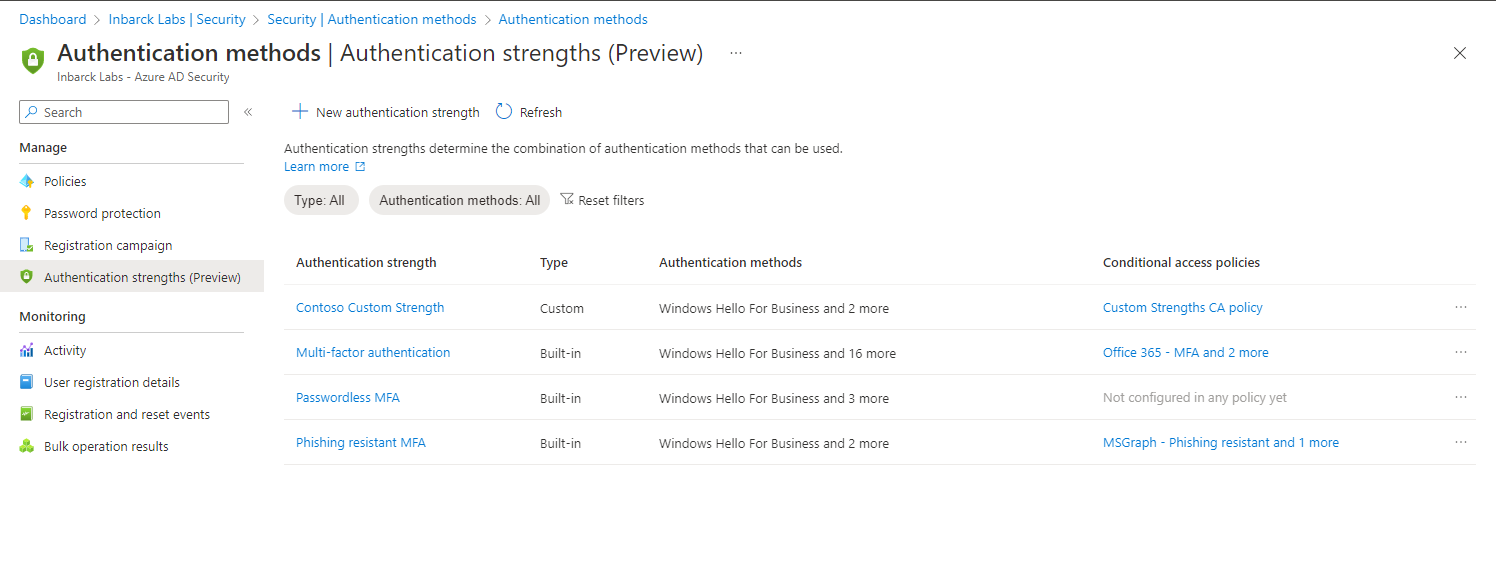
We’re thrilled to announce authentication strength, a Conditional Access control that allows administrators to specify which authentication methods can be used to access a resource. For example, an administrator can allow any multifactor authentication (MFA) method to access most resources in the tenant but require phishing-resistant authentication methods when their users access highly sensitive resources.
“Requiring multifactor authentication” is the most popular control in Conditional Access, with about 35% of the policies using this control. Users can satisfy this requirement by using any valid combination of strong authentication methods like an old-school password and SMS or modern and stronger methods such as the Authenticator app or a FIDO2 security key.
Not all MFA methods are created equal. Over time, we’ve added new and modern authentication methods in Azure AD, and some are more secure than others. Authentication strength allows you to differentiate between these methods and use the most secure methods for the most sensitive resources.
Conditional Access authentication strength also helps you nail your key compliance and regulatory requirements. For example, the US federal government's Office of Management and Budget (OMB) memorandum 22-09 that was issued in support of Executive Order 14028, “Improving the Nation’s Cybersecurity,” addresses the weaknesses of the traditional MFA methods and mandates usage of phishing-resistant MFA. Authentication strength helps government customers to enforce phishing-resistant MFA for their employees and vendors. Learn more about how to meet multifactor authentication requirements of memorandum 22-09 in Azure AD.
To tell you more about enforcing specific authentication methods for your users, I’ve invited Inbar Cizer Kobrinsky and Namrata Kedia, Product Managers on Microsoft Entra, who will talk about how this game-changing feature will kickstart your journey toward phishing-resistant MFA.
Thanks, and please let us know your thoughts!
Alex Weinert (twitter:
--
Hello everyone,
We’re excited to share with you more about the public preview of Conditional Access authentication strength for internal and external users that was just announced at Microsoft Ignite. With this feature, administrators can control which authentication methods are used to access sensitive resources and start their journey for phishing-resistant MFA.
We’ve been beating the drum on enabling multifactor authentication (MFA) for quite some time now. In fact, this year we have enabled Security Defaults for customers who haven’t done so themselves. With the increase in MFA usage, we also see MFA attacks becoming more popular. Password attacks are still by far the most common identity attacks out there. You absolutely should enable MFA, but increasingly it’s important to protect key resources with MFA that can resist current attacks.
Your best choice is to use phishing-resistant MFA. These strong authentication methods help against phishing attacks where the user provides their credentials to the attacker or social engineered into approving authentication requests. With certificate-based authentication (CBA) now generally available in Azure AD, you have three phishing-resistant options to choose from: Windows Hello for Business, FIDO2 security key, and CBA. Now, the next step in protecting your users is to require these methods in critical use cases using Conditional Access authentication strength.
To get started with authentication strength, you can create a Conditional Access policy using any set of Conditional Access conditions and just require one of the built-in authentication strengths:
- Multifactor authentication
- Passwordless MFA
- Phishing-resistant MFA
In this case, we’ll require the built-in phishing-resistant MFA strength to grant access. Users who are in scope for this policy will be required to use any phishing-resistant methods you have configured in the tenant before they can access the resource.
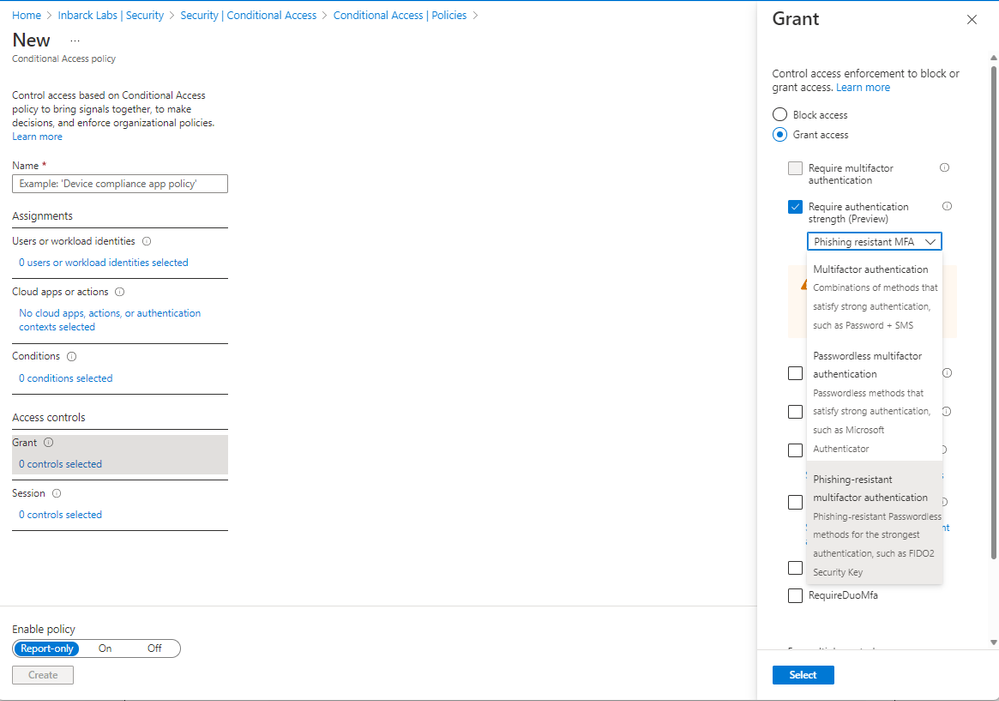
The built-in authentication strengths can help you quickly enforce the methods you need. During the private preview we were able to help a major US Government agency to migrate off AD FS. Authentication strength allowed the agency to enforce the usage of CBA through the phishing-resistant MFA authentication strength control in Conditional Access policy, which means Active Directory Federation Services (AD FS) was no longer required.

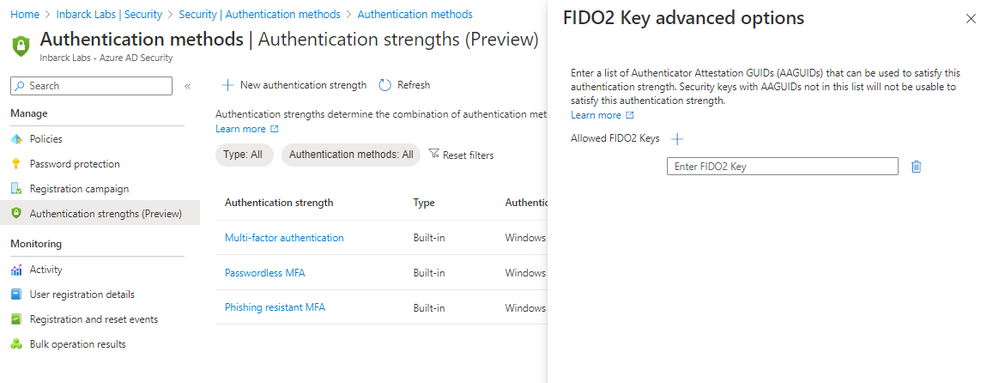
If you looked around the built-in authentication strengths and found you need another set of authentication methods, you can create your own custom authentication strength and choose the methods that will help you meet your requirements. You can even restrict access further by requiring specific FIDO2 keys using the Authenticator Attestation GUIDs (AAGUIDs).
Pim Jacobs, Principal Consultant at InSpark, who helps customers with their passwordless deployment, uses the authentication strength to enforce passwordless MFA:
"With the release of authentication strength in Azure AD we finally can ban the use of passwords for ourselves and
the customers we support. The most heard feedback we got during workshops about passwordless was ‘But that means
I can still use my password to sign-in. With authentication strengths, that doesn’t apply anymore!"
Authentication strength for external identities
You can now require your business partner (B2B) guests across all Microsoft clouds to use specific authentication methods to access your resources with Conditional Access authentication strength policies. This provides enhanced controls to administrators as they trust MFA performed by the external user in their home tenant using inbound cross tenant access policy.
Fabian Bader, a Cloud Architect at Glueckkanja-gab AG and a Microsoft Most Valuable Professional (MVP), uses authentication strength for external identities:
“Authentication strength is a game changer for us. We now can enforce the usage of FIDO2 security keys
for our administrative accounts and sensitive applications and define the exact MFA methods we want to allow for
all our internal users. And for External Identities we can safely trust MFA using cross-tenant access settings and
are still in full control of the authentication strengths.”
You can learn more about authentication strength here:
- Concept: https://aka.ms/authstrengthdocs
- APIs: https://aka.ms/authstrengthAPIdocs
- External Identities: https://aka.ms/authStrengthExternalUserdocs
What’s next
In the coming weeks, we will add new controls in the authentication methods policy to facilitate management of authentication methods available in Azure AD in one place. This update will provide you with granularity in managing the methods – for example, scoping methods to specific groups, not just all or no users. It will allow you to manage the usage of less secure methods, such as SMS, for all scenarios, and then add scenario-specific requirements using authentication strength. Together, these will give you the control you need to step forward into a passwordless and phishing-resistant future.
Go ahead and try it! We love hearing from you, so please share your feedback using [email protected], the Azure forum or by tagging @AzureAD on Twitter.
Best regards,
Inbar and Namrata
Learn more about Microsoft identity:
- Return to the Azure Active Directory Identity blog home
- Join the conversation on Twitter and LinkedIn
- Share product suggestions on the Azure Feedback Forum
Published on:
Learn moreRelated posts
Sync identities from Rippling to Microsoft Entra ID
Today, we’re thrilled to announce that customers using Rippling HCM can now automatically provision users to on-premises Active Directory and ...
Microsoft Entra ID Governance for government
I’m pleased to announce that as of November 1, 2024, Microsoft Entra ID Governance is available for federal agencies, state and local governme...
Update to security defaults
As part of the Secure Future Initiative, we’ve evolved our security approach to align with three security principles: secure by design, secure...
Meet Microsoft Entra at Ignite 2024: November 18-22
Microsoft Ignite is just around the corner, taking place from Monday, November 18, 2024 through Friday, November 22, 2024, in Chicago, Illinoi...
Manage Microsoft Entra ID role assignments with Microsoft Entra ID Governance
I’m excited to announce that we now support Microsoft Entra role assignments in Microsoft Entra ID Governance's Entitlement Management feature...
The latest enhancements in Microsoft Authenticator
Hi folks, I'm thrilled to announce three major Microsoft Entra ID advancements that will help you protect your users with phishing-resi...
Microsoft Security announcements and demos at Authenticate 2024
The Microsoft Security team is excited to connect with you next week at Authenticate 2024 Conference, taking place October 14 to 16 in Carlsba...
What's new in Microsoft Entra - September 2024
We’re excited to announce the general availability of Microsoft Entra Suite—one of the industry’s most comprehensive secure access solutions f...
Explore the key benefits of Microsoft Entra Private Access
The traditional network security models are becoming increasingly ineffective in a world where remote work and cloud services are the norm. Co...
Join us at the Microsoft Entra Suite Showcase!
This fall, we are bringing the Microsoft Entra Suite Showcase to cities worldwide. Join us to explore how our latest advancements in secure id...