
Enhancements to Azure WAF now in General Availability

Regional WAF (Integrated with Azure Application Gateway)
We are excited to share that on May 3rd Microsoft announced the general availability of the managed rule set OWASP 3.2, also known as CRS 3.2, bringing additional features on WAF for Application Gateway that offer customers better security, improved scale, easier deployment, and better management of their applications.
Read the Intelligent application protection from edge to cloud with Azure Web Application Firewall announcement blog and Azure updates for more details on this announcement. For more information, visit Azure WAF documentation.
What’s new?
CRS 3.2 brings a new improved security posture on regional WAF integrated with Azure Application Gateway. Customers are strongly encouraged to take advantage of the latest ruleset and migrate from older CRS versions to reduce false positives.

Note: CRS 3.1 or below runs on the older versions of WAF engine. The default for policy deployment is CRS 3.1. During deployment, you can choose CRS 3.2. Once you create a WAF policy or upgrade and existing policy to OWASP_3.2, there is no option to downgrade the managed rule set to older versions.
As stated in our public docs, CRS 2.2.9 is no longer supported for new WAF policies. We recommend you upgrade to the latest CRS version.
- Improved performance and scale with the next generation of WAF engine released with CRS 3.2. When compared with the older engine, new engine results in 8x reduction in P99 tail latencies, while yielding >8x requests per second (RPS) using the same compute power. We also observed a reduction of up to 24x WAF latencies with the new engine.
- Increased size limits on regional WAF for body inspection up to 2MB (up from 128KB, a 16x improvement) and file upload up to 4GB (up from 750MB, a >5x increase).

- Advanced customization with per rule exclusions and attribute by names support on regional WAF. This flexibility helps customers narrowly define the exclusion scopes down to a specific rule, and thereby help reduce false positives and meet application specific requirements better.
There are 6 new options of Keys and Values as request attributes available to create the exclusions, like Request Header Key, and Request Args Key. You can find more details here.
Note: As of early May 2022, we are rolling out updates to the Azure portal for these features. If you don't see configuration options in the portal, please use PowerShell, the Azure CLI, Bicep, or ARM templates to configure global or per-rule exclusions.
- Native consistent experience with WAF policy – new deployments of Application Gateway v2 WAF SKU now natively utilizes WAF policies instead of configuration. It means defining an existing WAF policy or creating a new one is required for new deployments.

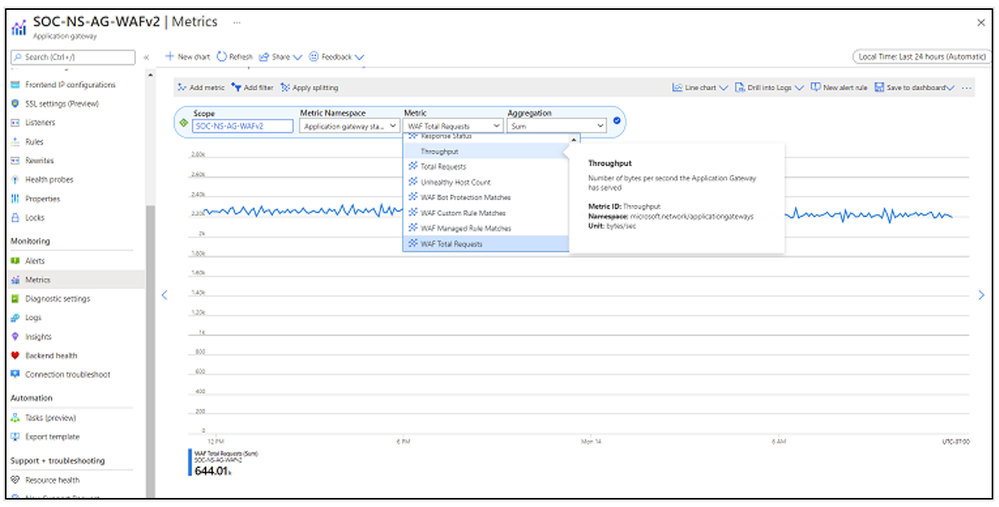
- Advanced analytics capabilities with new Azure Monitor metrics on regional WAF. CRS 3.2 now supports metrics for WAF requests, managed rules, custom rules, and bot protections matches. The new capabilities can be accessed for more effective monitoring, troubleshooting, and debugging.
|
Metrics |
Description |
Dimension |
|
WAF Total Requests |
Count of successful requests that WAF engine has served. |
Action, Country/Region, Method, Mode |
|
WAF Managed Rule Matches |
Count of total requests that a managed rule has matched. |
Action, Country/Region, Mode, Rule Group, Rule Id |
|
WAF Custom Rule Matches |
Count of total requests that match a specific custom rule. |
Action, Country/Region, Mode, Rule Group, Rule Name |
|
WAF Bot Protection Matches |
Count of total requests that have been blocked or logged from malicious IP addresses. The IP addresses are sourced from the Microsoft Threat Intelligence feed. |
Action, Country/Region, Bot Type, Mode |
Global WAF (Integrated with Azure Front Door)
A new managed rule set called Default Rule Set 2.0 with anomaly scoring, Bot Manager 1.0, and security service that protects applications and APIs running in Azure or anywhere else, has also been announced in general availability on WAF for Azure Front Door on March 29th.

The new managed rule set DRS 2.0 is only available for Azure Front Door Premium and includes the latest Microsoft proprietary rules authored by Microsoft Threat Intelligence. See the Feature Comparison between both Standard and Premium SKUs.
If you have multiple domains in your Front Door Premium, you can assign different WAF policies per Domain.

Learn More
Azure WAF provides advanced threat protection capabilities to help detect and protect against web application vulnerabilities. For more information on everything we covered above, please see the following documentation:
- Azure WAF DRS rules documentation for Azure Front Door
- Azure WAF CRS rules documentation for Azure Application Gateway
Published on:
Learn moreRelated posts
IPv6 Adoption: Enhancing Azure WAF on Front Door
The transition to IPv6 is a significant step for enterprise corporations, reflecting the evolution of internet technology and the need for a l...
Azure WAF’s Bot Manager 1.1 and JavaScript Challenge (Preview): Navigating the Bot Threat Terrain
Introduction Bots are a common presence on the internet, serving a range of functions from automating customer service to indexing page...
Private IP DNAT Support (Preview) and Scenarios with Azure Firewall
Introduction Azure Firewall is a cloud native security service to protect your workloads running in Azure. It is a stateful firewall as a serv...
Getting Started with Azure DDoS Protection REST API: A Step-by-Step Guide
REST API is a cornerstone in the management of resources on Azure, providing a streamlined and efficient approach for executing create, read, ...
Monitoring Azure DDoS Protection Mitigation Triggers
Monitoring Azure DDoS Protection Mitigation Triggers In today’s digital landscape, Distributed Denial of Service (DDoS) attacks pose a signifi...
Azure WAF’s Bot Manager 1.1 and JavaScript Challenge: Navigating the Bot Threat Terrain
Introduction Bots are a common presence on the internet, serving a range of functions from automating customer service to indexing page...
Utilizing Azure DDoS Protection Workbook for DDoS attack traffic Analysis
In today's digital age, the security of applications, servers, and networks is paramount. One of the most significant threats to this security...
Independent Configuration of Size Enforcement and Inspection Limits in Application Gateway WAF
Introduction In the constantly changing world of cybersecurity, both flexibility and effective security are essential for safeguarding ...
Private IP DNAT Support and Scenarios with Azure Firewall
Introduction Azure Firewall is a cloud native security service to protect your workloads running in Azure. It is a stateful firewall as a serv...
Monitoring traffic flows in Azure Firewall using Virtual Network Flow Logs
Azure Firewall is a managed service designed to protect your Azure Virtual Network resources, providing advanced threat protection and advance...