
Public Preview: Support for DRS and Mask sensitive data on Application Gateway WAF

Azure WAF on Application Gateway with Default Rule Set now in Public Preview
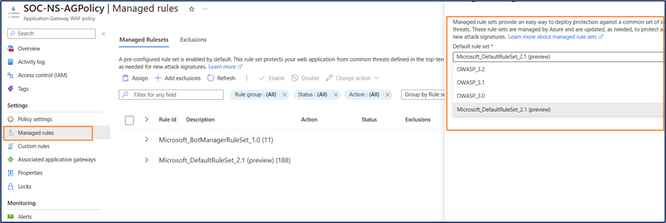
The long-anticipated option to use the Microsoft Default Rule Set (DRS) for Application Gateway in Web Application Firewall is now available in Public Preview. Customers can use the DRS with the latest Bot Manager rule set with their Regional WAF v2 to bring the same security experience as with Azure Front Door.
DRS 2.1 is a Microsoft Managed Rule Set baselined off the Open Web Application Security Project (OWASP) Core Rule Set (CRS) 3.3.2 and extended to include additional proprietary protections rules developed by Microsoft Threat Intelligence team. The Microsoft Threat Intel team analyzes Common Vulnerabilities and Exposures (CVEs) and adapts the CRS ruleset to address CVE and reduce false positives.
For more information on what's included in this release, please see the managed rules documentation.
How to enable the feature in App Gateway
- Go to the Application Gateway blade.
- Click on the Web Application Firewall and click the WAF Policy
- Click Managed rules.
- Click Assign and select the drop down for the Default Ruleset
- Select the Microsoft_DefaultRuleSet_2.1[preview]
Sensitive Data Protection for Application Gateway Web Application Firewall
The ability to mask sensitive data in Azure Application Gateway WAF logs is now available in public preview as an additional security option. When a WAF rule is activated, the WAF captures the request details and stores them in plain text within the logs. If the specific part of the request that triggers the WAF rule contains sensitive information (such as customer passwords or IP addresses), anyone with access to the WAF logs can view that sensitive data.
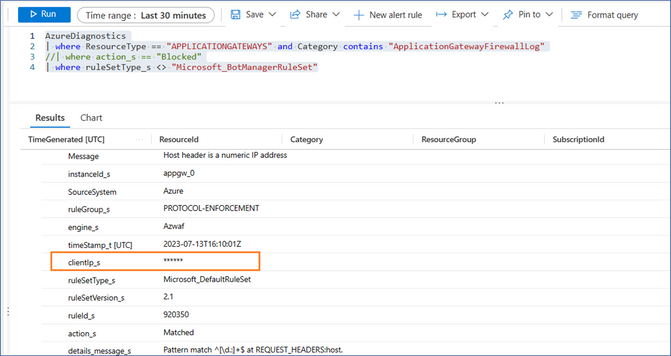
In order to protect customer data, WAF users can now set up log scrubbing rules targeting this sensitive data for protection. When one of these log scrubbing rules is triggered, the tool scrubs that information from the WAF logs and replaces it with <*******>
The announcement for the sensitive data protection brings an improvement on the default log structure with option to mask the following fields : { IP address, Request header name, Request cookie name, Request args name, Post arg name, JSON arg name }
You can find the reference information about the match variable use cases for the different parameters to be scrubbed in this table.
To enable Sensitive Data Protection:
- Go to the Application Gateway WAF policy blade.
- Under Settings, select Sensitive data.
- On the Sensitive data page, select Enable log scrubbing.

To configure Log Scrubbing rules for Sensitive Data Protection:
- Under Log scrubbing rules, select a Match variable.
- Select an Operator (if applicable).
- Type a Selector (if applicable).
- Select Save.
For PowerShell, you can create and configure the scrubbing rules using the following:
Once the selected fields have been configured, you can view the desired fields in the logs to verify the sensitive data field is now protected.
Conclusion
It is essential to regularly update the security configuration of your WAF policy in alignment with the necessary security baseline requirements for your application environment. These features, now available in public preview ensure improved WAF tuned environment that reduces false positives and manage visibility into sensitive information in your logs.
To learn how to mask sensitive information in your Application Gateway WAF logs, create your own log scrubbing rules
Ready to update to the new rule set for Application Gateway WAF?- DRS 2.1 for Regional WAF with Application Gateway Azure updates | Microsoft Azure
Are you looking to read up on the rule group and rule set logic for pattern matches? - CRS rule groups and rules - Azure Web Application Firewall | Microsoft Learn
Want to stay in the loop? Stay connected to the latest improvements before everybody else by joining the Private Community
Published on:
Learn moreRelated posts
IPv6 Adoption: Enhancing Azure WAF on Front Door
The transition to IPv6 is a significant step for enterprise corporations, reflecting the evolution of internet technology and the need for a l...
Azure WAF’s Bot Manager 1.1 and JavaScript Challenge (Preview): Navigating the Bot Threat Terrain
Introduction Bots are a common presence on the internet, serving a range of functions from automating customer service to indexing page...
Private IP DNAT Support (Preview) and Scenarios with Azure Firewall
Introduction Azure Firewall is a cloud native security service to protect your workloads running in Azure. It is a stateful firewall as a serv...
Getting Started with Azure DDoS Protection REST API: A Step-by-Step Guide
REST API is a cornerstone in the management of resources on Azure, providing a streamlined and efficient approach for executing create, read, ...
Monitoring Azure DDoS Protection Mitigation Triggers
Monitoring Azure DDoS Protection Mitigation Triggers In today’s digital landscape, Distributed Denial of Service (DDoS) attacks pose a signifi...
Azure WAF’s Bot Manager 1.1 and JavaScript Challenge: Navigating the Bot Threat Terrain
Introduction Bots are a common presence on the internet, serving a range of functions from automating customer service to indexing page...
Utilizing Azure DDoS Protection Workbook for DDoS attack traffic Analysis
In today's digital age, the security of applications, servers, and networks is paramount. One of the most significant threats to this security...
Independent Configuration of Size Enforcement and Inspection Limits in Application Gateway WAF
Introduction In the constantly changing world of cybersecurity, both flexibility and effective security are essential for safeguarding ...
Private IP DNAT Support and Scenarios with Azure Firewall
Introduction Azure Firewall is a cloud native security service to protect your workloads running in Azure. It is a stateful firewall as a serv...
Monitoring traffic flows in Azure Firewall using Virtual Network Flow Logs
Azure Firewall is a managed service designed to protect your Azure Virtual Network resources, providing advanced threat protection and advance...