
GA: Azure Storage updating client-side encryption in SDK to address security vulnerability

About the client-side encryption security vulnerability
Azure Storage .NET, Java, and Python SDKs support encryption on the client with a customer-managed key that is maintained in Azure Key Vault or another key store. Current release versions of the Azure Storage SDKs use cipher block chaining (CBC mode) for client-side encryption (referred to as “v1”). The current implementation of CBC block mode is vulnerable to a padding oracle attack, provided the attacker has write access to the blob and can observe decryption failures. The attacker would need to perform 128 attempts per byte of plain text to decrypt blob contents. We view putting this combination of qualifiers together for an attack to be rare. We encourage customers to assess the risk to their scenarios.
In this blog post, we will cover the following,
1. How Microsoft is mitigating the vulnerability
2. Explore additional protection with private endpoints & limiting network access
3. Alternatives to client-side encryption – Azure Storage server-side encryption
4. Action Required to remediate this vulnerability
5. Brief – Azure Storage server-side encryption
6. Frequently Asked Questions
If you have any further questions or concerns, please open a support case through the Azure Portal at aka.ms/azsupt.
1. How Microsoft is mitigating the vulnerability
Azure Storage is announcing the release of a new version of the client-side encryption feature (referred to as “v2”) in the Azure Storage SDKS to mitigate the CBC mode vulnerability. Given this vulnerability in CBC, v2 will not use CBC mode for client-side encryption instead use AES-GCM for client-side encryption, which is a major change in client-side encryption feature. The updated sdks provide ability for you to read and write data encrypted with v1 version i.e backward compatible with v1. The updated sdks are now in GA(Generally Available).
2. How to verify if you use client-side encryption feature?
This vulnerability impacts only if your code is using client side encryption feature of Azure Storage SDK. Below is how you can check if your code is using client side encryption feature from Azure Storage SDK.
- For .net – Check if in your code uses either ClientSideEncryptionOptions or BlobEncryptionPolicy
- For Java - Check if your code uses either EncryptedBlobClientBuilder or BlobEncryptionPolicy
- For Python – Check if your code uses either key_encryption_key OR key_resolver_function
3. Explore additional protection with private endpoints & limiting network access
You could additionally explore adding protection against this vulnerability with Private endpoints and limited network access.
- Private endpoints - It can secure all traffic between your VNet and the storage account over a private link.
- Limit network access to specific networks - It can limit access to specific networks hosting clients.
You can learn more about these and explore other security recommendation here
4. Alternatives to client-side encryption – Azure Storage server-side encryption
Azure Storage offers server-side encryption features which address most customers’ needs for encryption protection at rest and reduce the management overhead and burden associated with client-side encryption. We strongly encourage you to explore server-side encryption for your needs and use it in place of client-side encryption if possible. To learn more about server-side encryption offerings, see the “Azure Storage server-side encryption” section at the bottom. If you have any questions, email us at [email protected].
5. Action Required to remediate this vulnerability
There are three steps that you need to follow to update your applications and fully mitigate the above mentioned CBC mode vulnerability.
- If you are still using previous version of sdk than v12.x SDK then, update your code to use the latest version of v12.x sdk
- Update your code to use client-side encryption v2 instead of v1 client-side encryption
- Migration your data previously encrypted with v1 client-side encryption to v2 by downloading it, reencrypting it, and uploading it again. Sample code is provided below.
The following sections describe how to update your code to use client-side encryption v2 with each SDK:
A. .NET SDK
- If you are using v11 or previous SDK versions, which are deprecate, please update your code to use the v12.x SDK. Here is the migration guide (here).
- Download preview release of client-side encryption v2 and update your code to use client-side encryption v2. Download blob package 12.13.0 or above from here, queue package 12.11.0 or above from here.
C#
var client = new BlobClient(myConnectionString, new SpecializedBlobClientOptions()
{
ClientSideEncryption = new ClientSideEncryptionOptions(ClientSideEncryptionVersion.V2_0)
{
KeyEncryptionKey = myKey,
KeyResolver = myKeyResolver,
KeyWrapAlgorihm = myKeyWrapAlgorithm
}
});
Or
client.WithClientSideEncryptionOptions(new ClientSideEncryptionOptions(ClientSideEncryptionVersion.V2_0)
{
KeyEncryptionKey = myKey,
KeyResolver = myKeyResolver,
KeyWrapAlgorihm = myKeyWrapAlgorithm
});
- Migrate data which was encrypted with client-side encryption v1 to client-side encryption v2 for your scenarios. Sample project here to help you get started. This is required to fully remediate the above mentioned vulnerability..
B. Java SDK
- If you are using v8 or previous SDK versions, which are deprecate, please update your code to use the v12.x SDK. Here is the migration guide (here).
- Download blob package 12.18.0 or above from here
- Update your code to use client-side encryption v2. Sample code – here. Essentially create the builder with V2 encryption version. EncryptedBlobClientBuilder(EncryptionVersion.V2)
- Migrate data which was encrypted with client-side encryption v1 to client-side encryption v2 for your scenarios. See the Sample project here to help you get started. This is required to fully remediate the above mentioned vulnerability.
C. Python SDK
- If you are using v11 or previous SDK versions, which are deprecate, please update your code to use the v12.x SDK. Here is the migration guide (here).
- Download blob package 12.13.0 or higher from here and queue package 12.4.0 or higher from here).
- Update your code to use client-side encryption v2
Blob_client = blob_service_client.get_blob_client(container=container_name, blob=blob_name)
blob_client.require_encryption = True
blob_client.key_encryption_key = kek
blob_client.encryption_version = ‘2.0’ # Use Version 2.0!
with open(“decryptedcontentfile.txt”, “rb”) as stream:
blob_client.upload_blob(stream, overwrite=OVERWRITE_EXISTING)
- Migrate data which was encrypted with client-side encryption v1 to client-side encryption v2 for your scenarios. Detailed steps are here to help you get started. This is required to fully remediate the above mentioned vulnerability.
If you have any further questions or concerns, please open a support case through the Azure Portal at aka.ms/azsupt.
6. Brief – Azure Storage server-side encryption
Azure Storage uses server-side encryption to automatically encrypt your data when it is uploaded. All data in all storage accounts is encrypted by default, so you don’t need to do anything to take advantage of Azure Storage server-side encryption at rest.
By default, server-side encryption uses Microsoft-managed keys to encrypt your data. You can also choose to manage encryption with your own keys. To leverage the default encryption option using Microsoft-managed keys, just update your code to stop using client-side encryption. All data that you upload is automatically encrypted by Microsoft. Learn more at Azure Storage encryption for data at rest.
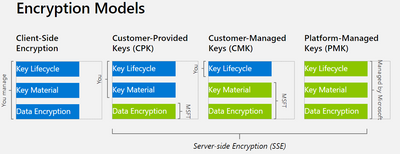
If you choose to manage your own keys for encryption, you have the below two choices. All object metadata will also be encrypted.
- Customer-managed keys (CMK): You can specify a customer-managed key to use for encrypting and decrypting data in Azure Storage. Customer-managed keys must be stored in Azure Key Vault or Azure Key Vault Managed Hardware Security Model (HSM).
For more information about CMK, see Configure encryption with customer-managed keys stored in Azure Key Vault.
- Customer-provided keys (CPK): You can specify a customer-provided key (CPK) on Blob storage operations. A client making a read or write request against Blob storage can include an encryption key on the request for granular control over how blob data is encrypted and decrypted. The CPK is only available to Azure Storage for a limited time to perform the operations and not permanently stored in the service.
Azure Storage does not store the key you provide on the request, it stores the cryptographic hash of the key to verify that all subsequent operations against the blob use the same encryption key. Customer-provided keys can be stored in Azure Key Vault or in another key store.
For more information about CPK, see Provide an encryption key on a request to Blob storage.
To migrate previously encrypted data, you will need to reupload it to Azure Storage. We are working on getting the steps for this and we will update this blog once we have it. Please email us if you need it urgently, or if you have any questions / feedback / gaps with server-side encryption, at [email protected].
7. Frequently Asked Questions
- How likely is this vulnerability going to affect my workload and data ?
- As explained in the first section, we view this CBC padding oracle to be rare, as it needs combination of many qualifiers together for an attack. We encourage customers to assess the risk to their scenarios.
- How would I know if this affects me and I need to take action?
- Please check if you are using client-side encryption to upload your data to Azure Storage. For steps, refer above section “How to verify if you use client-side encryption feature?”
- If not, there is no action needed from you.
- What actions do I need to take?
- Azure Storage SDK is releasing an update version of client-side encryption called v2 which fixes this vulnerability. Please refer this section for detailed steps : “Action Required to remediate this vulnerability”
- Who do I ask any questions?
- If you have any further questions or concerns, please open a support case through the Azure Portal at aka.ms/azsupt.
Published on:
Learn moreRelated posts
Update on classic storage account retirement and upcoming changes for classic storage customers
We previously announced that support would end for retired Azure classic storage accounts on 31 August 2024. Now that we are past the retireme...
Azure Elastic SAN for Azure VMware Solution: now Generally Available
Have you been looking to expand your storage on Azure VMware Solution (AVS), but do not need the extra compute performance and the associated ...
Accelerate metadata heavy workloads with Metadata Caching preview for Azure Premium Files SMB & REST
Azure Files previously announced the limited preview of Metadata caching highlighting improvements on the metadata latency (up to 55...
Announcing UNLIMITED Public Preview of Metadata Caching for Azure Premium SMB/REST File Shares
Azure Files is excited to announce the Unlimited public preview of Metadata Caching for the premium SMB/REST file share tier. Unlimited ...
Azure Backup-SAP HANA DB Backup Delivers More Value at Lower TCO with Reduced Protected Instance Fee
Azure Backup for SAP HANA Database Delivers More Value at Lower TCO with Reduced Protected Instance Fees starting 1st Sept’2024 At Azur...
Switch to Azure Business Continuity Center for your at scale BCDR management needs
In response to the evolving customer requirements and environments since COVID-19, including the shift towards hybrid work models and the incr...
The Azure Storage product group is heading to the SNIA Developer Conference 2024
The Azure Storage product group is heading to the SNIA Developer Conference (SDC) 2024 in Santa Clara, California, USA from September 16th thr...
Latest advancements in Premium SSD v2 and Ultra Azure Managed Disks
We are excited to share the latest advancements in Premium SSD v2 (Pv2) and Ultra disks, the next generation of Azure disk stor...
Unlocking the Potential of Unstructured Data with Microsoft Copilot and Azure Native Qumulo
It has been a true pleasure to see our friends at Qumulo constantly innovating and delivering a service that adds more value with every releas...
Public Preview: Customer Managed Planned Failover for Azure Storage
We are excited to announce customer managed Planned Failover for Azure Storage is now available in public preview. Over the past few ye...