Microsoft Planner: No Templates? No worries.
How to create templates in Microsoft Planner. Here's how to create them and how to help users re-use your work.
Navigate the world of process automation with our curated collection of Microsoft Power Automate blogs. Stay informed about the latest updates, tips, and best practices to streamline your workflows and boost productivity with Power Automate.
How to create templates in Microsoft Planner. Here's how to create them and how to help users re-use your work.
Get ready to laugh out loud with this hilarious compilation of bloopers from the Power Baseball League! From missed catches to clumsy trips, t...
It very easy to setup and use Azure Insights in Business Central. You can read how to set it up here But how to actually analyze the logs in A...
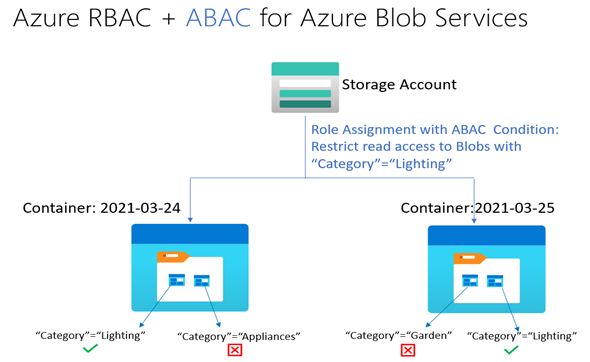
The public preview of Attribute Based Access Control (ABAC) in Azure builds on Azure Role-Based Access Control (RBAC) to make it easier for or...
This video is a recording of the May 2021 Washington, DC User Group meeting, where experts from Microsoft offered insights into developing mis...
In a recent podcast, Ryan Chartrand, CEO of X-Team, discusses the difference between remote work in the pandemic and remote work as a regular ...
While working with Power Apps we can in some cases forget to add handling of simple stuff like Unsaved data. Learn how to deal with unsaved da...
The rapid adoption of Azure globally has resulted in a need to provide strong security assurances to customers on the state of their workloads...
One of the features of Power Apps portals that I have been impatiently waiting for is the Power Apps portals WebAPI. This new feature recently...
How to create nested folders and copy templates automatically? See where 15 minutes can save you hours of work with these simple techniques.
Azure
Microsoft 365 Sharepoint
Newsletter
A curated digest of community blogs, product news, videos, and podcasts — delivered without the noise.