
Announcing General Availability of Az.Tools.Predictor

On November 10, 2020, we announced the first preview of Az.Tools.Predictor, a PowerShell module suggesting the Azure cmdlet to use with parameters and suggested values.
Today, we are announcing the general availability of Az.Tools.Predictor.
How it all started
During a study about a new module for Azure, I was surprised to see how difficult it was for the participant to find the correct cmdlet to use. Later, I was summarizing the learnings of the study, and though it would be great if we could have a solution that could help people finding the right cmdlet to use.
At the same time, we were starting to work on Predictive IntelliSense in PowerShell and after a couple of meetings with Jason Helmick, it became clear that this would be a great mechanism to address the challenge I had seen few days before by providing, in the command line, suggestions about cmdlet to use.
We quickly thought that some form of AI could help providing accurate recommendations so we involved Roshanak, Yevhen and Maoliang from our data science team to work with us on how we could build an engine that would provide recommendations for PowerShell cmdlets based on the user’s context.
Behind the scenes
Once a functional prototype was built, we wanted to confirm its usability before considering any public previews.
For our team usability is important, over time certain key combinations became a reflex and we knew that we had to fit in the existing memory muscle and become intuitive for PowerShell. For predictors to be successful, we organized several usability studies with prototypes of Az Predictors and addressed several improvements, like the color of the suggested text or the key combination to use to accept or navigate amongst predictions.
One of our initial prototypes was using the color scheme below, we wanted to have a clear color-based differentiation between typed characters and suggestions hoping this would help user navigate the suggestion. We worked with our design team to address the issue and evolve our design towards the current design.

We also evaluated if the information provided in the suggestions is helpful. Below is another of our early designs. By listening to our customers and observing how they are using the tool, we learned that showing cmdlets first then parameters and associated value samples was not as useful as showing the full line and not using more space in the terminal which is our current design.

During the last months we have done a few previews (read about preview 5) to stabilize the module as PowerShell and PS Readline which we depend on became stable. We have also improved our model based on the feedback we have collected and addressed issues reported.
Getting started
We would like to invite you to try the stable version of Az.Tools.Predictor.
To get started, follows these steps:
- Install or upgrade PowerShell v7.2
https://docs.microsoft.com/powershell/scripting/install/installing-powershell - Install or upgrade PSReadline 2.2
Install-Module -Name PSReadLine -Force
- Install or upgrade Az.Tools.Predictor
Install-module -name Az.Tools.Predictor -Force
- Enable Az Predictor
Enable-AzPredictor -AllSession
Once installed, it is recommended that you restart your PowerShell sessions.
For more details, visit the Az Predictor documentation page: https://docs.microsoft.com/powershell/azure/az-predictor
Inline view mode (default)
Once enabled, the default view is the "inline view" as shown in the following screen capture:


This mode shows only one suggestion at a time. The suggestion can be accepted by pressing the right arrow or you can continue to type. The suggestion will dynamically adjust based on the text that you have typed.
You can accept the suggestion at any time then come back and edit the command that is on your prompt.
List view mode
This is my favorite mode!
Switch to this view either by using the "F2" function key on your keyboard or run the following command:
Set-PSReadLineOption -PredictionViewStyle ListView
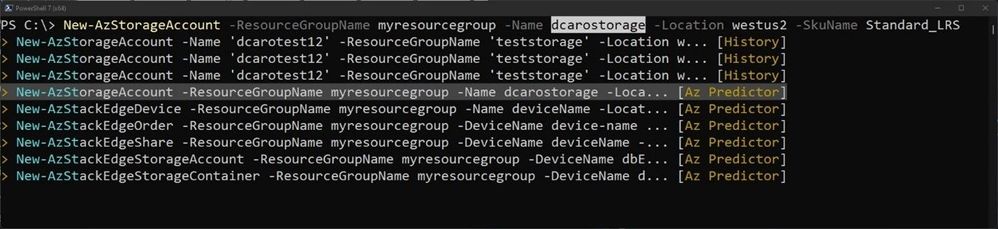
This mode shows from your current prompt a list of possible matches for the command that you are typing. It combines suggestions from your local history and from Az Predictor.
Select a suggestion and then navigate through the parameter values with "Alt + A" to quickly fill replace the proposed values with yours.
Next steps
This is just the beginning of our journey to improving the usability of Azure PowerShell!
We will be carefully listening to every feedback that you send us:
- Open an issue on GitHub to report a problem
- Tell us about your experience using this survey: http://aka.ms/azpredictorsurvey
- Reach out to us on Twitter: @azureposh
We will share soon more about how we plan to expand this experience to other environments.
Credits
“It takes a village to raise a child” Az.Tools.Predictor is the result of the close collaboration of several teams distributed across continents and time zones working hard during the pandemic.
Published on:
Learn moreRelated posts
Unlocking the Best of Azure with AzureRM and AzAPI Providers
With the recent release of AzAPI 2.0, Azure offers two powerful Terraform providers to meet your infrastructure needs: AzureRM and AzAPI. The ...
Announcing AzAPI 2.0
The AzAPI provider, designed to expedite the integration of new Azure services with HashiCorp Terraform, has now released 2.0. This updated ve...
Azure CLI docker container base Linux image is now Azure Linux
Starting from the version 2.64.0 of Azure CLI, the base Linux distribution of Azure CLI is now Azure Linux. Impact of the change ...
Mastering the Shorthand Syntax in your daily workflow
Introduction In this tech blog, we'll unravel the magic behind Azure CLI shorthand syntax and discover how it can elevate your command-line ex...
Azure Verified Modules - Monthly Update [June]
AVM Module Summary The AVM team are excited that our community have been busy building AVM Modules. As of June 17th, the AVM Footprint curren...
Azure Verified Modules - Monthly Update [May]
Quarterly Community Call This month we held our first community call. Thank you to everyone that attended & contributed. It was amazing t...
Azure CLI and PowerShell Tools Build 2024 Announcement
Microsoft has announced several new capabilities for Azure CLI and Azure PowerShell at the Microsoft Build 2024. The priority remains to provi...
Terraform on Azure May 2024 Update
Welcome to our April 2024 update! These blogposts will be covering everything we've gotten up to recently with Terraform on Azu...
Azure Verified Modules - Monthly Update [April]
In the April edition of the Azure Verified Modules update, the AVM team announces their upcoming quarterly community call scheduled for 21st M...
Announcing AzAPI Dynamic Properties
It’s been almost two years since the announcement of AzAPI, and the provider has eclipsed 20M+ downloads thanks to all of you. We’re ex...