
Managing WAF Policies and DDoS protection plans with Azure Firewall Manager
Written in collaboration with
As your organization’s security requirements grow, it becomes difficult to manage all the perimeter security technologies. To simplify the management of cloud-based network security, we can use Azure Firewall Manager and its centralized management dashboard to gain visibility and centrally configure capabilities for Azure Firewall, Azure WAF and DDoS Protection technologies. In this blog we will specifically focus on using Azure Firewall Manager for WAF Policy Management and Distributed Denial of Service (DDoS) Protection plan management. For more details on Network Security Management with Azure Firewall Manager, please refer to this blog AZ-FWM-Blog.
Azure Firewall Manager is a security management service that provides central security policy and route management for cloud-based security perimeters. Azure Firewall Manager has been available for managing Firewall policies, and now Azure Firewall Manager also centrally manages Azure WAF policies and DDoS protection Plans. Azure Firewall Manager features are:
- Hierarchical Firewall policies
- Centralized route management
- Multi Region availability
- Integration with third-party security-as-a-service providers
- Centralized WAF Policy Management
- Manage DDoS Protection plans for your virtual networks
- Monitor Network Security Posture
Centralized WAF Policy Management
Azure Web Application Firewall is a cloud-native WAF service that provides centralized OWASP and bot protection for web apps including common hacking techniques such as SQL injection and security vulnerabilities such as cross-site scripting. These WAF protection capabilities are available as part of Application Gateway and Azure Front Door services, and users need to create a separate WAF policy for each of their Application Gateway and Front Door deployments. In Azure Firewall Manager, you can now manage and protect your Azure Front Door or Application Gateway v2 deployments by associating WAF policies, at scale. This allows you to view all your key deployments in one central place.
Here is a step-by-step demonstration of creating and associating WAF policies with Application Gateway.
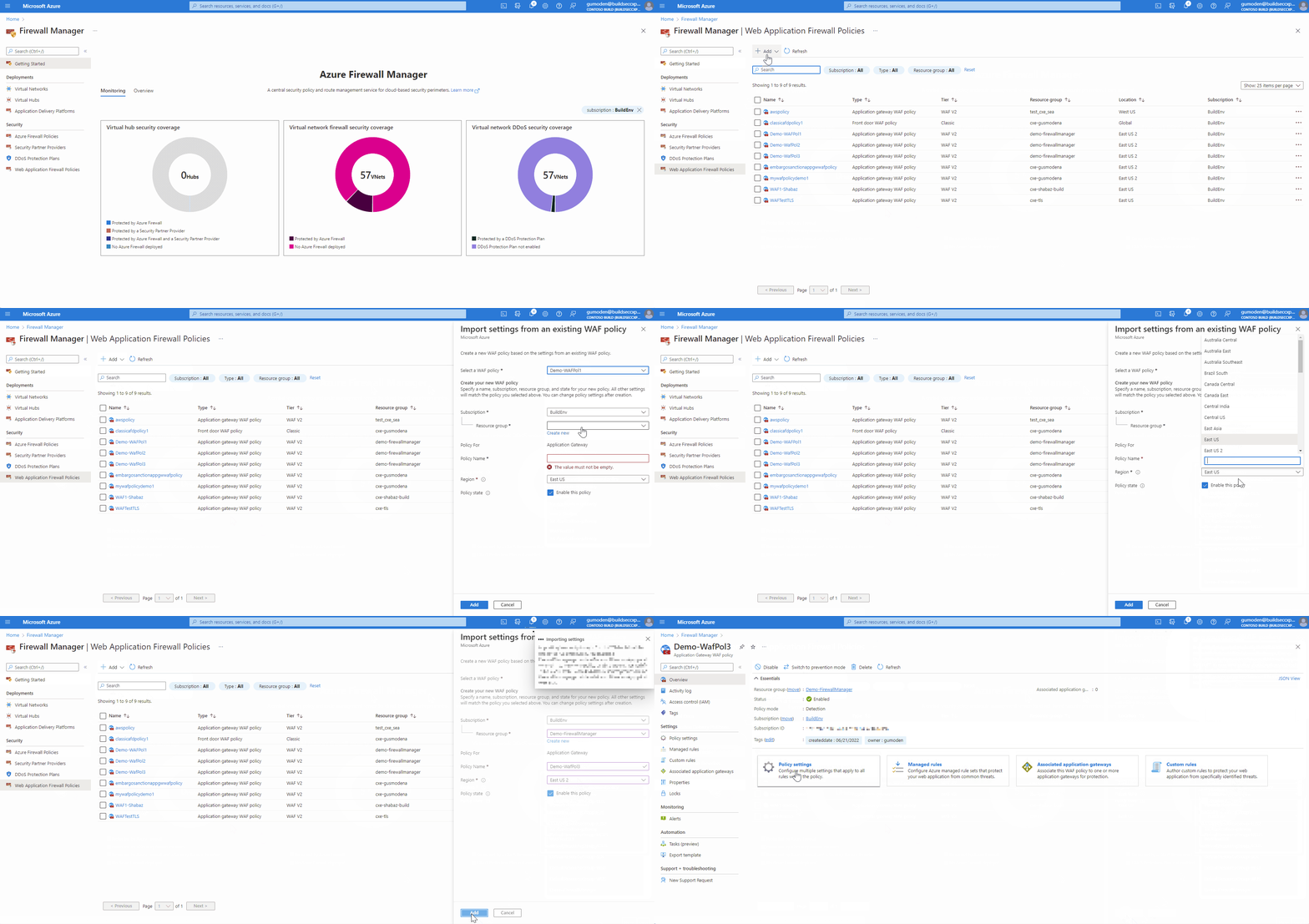
To create a WAF policy by importing settings from an existing policy, follow the steps below:
- On the Azure Firewall Manager page, select Web Application Firewall Policies
- Select Add to create a new WAF policy. In this example, we are creating a new policy by importing settings from an existing WAF policy
- Select the WAF policy that you want to import the settings from
- Select either an existing resource group or Create New
- Give a name for the new WAF policy. For new WAF policy for Front Door, the name must begin with a letter and contain only letters and numbers
- Select the region
- Select “Enable this policy”
- Select Add
To Associate WAF policy, follow the steps below:
Through Firewall Manager we can also associate/disassociate WAF policies from our application delivery platforms (Front Door or Application Gateway). When associating a new WAF policy at same level as another WAF policy, a replacement will happen and only the last policy associated will be effective.
- On the Azure Firewall Manager page, select Application Delivery Platforms
- Select your application delivery platform (Front Door or Application Gateway) to associate a WAF policy. In this example, we are associating a WAF policy to an Application Gateway
- Select Manage Security and then select Associate WAF policy
- Select either an existing policy or Create New
- Select the level you want to apply the WAF policy (Globally, HTTP Listener or Route Path). In this example, we are selecting Listener
- Select Associate
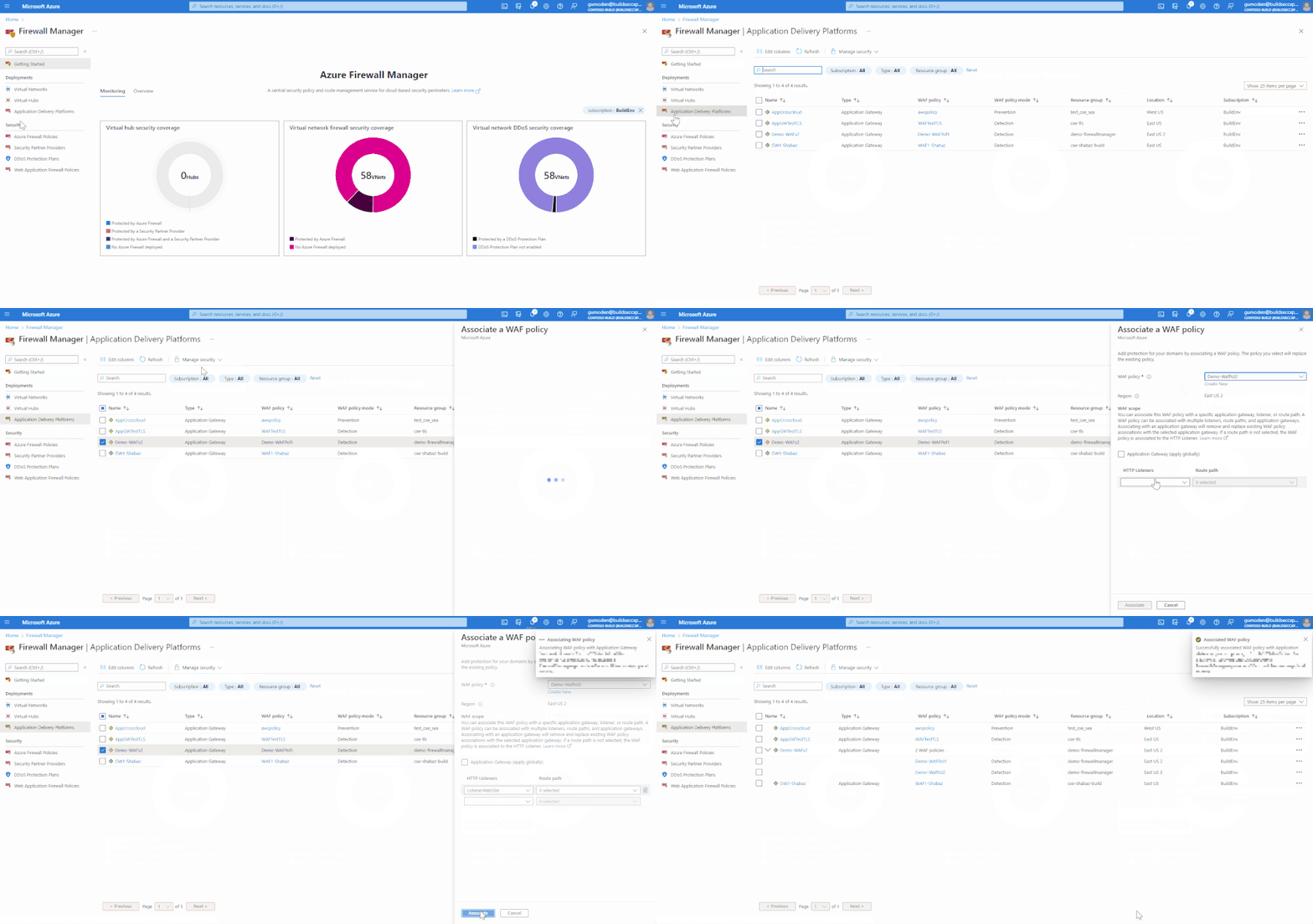
As we can see in the above demonstration there are multiple WAF policies associated with the Application Gateway, being one globally and another at listener level. Application Gateways require at least one WAF policy applied globally. So, we can only remove associations from Listener and Route Path.
To Upgrade from WAF config to WAF policy, follow the steps below:
In addition, the platform supports administrators to upgrade from a WAF config to WAF policies for Application Gateways, by selecting the service and Upgrade from WAF configuration. This allows for a more seamless process for migrating to WAF policies, which supports WAF policy settings, managed rulesets, exclusions, and disabled rule-groups.
As a note, all WAF configurations that were previously created in Application Gateway can be done through WAF policy.
- On the Azure Firewall Manager page, select Application Delivery Platforms
- Select Upgrade from WAF configuration on the Application Gateway which you want to make apply the change
- Select either an existing resource group or Create New
- Give a name for the new WAF policy
- Select the region
- Select “Enable this policy”
- Select Upgrade
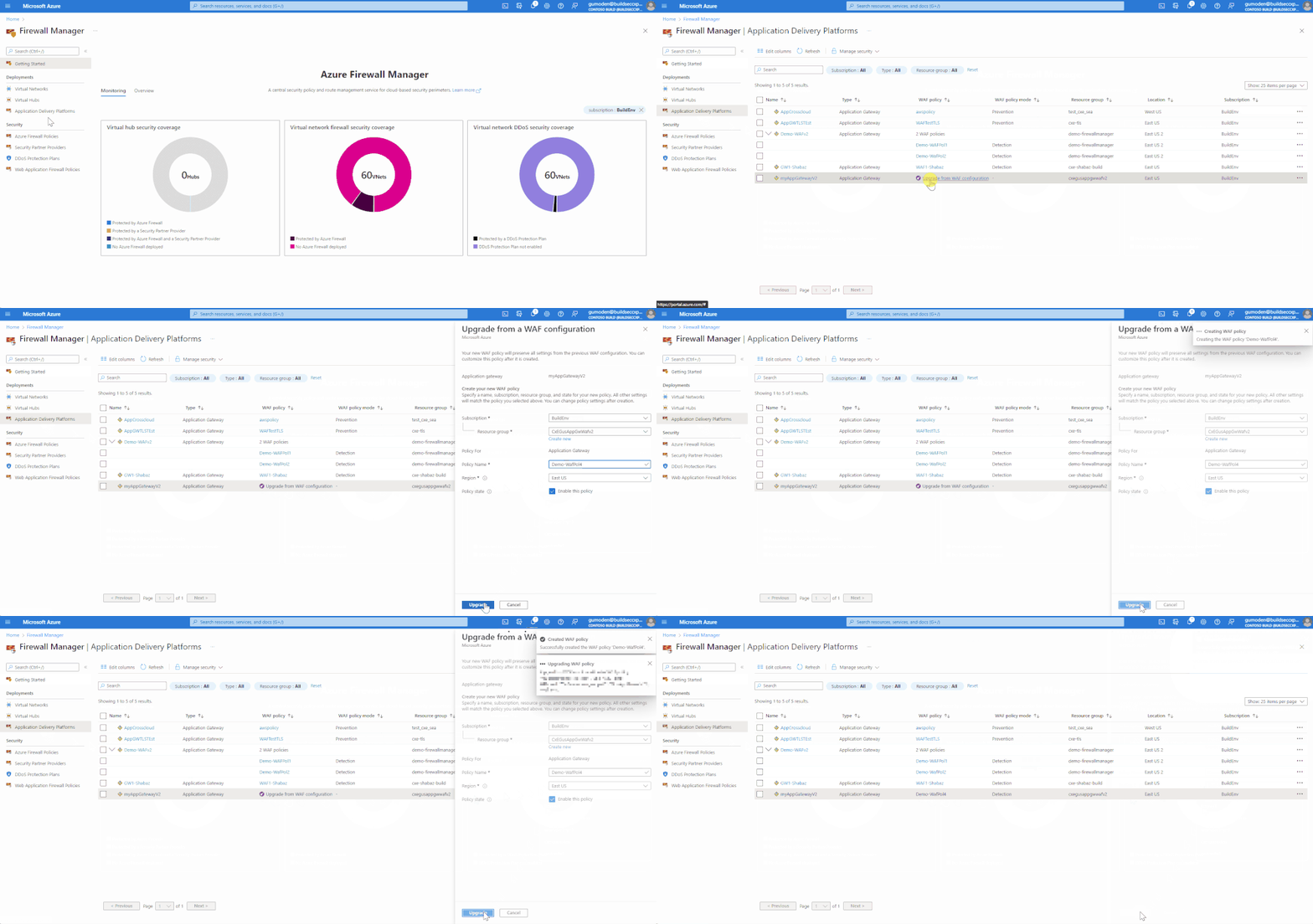
Once the upgrade is complete, there is no option to change it back to WAF config.
DDoS Protection Plan Management with Azure Firewall:
Distributed denial of service (DDoS) attacks are some of the main availability and security concerns faced by customers with applications in the cloud. A DDoS attack attempts to exhaust an application's resources, making the application unavailable to legitimate users.
Azure DDoS Protection Standard, combined with application design best practices, provides enhanced DDoS mitigation features to defend against DDoS attacks. It is automatically tuned to help protect your specific Azure resources in a virtual network. Protection is simple to enable on any new or existing virtual network, and it requires no application or resource changes.
What are the scalability challenges with the current way DDoS plan gets implemented and how is Firewall Manager going to help? With the help of Azure Firewall Manager, you can now enable DDoS Protection Plan Standard on your virtual networks across subscriptions and regions.
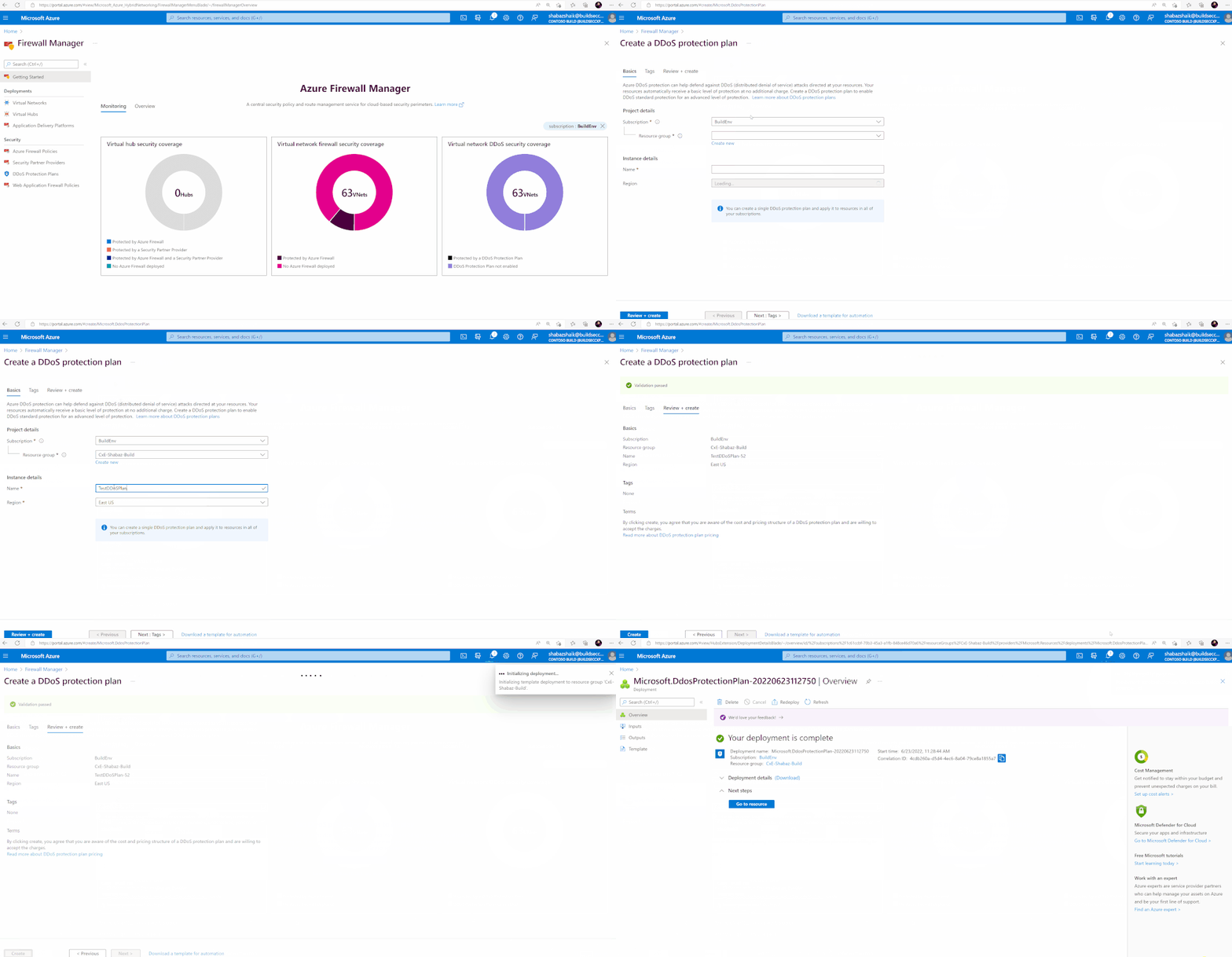
Here is a step-by-step demonstration of Enabling a DDoS Protection plan on Azure Firewall Manager and associating it with a Virtual Network.
To create a DDoS Protection Plan, follow the steps below:
- On the Azure Firewall Manager page, select DDoS Protection Plans
- Select Create
- For Resource Group, select an existing resource group you have or create a new resource group
- Under instance details, give a name to the DDoS protection Plan
- Select the Region for the plan
- Select “Review + Create” and then select Create
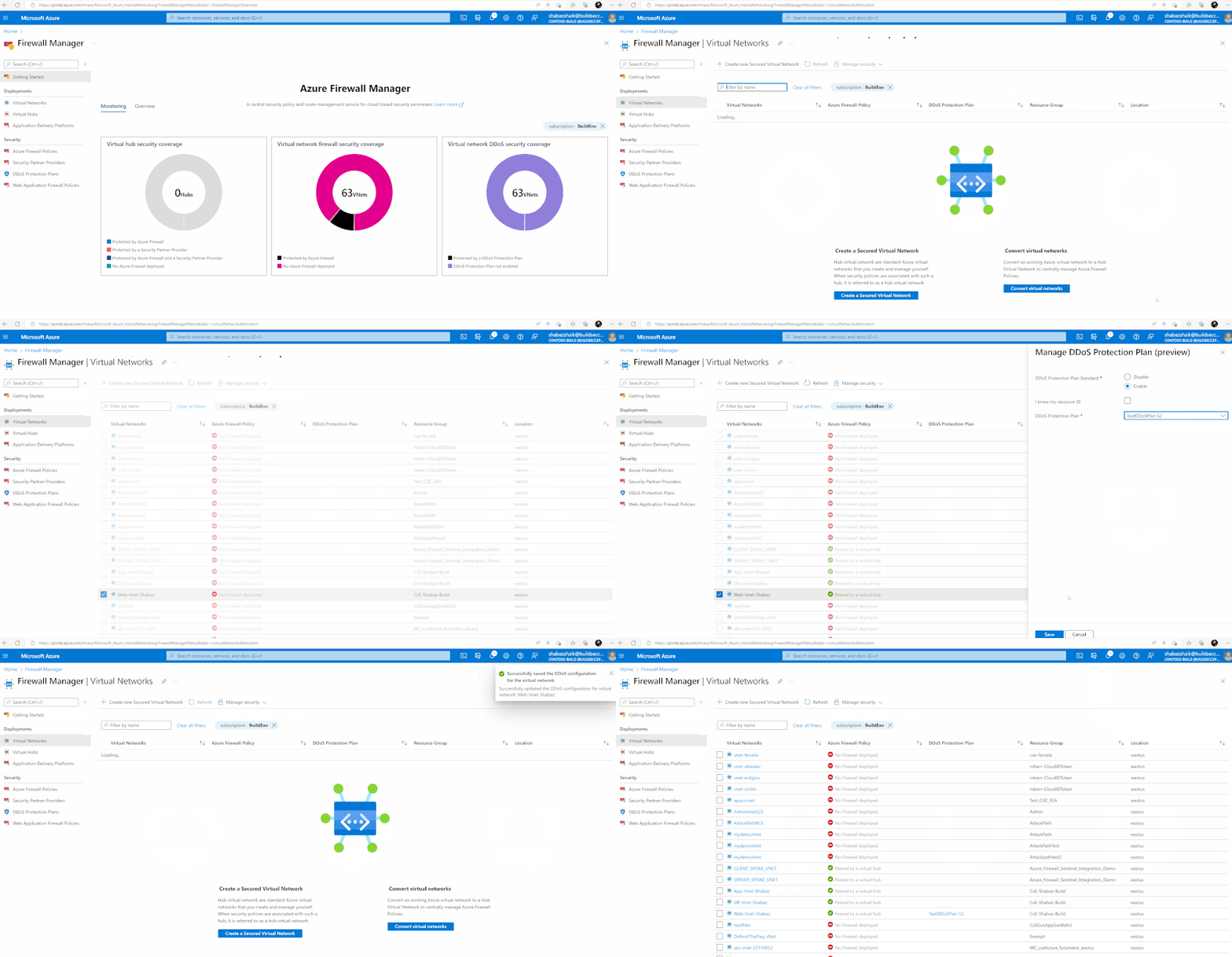
To associate a DDoS Protection Plan with a Virtual Network, follow the steps below:
- On the Azure Firewall Manager page, select Virtual Networks
- Select the check box for the Virtual Network to which you want to associate the DDoS protection plan you created
- Select Manage security and select Manage DDoS Protection Plan
- Under Manage DDoS Protection Plan, Enable DDoS Protection Plan Standard
- For, DDoS Protection Plan, select the DDoS Protection Plan you created
- Select Save
- After the deployment is complete select Refresh
Conclusion:
As we have seen above, Azure Firewall Manager simplifies the management of cloud security perimeters by enforcing consistency on all the Network Security Configuration, ease and scale of management, and visibility on a single dashboard. To learn more about Azure Firewall Manager, please visit the Azure Firewall Manager documentation.
Published on:
Learn moreRelated posts
IPv6 Adoption: Enhancing Azure WAF on Front Door
The transition to IPv6 is a significant step for enterprise corporations, reflecting the evolution of internet technology and the need for a l...
Azure WAF’s Bot Manager 1.1 and JavaScript Challenge (Preview): Navigating the Bot Threat Terrain
Introduction Bots are a common presence on the internet, serving a range of functions from automating customer service to indexing page...
Private IP DNAT Support (Preview) and Scenarios with Azure Firewall
Introduction Azure Firewall is a cloud native security service to protect your workloads running in Azure. It is a stateful firewall as a serv...
Getting Started with Azure DDoS Protection REST API: A Step-by-Step Guide
REST API is a cornerstone in the management of resources on Azure, providing a streamlined and efficient approach for executing create, read, ...
Monitoring Azure DDoS Protection Mitigation Triggers
Monitoring Azure DDoS Protection Mitigation Triggers In today’s digital landscape, Distributed Denial of Service (DDoS) attacks pose a signifi...
Azure WAF’s Bot Manager 1.1 and JavaScript Challenge: Navigating the Bot Threat Terrain
Introduction Bots are a common presence on the internet, serving a range of functions from automating customer service to indexing page...
Utilizing Azure DDoS Protection Workbook for DDoS attack traffic Analysis
In today's digital age, the security of applications, servers, and networks is paramount. One of the most significant threats to this security...
Independent Configuration of Size Enforcement and Inspection Limits in Application Gateway WAF
Introduction In the constantly changing world of cybersecurity, both flexibility and effective security are essential for safeguarding ...
Private IP DNAT Support and Scenarios with Azure Firewall
Introduction Azure Firewall is a cloud native security service to protect your workloads running in Azure. It is a stateful firewall as a serv...
Monitoring traffic flows in Azure Firewall using Virtual Network Flow Logs
Azure Firewall is a managed service designed to protect your Azure Virtual Network resources, providing advanced threat protection and advance...