
Introducing Windows Local Administrator Password Solution with Microsoft Entra (Azure AD)

Howdy folks,
Today we have some news I know many of you will be excited about! As part of our vision to give you comprehensive security solutions, we’ve joined forces with the Windows and Microsoft Intune teams to release a public preview of Windows Local Administrator Password Solution (LAPS) for Azure AD (which is now part of Microsoft Entra).
I’ve asked Sandeep Deo, one of the Product Managers behind this release, to give you the low down on all these updates and explain how you can start using Windows LAPS with Microsoft Entra (Azure AD). You’ll find Sandeep’s blog post below.
Best regards,
Alex Simons (@Alex_A_Simons)
Corporate VP of Program Management
Microsoft Identity Division
----------------
Hi everyone,
I am excited to share with you the updates we have made to LAPS and how you can start using it with Microsoft Entra (Azure AD) and Microsoft Intune to secure your Windows devices joined to Azure AD.
Every Windows device comes with a built-in local administrator account that you must secure and protect to mitigate any Pass-the-Hash (PtH) and lateral traversal attacks. Many customers have been using our standalone, on-premises LAPS product for local administrator password management of their domain joined Windows machines. We heard from many of you that you need LAPS support as you modernize you Windows environment to join directly to Azure AD.
Today we're making Windows LAPS available to you for both Azure AD joined and hybrid Azure AD joined devices. Additionally, Windows LAPS is now built-in into Windows with Windows 10 20H2 and later, Windows 11 21H2 and later, and Windows Server 2019 and later using the most recent security update (released on April 11, 2023). With these updates, you will also no longer need to install an external MSI package and future fixes or feature updates will be delivered via the normal Windows patching processes.
There are some pretty important capabilities we've enabled with in this preview:
- Turn on Windows LAPS using a tenant wide policy and a client-side policy to backup local administrator password to Azure AD.
- Configure client-side policies via Microsoft Intune portal for local administrator password management to set account name, password age, length, complexity, manual password reset and so on.
- Recover stored passwords via Microsoft Entra/Microsoft Intune portal or Microsoft Graph API/PSH
- Enumerate all LAPS enabled devices via Microsoft Entra portal or Microsoft Graph API/PSH.
- Create Azure AD role-based access control (RBAC) policies with custom roles and administrative units for authorization of password recovery.
- View audit logs via Microsoft Entra portal or Microsoft Graph API/PSH to monitor password update and retrieval events.
- Configure Conditional Access policies on directory roles that have the authorization of password recovery.
Let’s walk through the simple steps to enable some of these scenarios.
Setting up LAPS
In the Azure AD Devices menu, select Device settings, and then select Yes for the LAPS setting and click Save.

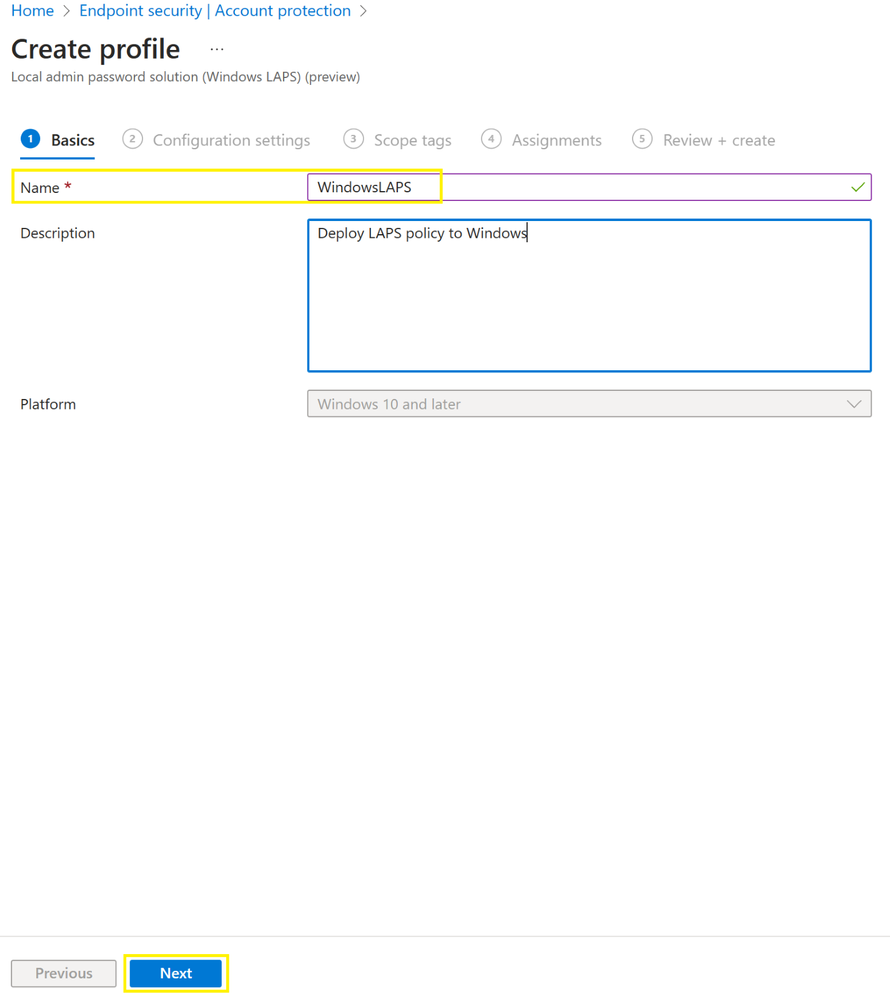
In the Microsoft Intune Endpoint security menu, select Account protection, then select Create Policy to create a Windows LAPS profile for Windows 10 and later. During profile creation, the pick Backup Directory to be Azure AD and can also configure other client policies for LAPS, does the Assignments to Azure AD groups and then finally selects Review + Create.


Recovering local administrator password
In the Azure AD Devices | Overview page, select Local admin password recovery option. This will enumerate all devices that are enabled with LAPS and then click Show local administrator password next to the device name to recover the password. You will also have the option to enter device name to filter from the enumerated list and then choose Show local administrator password.
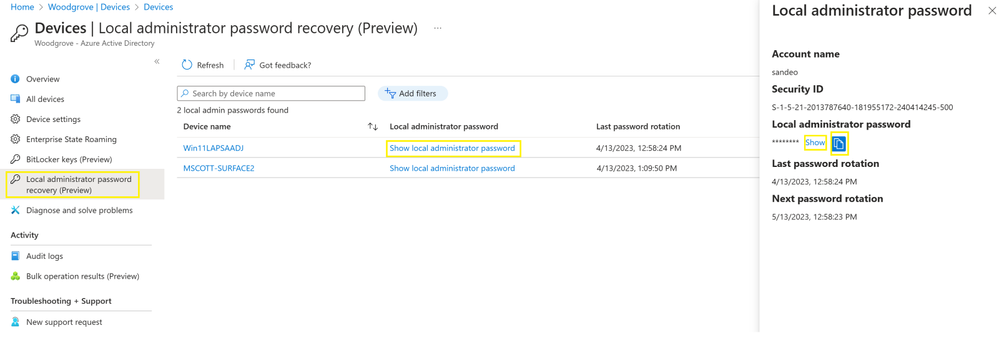
You can also create custom roles or administrative units in Azure AD for authorization of local administrator password recovery.
Reset local administrator password manually
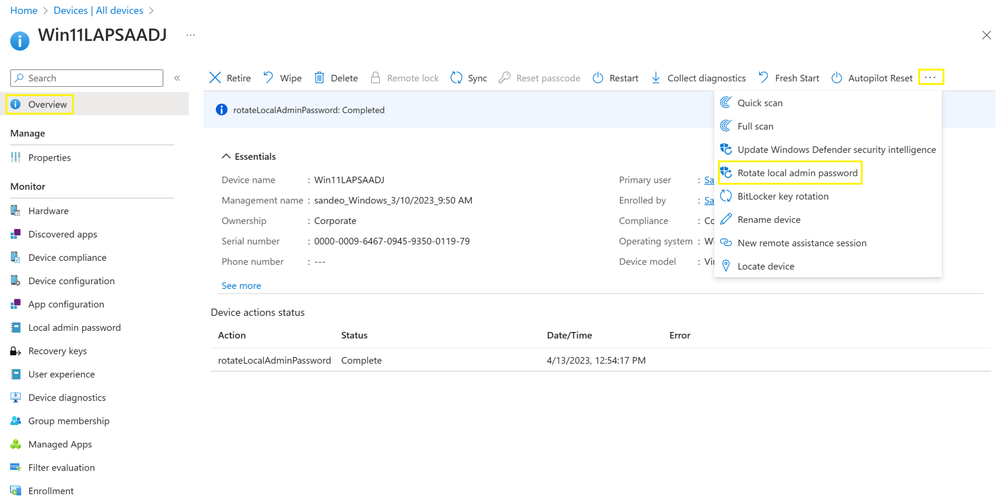
In the Microsoft Endpoint Devices | All devices page, the admin enters the device name in the Search field. Then on the specific device’s overview page they choose the device action Rotate local admin password.
Audit local administrator password update and recovery
In the Azure AD Devices | Overview page, the admin selects Audit logs, then they use Activity filter and Search for Update device local administrator password or Recover device local administrator password to view the audit events.
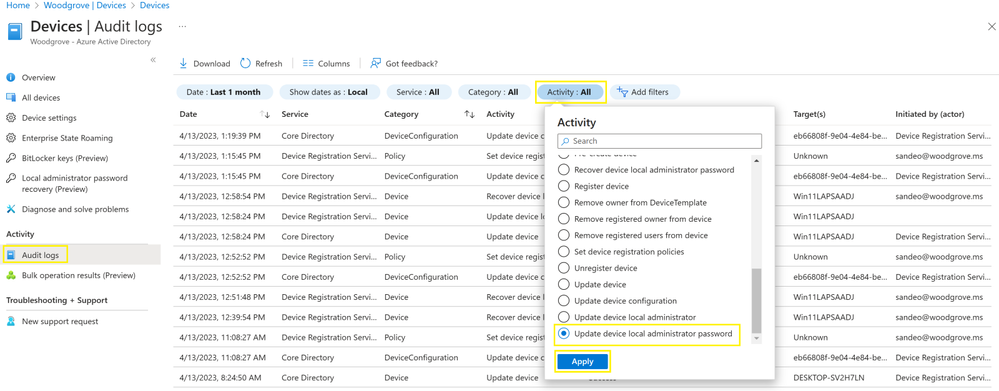
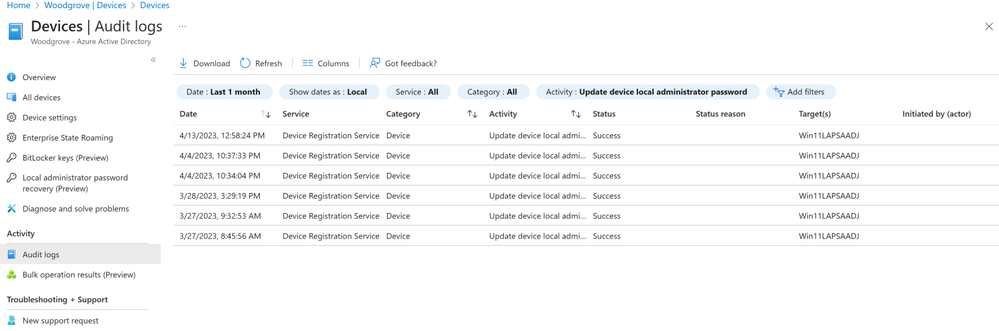
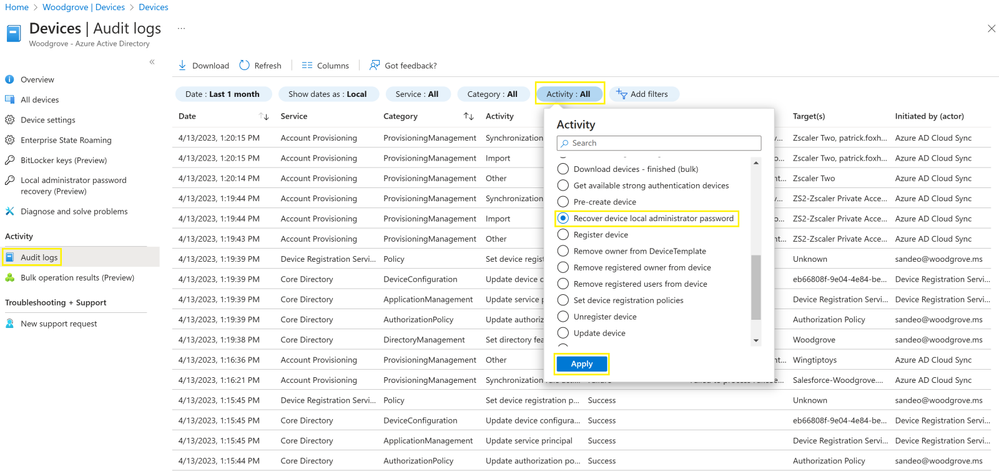
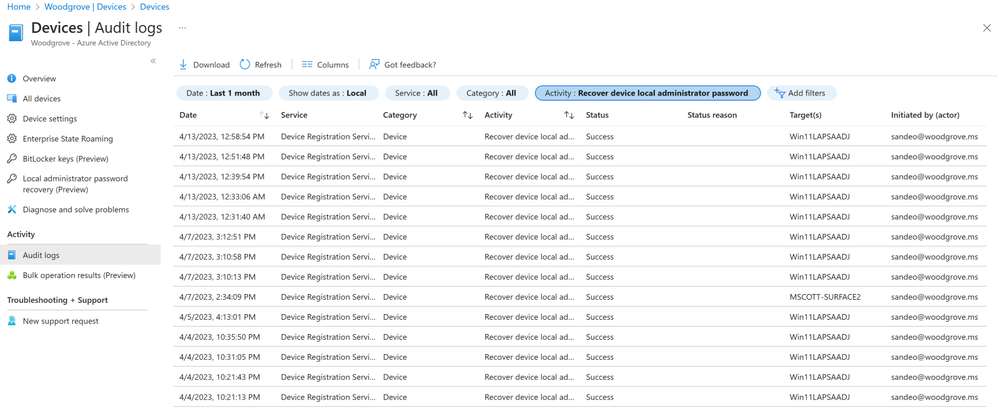
You can click on the individual audit events to get more details like activity, target(s), and modified properties.
We strongly recommend you deploy Windows LAPS with Microsoft Entra (Azure AD) and Microsoft Intune to take advantage of the new security improvements. Doing this will be much more secure for these sensitive passwords. To get started with Windows LAPS for Microsoft Entra (Azure AD), go here.
As always, we'd love to hear your feedback, thoughts, and suggestions! Feel free to share with us on the Microsoft Entra (Azure AD) forum or leave comments below. We look forward to hearing from you.
Best regards,
Sandeep Deo (@MsftSandeep)
Principal Product Manager
Microsoft Identity Division
Learn more about Microsoft identity:
- Related Articles: Microsoft Intune support for Windows LAPS, Windows LAPS technical documentation, LAPS CSP reference
- Get to know Microsoft Entra – a comprehensive identity and access product family
- Return to the Microsoft Entra (Azure AD) blog home
- Join the conversation on Twitter and LinkedIn
- Share product suggestions on the Microsoft Entra (Azure AD) forum
Published on:
Learn moreWe can help you with Introducing Windows Local Administrator Password Solution with Microsoft Entra (Azure AD)
If you want help implementing, troubleshooting, or improving this product, contact us and we’ll point you in the right direction.
Related posts
Sync identities from Rippling to Microsoft Entra ID
Today, we’re thrilled to announce that customers using Rippling HCM can now automatically provision users to on-premises Active Directory and ...
Microsoft Entra ID Governance for government
I’m pleased to announce that as of November 1, 2024, Microsoft Entra ID Governance is available for federal agencies, state and local governme...
Update to security defaults
As part of the Secure Future Initiative, we’ve evolved our security approach to align with three security principles: secure by design, secure...
Meet Microsoft Entra at Ignite 2024: November 18-22
Microsoft Ignite is just around the corner, taking place from Monday, November 18, 2024 through Friday, November 22, 2024, in Chicago, Illinoi...
Manage Microsoft Entra ID role assignments with Microsoft Entra ID Governance
I’m excited to announce that we now support Microsoft Entra role assignments in Microsoft Entra ID Governance's Entitlement Management feature...
The latest enhancements in Microsoft Authenticator
Hi folks, I'm thrilled to announce three major Microsoft Entra ID advancements that will help you protect your users with phishing-resi...
Microsoft Security announcements and demos at Authenticate 2024
The Microsoft Security team is excited to connect with you next week at Authenticate 2024 Conference, taking place October 14 to 16 in Carlsba...
What's new in Microsoft Entra - September 2024
We’re excited to announce the general availability of Microsoft Entra Suite—one of the industry’s most comprehensive secure access solutions f...
Explore the key benefits of Microsoft Entra Private Access
The traditional network security models are becoming increasingly ineffective in a world where remote work and cloud services are the norm. Co...
Join us at the Microsoft Entra Suite Showcase!
This fall, we are bringing the Microsoft Entra Suite Showcase to cities worldwide. Join us to explore how our latest advancements in secure id...