
Use cloud groups in on-premises Active Directory with group writeback

I'm thrilled to announce major enhancements to group writeback are in public preview! Use Azure AD Connect to write cloud groups, including security groups, back to your on-premises Active Directory. With this preview, you can manage access to on-premises resources with groups that are managed in the cloud.
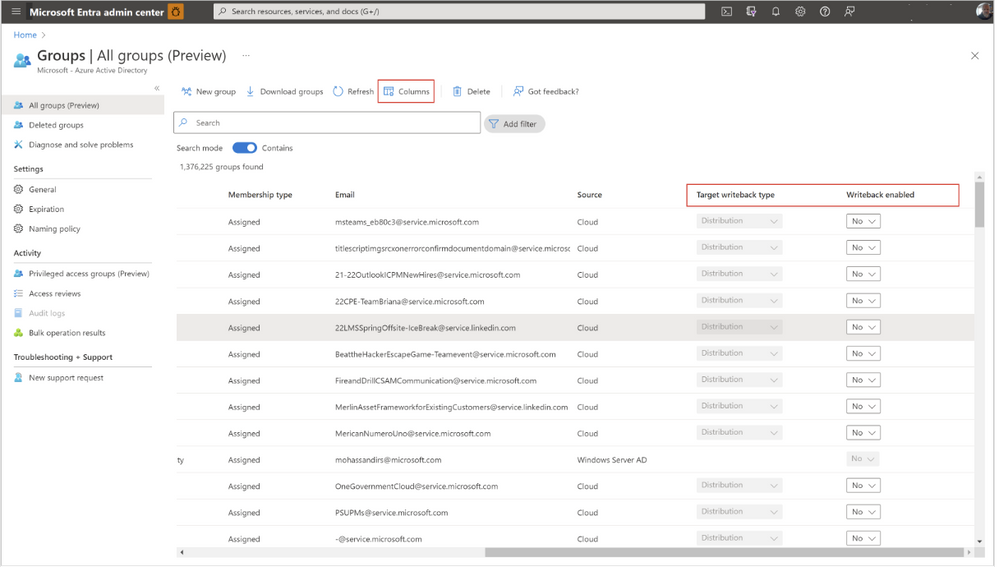
Today, you can write M365 groups back to their on-premises Active Directory as universal distribution groups. With this public preview, we’ve expanded what groups can be written back, added the ability to manage groups for writeback in MS Graph and the Azure Admin Portal, and added a feature in Azure AD Connect to make it easier to find your groups on-prem.
M365 group enhancements
- You'll now be able to write your M365 groups back to on-premises Active Directory as either a universal Distribution Group, Security Group, or Mail-Enabled Security Group using PowerShell, MS Graph, or the Azure Admin Portal.
- You can set a tenant-wide setting to automatically write back newly created M365 groups using MS Graph.
New group writeback features
- You can now also configure writing Azure AD Security Groups back to on-premises Active Directory as a universal Security Group using PowerShell, MS Graph, or the Microsoft Entra admin center.
- When configuring group writeback in Azure AD Connect, you have the option to swap the common name of the on-prem distinguished name to be the cloud group’s display name, making it easier to identify what groups are being written back from Azure AD.
- You can manage what groups you’d like to write back to Active Directory using MS Graph Explorer and the Microsoft Entra admin center.

Learn more about Microsoft identity:
- Related Articles: group resource type - Microsoft Graph beta | Microsoft Docs Azure AD Connect: Group writeback V1 - Microsoft Entra | Microsoft Docs
- Return to the Azure Active Directory Identity blog home
- Join the conversation on Twitter and LinkedIn
- Share product suggestions on the Azure Feedback Forum
Published on:
Learn moreRelated posts
Sync identities from Rippling to Microsoft Entra ID
Today, we’re thrilled to announce that customers using Rippling HCM can now automatically provision users to on-premises Active Directory and ...
Microsoft Entra ID Governance for government
I’m pleased to announce that as of November 1, 2024, Microsoft Entra ID Governance is available for federal agencies, state and local governme...
Update to security defaults
As part of the Secure Future Initiative, we’ve evolved our security approach to align with three security principles: secure by design, secure...
Meet Microsoft Entra at Ignite 2024: November 18-22
Microsoft Ignite is just around the corner, taking place from Monday, November 18, 2024 through Friday, November 22, 2024, in Chicago, Illinoi...
Manage Microsoft Entra ID role assignments with Microsoft Entra ID Governance
I’m excited to announce that we now support Microsoft Entra role assignments in Microsoft Entra ID Governance's Entitlement Management feature...
The latest enhancements in Microsoft Authenticator
Hi folks, I'm thrilled to announce three major Microsoft Entra ID advancements that will help you protect your users with phishing-resi...
Microsoft Security announcements and demos at Authenticate 2024
The Microsoft Security team is excited to connect with you next week at Authenticate 2024 Conference, taking place October 14 to 16 in Carlsba...
What's new in Microsoft Entra - September 2024
We’re excited to announce the general availability of Microsoft Entra Suite—one of the industry’s most comprehensive secure access solutions f...
Explore the key benefits of Microsoft Entra Private Access
The traditional network security models are becoming increasingly ineffective in a world where remote work and cloud services are the norm. Co...
Join us at the Microsoft Entra Suite Showcase!
This fall, we are bringing the Microsoft Entra Suite Showcase to cities worldwide. Join us to explore how our latest advancements in secure id...